Participant
March 25, 2014
Answered

Why can't I find the Spot Healing Brush?

  • March 25, 2014
  • 2 replies
  • 25362 views

Can't find the "Spot Healing Brush" on my PS CS5.

    This topic has been closed for replies.
    Correct answer Trevor.Dennis

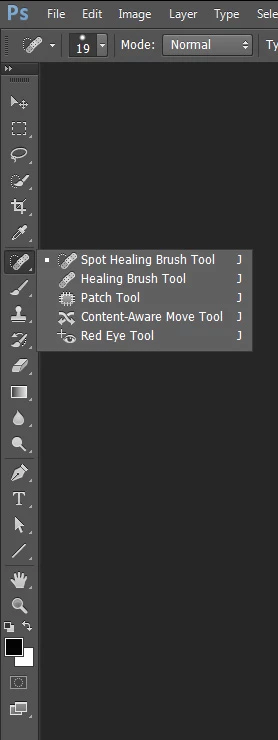
    I came in with CS2 so you should have it.  Have you twirled out the flyout?
    2 replies

    jeremyb34879191
    Participant
    September 22, 2017

    I had the same problem, but found a different solution... My workspace was set to 3D...Apparently switching to the Essentials workspace adds the spot healing brush tools...

    Trevor.Dennis
    Community Expert
    Trevor.DennisCommunity ExpertCorrect answer
    Community Expert
    March 26, 2014

    I came in with CS2 so you should have it.  Have you twirled out the flyout?

    Participant
    March 27, 2014

    Trevor,

    The tab on each tool would not open up with options.  I clicked here and there, deadly mistake, so now the tools panel is gone and I can't seem to figure out how to reinstate it.  Will contact a local friend and hope he can help.

    Thanks for your reply.

    Bob

    Trevor.Dennis
    Community Expert
    Community Expert
    March 27, 2014

    Tab toggles all the panels on and off.  You can use the f key to toggle through the screen modes, but if you are in a mode that hides the panels Escape brings them back again.

    I am sure we used to be able to tun the Toolbar on and off with the t key, but that no longer works with CC (and I don't how far back).

    So long as you can see the Options bar, you can use the Workspace dropdown and reset your workspace.  That will fix things no matter how confused things have become.