

Branko Teršek
Participating Frequently
February 13, 2023
Answered

Why can't I stretch the program over the whole screen

  • February 13, 2023
  • 3 replies
  • 2758 views

Hello,
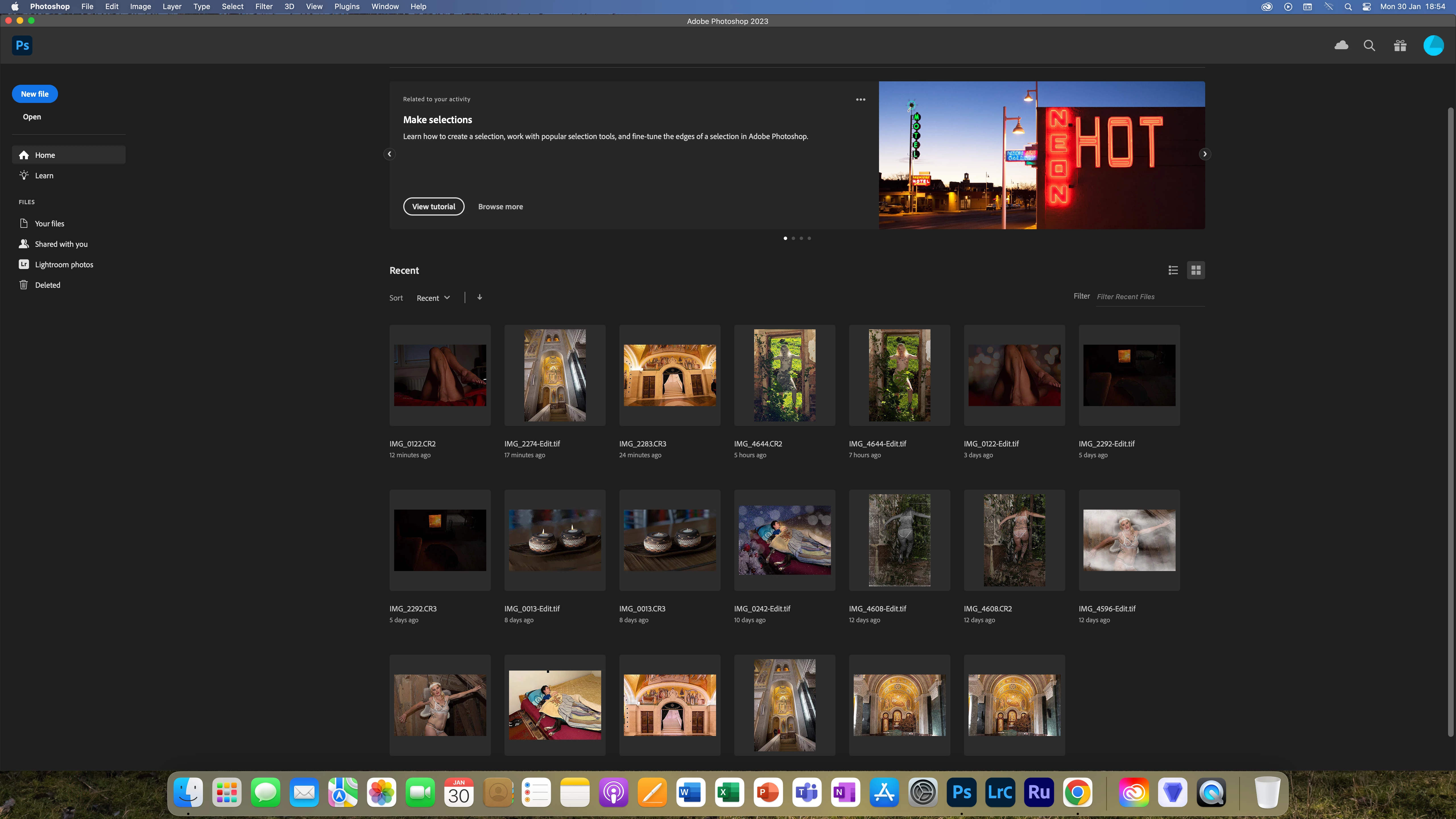
I have a minor problem, namely, if someone can help me, why can't I stretch the PS program over the entire screen. I am attaching a photo and even if I click on the + no change happens. I am attaching some basic information. Namely, I stretch LRC over the entire screen, as well as other programs.
Greetings,
Branko Teršek


Adobe Photoshop Version: 24.1.1 20230112.r.238 4bbfa7a arm64 Number of Launches: 110 Operating System: Mac OS 13.2.0 System architecture: Apple M1 Max, HybridCPU(8:2) Physical processor count: 10 Built-in memory: 65536 MB Free memory: 30802 MB Memory available to Photoshop: 62297 MB Memory used by Photoshop: 70 % Crash Handler: Adobe DCX Version: 6.15.3 SAM SDK Version: 2.0.0-main.1564 ACP.local Status: - SDK Version: 2.11.0 
This topic has been closed for replies.
Correct answer PECourtejoie

Hi, is the issue that the dock is not covered? You can select to hide it in the system preferences.

LrC is a single screen application, it behaves differently than Ps.

3 replies

PECourtejoie
Community Expert
PECourtejoieCommunity ExpertCorrect answer
Community Expert
February 13, 2023

Hi, is the issue that the dock is not covered? You can select to hide it in the system preferences.

LrC is a single screen application, it behaves differently than Ps.

Branko Teršek
Participating Frequently
February 13, 2023

Thanks again ❤️ Turned off the dock and now it covers the whole screen.


Branko Teršek
Participating Frequently
February 13, 2023

Hello again. From <3, I thank everyone who took the time to help me solve and solve my problem.

Legend
February 13, 2023

Have you tried turning off the Application Frame?

The F key puts the current document in full screen. I also have a small script that turns on window resize during zoom, zooms to 100%, then turns off resize during zoom.

Branko Teršek
Participating Frequently
February 13, 2023

Thanks for the reply. With the F key, the upper part of the screen fits nicely, the lower part only goes to (doc)


Kevin Stohlmeyer
Community Expert
Community Expert
February 13, 2023

Hi @Branko Teršek Im looking at your screen - are you refrerring to the home page?

Have you tried changing your screen resolution or the UI scale under Preferences/Interface?

Check the scale UI to Font and increase the font size. Relaunch PS.


Branko Teršek
Participating Frequently
February 13, 2023

Thanks for the reply, tried and still can't stretch to full screen

Kevin Stohlmeyer
Community Expert
Community Expert
February 13, 2023

Is the issue only the home screen? Your application frame appears to cover the entire screen. It could be intentional.