
Inspiring
August 23, 2015
Beantwortet

Why do photos on my phone look different from my computer?

  • August 23, 2015
  • 7 Antworten
  • 88428 Ansichten

Alright, I can't seem to find any definitive information about this topic...why do pictures look great on my computer - in Photoshop and in browser - and look completely different when I view them on my phone (Galaxy S5)? I know color calibration is going to be different on every device, but there's got to be some more info about it somewhere. I feel like my computer is right, because when I order prints, they come out perfect, so it's got to be a phone issue. I'm just worried that my photos aren't looking so great to potential customers when they view my website/social media on their phones?
Dieses Thema wurde für Antworten geschlossen.
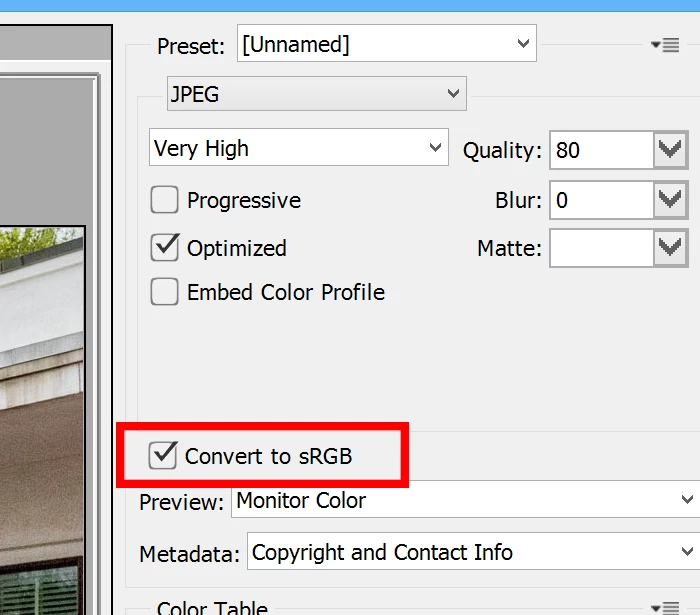
Beste Antwort von Chuck Uebele

In the save for web dialog box:

7 Antworten

gregoryg60541415
Participant
September 25, 2019

A big factor in this is also the quality of the screen you're editing on.  For instance if you're ordering for print, a matte screen is a great point of reference.  But if you're editing for web, a glossy, IPS screen is ideal because that is also what phones are.   I'm sitting here referencing the same image on a benq matte monitor, my laptop which is also matte, and an atomos reference monitor with a 10 bit screen and glossy display, and the colors are waaayyy out of line on the glossy display, just like they are on my phone.  So, lesson learne .  Stick with mac. Lo . Windows doesnt have any available options in this department 

Participant
January 20, 2019

I have the same exact problem. When I edit pictures on Photoshop, it looks great on my PC but then when I share it to places like Instagram and look at my phone, the picture looks much more saturated and there's more contrast.  I figured out that it has everything to do with the position your PC screen.  When you look at the screen head-on, the colors will be different than if you tilt the screen up.  So what I do now is finish my work in Photoshop, then tilt my screen up to see how it will look on the phone. At that point, I can adjust the saturation, add to the exposure or whatever.  The truth is that the phone is always correct. I know this because I checked the image on my husband's phone and it looked the same on his phone as it looked on mine.  It has everything to do with the tilt of the PC screen.

D Fosse
Community Expert
Community Expert
January 20, 2019

OK, I just have to reply to that 

That just means you have a TN-type display, generally considered unsuitable for photographic work for precisely this reason. High-quality IPS monitors don't change with viewing angle.

TN panels are used in office and gaming monitors - and most laptops - because they are inexpensive and accuracy isn't needed. IPS panels are rather more expensive.

As for reliable colors, you get that by using a calibrator that measures the display and creates a monitor profile. Then you need to use color managed software that will actually use the profile. Phones don't support color management at all and don't qualify here.

Participant
January 20, 2019

Cool.  Thanks for the tip! I need to get one.

January 15, 2019

Maybe it changed when you transfer photos from phone to your computer. Here is a video about transferring photos from Samsung Galaxy phones to a computer with original quality

[Android] How to Transfer Photos from Samsung Galaxy S4/S5/S6 to PC ? - YouTube

Chuck Uebele
Community Expert
Community Expert
August 23, 2015

In the save for web dialog box:

Inspiring
August 23, 2015

Thanks for all the info, Chuck and Per! Yes, that was helpful. It definitely helped clear up the color profile issues for me; however, I also discovered a color adjustment thing on my phone itself, which also seemed to make that problem better. I appreciate the help!

Chuck Uebele
Community Expert
Community Expert
August 23, 2015

Under the edit meun<convert to profile:

Per Berntsen
Community Expert
Community Expert
August 23, 2015

The Galaxy S5 has several display modes, have you tried setting it to Professional Photo Mode?

I don't have this phone, but I have a Galaxy Tab S, which I believe uses similar display type and technology, and it's very accurate when set to Basic. Take a look at this article: Samsung Galaxy S5 Display Technology Shoot-Out

Inspiring
August 23, 2015

Yes, I tried that, but it didn't seem to make a difference.

Chuck Uebele
Community Expert
Community Expert
August 23, 2015

Phones just aren't color calibrated, so you're going to get a difference there. I think there is little you can do, other than making a set of images that you need to show on your phone and color balance them so they look good on your phone - kind of a PIA. Frankly, unless your customers have experience with correct color balance, I doubt anyone would notice, unless they're really off.

Inspiring
August 23, 2015

Yeah, it's pretty off, as you may see from the exmples here. One is directly from my computer and the other is a screenshot from my phone...it's a relatively simple edit, but you can tell the drabby looking color in the screenshot, or at least, I hope you can.

Chuck Uebele
Community Expert
Community Expert
August 23, 2015

The image from your computer looks like it might be Adobe RGB and the phone sRGB - at least it has that look from your samples.