
Participant
May 21, 2020
Answered

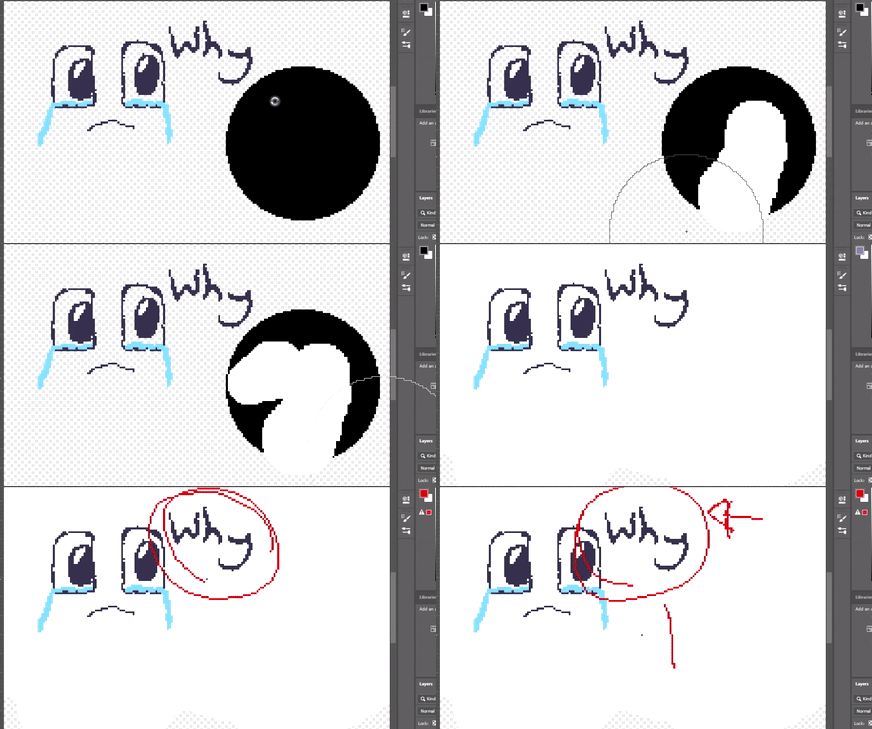
Why does every time i try to draw over something else it change to white?
  • May 21, 2020
  • 2 replies
  • 2184 views

everytime i have tried to draw over another line of the same colour, it changes to white.

This is very inconvienent as i love to draw and i really need this to stop.

I often over lap lines and i specialise in pixel art.

I spent about ten minutes of my time just trying to draw that simple face and about 15 trying to figure out the problem, and i think ive found what it is.

After some clicking aroun i found the tab for Colour Picker (background colour) and i think thats my problem.
It hasnt done this before and i desperately need this fixed asap.

If anyone has any fixes thatd be so so so great.

If i find a fix for those having the same problem as me i will keep this updated.

Thank you.
This topic has been closed for replies.
Correct answer gener7

Also ive set my settings up for pixel art so i have changed 1 setting for resizing . Otherwise i haevnt touched anything else as i havent need to.


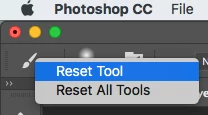
Try resetting the pencil tool by right clicking on the tool in the top Option bar:

2 replies

c.pfaffenbichler
Community Expert
Community Expert
May 21, 2020

You don’t even seem to mention which Tool you are using and you seeem to have clipped the screen recording to exclude the pertinent parts like the Toolbar and the Blend Mode setting in the Options Bar. 

_JellieAuthor
Participant
May 21, 2020

hi im using the pencil tool but it happens for all tools. Heres the unedited clip.

_JellieAuthor
Participant
May 21, 2020

Also ive set my settings up for pixel art so i have changed 1 setting for resizing . Otherwise i haevnt touched anything else as i havent need to.

c.pfaffenbichler
Community Expert
Community Expert
May 21, 2020

Could you please post a screenshot with the pertinent Panels (Toolbar, Layers, Options Bar, …) visible? 

What are the Tool’s exact and complete settings in the Options Bar?