
Inspiring
July 16, 2021
Answered

Why does one line of text have discrete baselines?

  • July 16, 2021
  • 4 replies
  • 1213 views

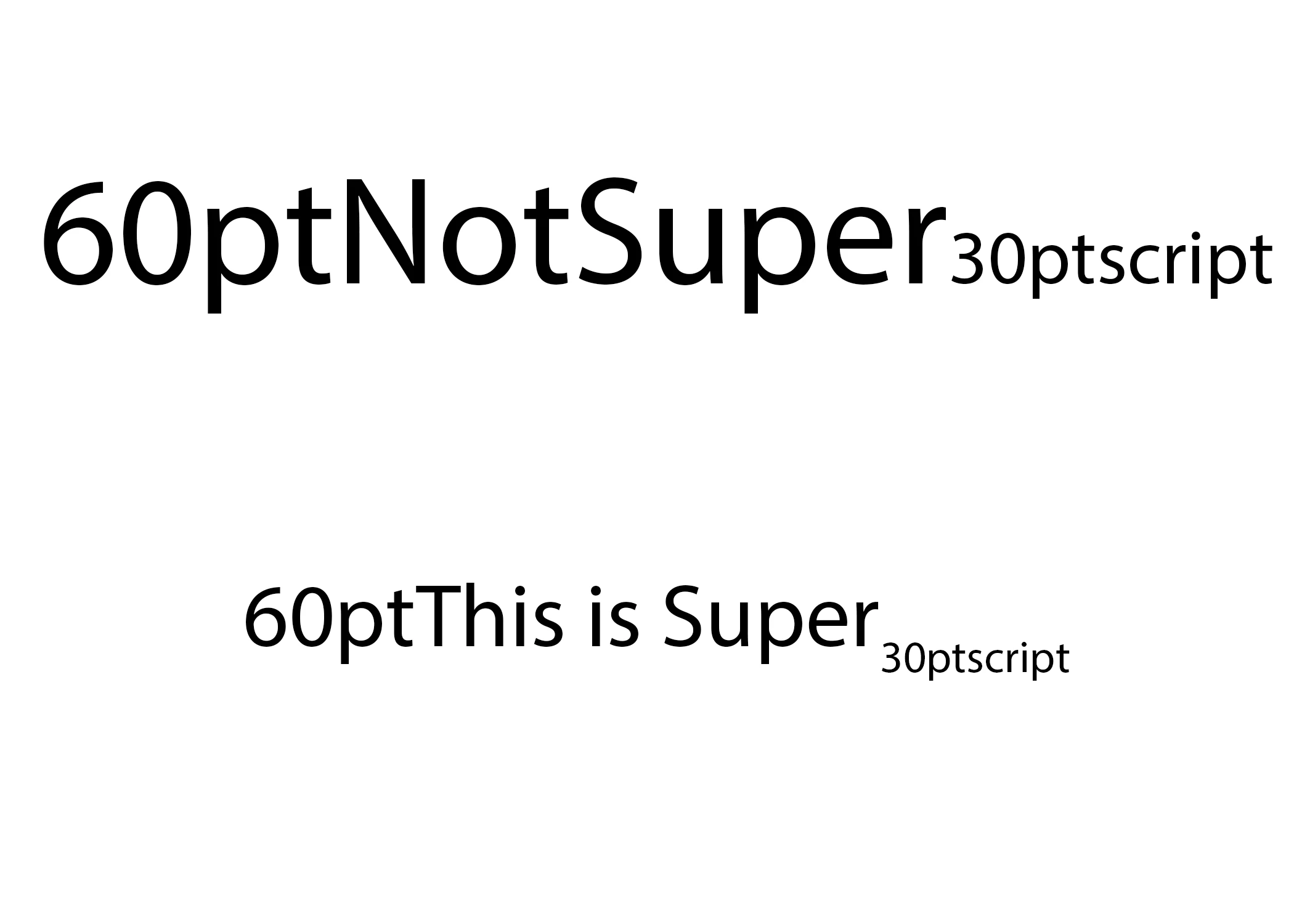
Is this a new thing? I've just made a single line of point text, adjusted the size of some of the text, and now the baselines are not the same. 

In the past this has not been the case. Is this new? Or perhaps a bug? 


Thanks for any insight.

This topic has been closed for replies.
Correct answer DW-FP

Solved: Somewhere along the line I had superscript activated. Who knows when or how as I never use superscript but I'm glad to have a solution. It creates jarring results when you're not expecting it, hence making this thread. Thanks to all who chimed in. 


Try it yourself:

  1. Make a line of point text
  2. Make some characters a different size than the rest
  3. Select entire line of text & make super script


4 replies

DW-FPAuthorCorrect answer
Inspiring
July 16, 2021

Solved: Somewhere along the line I had superscript activated. Who knows when or how as I never use superscript but I'm glad to have a solution. It creates jarring results when you're not expecting it, hence making this thread. Thanks to all who chimed in. 


Try it yourself:

  1. Make a line of point text
  2. Make some characters a different size than the rest
  3. Select entire line of text & make super script


Michael Bullo
Community Expert
Community Expert
July 16, 2021

Ah the good old sneaky superscript problem 😉


I wonder if you accidentally triggered it by pressing the keyboard shortcut...

Command/Control + Shift + "+"

Michael Bullo
Community Expert
Community Expert
July 16, 2021

Is this happening with all of your Photoshop files? Just old ones? Just new ones?

DW-FPAuthor
Inspiring
July 16, 2021

I've only seen this in a file I made today using the latest version of Photoshop. I've never seen this before in all my many years of using this software. 

Michael Bullo
Community Expert
Community Expert
July 16, 2021

If you create another new file does the problem persist? If not, you may just have a single corrupt file.

Chuck Uebele
Community Expert
Community Expert
July 16, 2021

Have you. Checked the text box controls and made sure something like leading isn't set wrong?

DW-FPAuthor
Inspiring
July 16, 2021

Are you referring to Top-to-Top Leading and Bottom-to-Bottom Leading? Those are each grayed out and unselectable. 

Chuck Uebele
Community Expert
Community Expert
July 16, 2021

Anything, but I see you found it was super script. 

War Unicorn
Community Expert
Community Expert
July 16, 2021

Can you tell us what font that is? I tried repro'ing but it's working as expected. Examples:

(Pictured, from top to bottom: Roboto (regular), Trajan Sans Pro (regular), and Arial (regular).)

Also, have you updated to the latest version of Photoshop?

DW-FPAuthor
Inspiring
July 16, 2021

Thanks for the reply. I was on the latest version of Photoshop. I've since rolled back to 22.0.0 after posting so I can avoid this issue and get my work done.


I just re-opened my test PSD and it looks like it was Myriad Pro. However it's repeatable with different typefaces. Curiously, my test document still displays the uneven baseline even when viewing in the legacy v22.0.0. 


Something was certainly odd as I was getting an error when trying to switch fonts (when using later version of Photoshop)


Saw this when using later version of Photoshop as I tried to switch typefaces ...


War Unicorn
Community Expert
Community Expert
July 16, 2021

Could be corruption, maybe at the font level, if not at the Photoshop level. Have you tried restoring the fonts and/or reinstalling the later version of Photoshop?