
Why Does Photoshop Require "Accepting" Transformations? Seeking Understanding + Feature Request
Photoshop Version: 26.7.0 (2025)
Platform: macOS Sequoia 15.5 (24F74) on Apple M1 Max
My Core Question
I've been using Photoshop for over a decade now, and I'm genuinely curious about the fundamental design decision behind transformation workflows. Why does Photoshop require users to "accept" or "commit" transformations instead of applying changes in real-time as you make them?
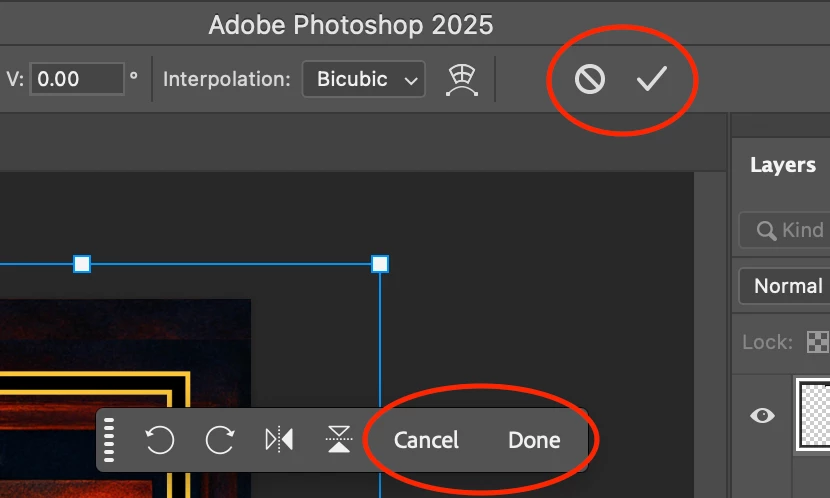
Currently, transformations require an extra step:
- Clicking the "Done" checkmark in the options bar
- Pressing Enter/Return on the keyboard
- Double-clicking inside the bounding box
The UX Question I'm Wrestling With
From a workflow perspective, this extra "commit" step feels redundant to me. When I'm scaling, rotating, or moving an object, I can see the changes happening in real-time. So why the additional confirmation step?
Other design software I've used applies transformations immediately as you manipulate objects. You can always undo if you make a mistake, but there's no modal "transformation state" that requires explicit acceptance. To add to this, the undo steps are different depending on if you're inside this "transformation state" or outside of it. This causes me, personally, to make mistakes when undoing certain changes, leading me to have to manually edit the same part again.
What I'm Curious About
I'd love to understand the reasoning behind this design choice:
- What problem does the commit requirement solve?
- What would break if transformations applied immediately?
- Is this tied to Photoshop's layer system or undo architecture?
- Was this always the design, or did it evolve this way for specific reasons?
My Feature Request
I humbly request a preference setting that would allow users to disable the transformation commit requirement entirely. Transformations would apply immediately as you make them, just like moving objects with the Move tool.
For users who prefer the current modal approach, the setting could remain enabled by default.
To Adobe Team Members
I'm genuinely trying to understand the design philosophy behind it. If there are technical or UX reasons why immediate transforms wouldn't work well, I'd love to learn about them.
Understanding the "why" would help me (and I suspect many other users) work more effectively within the current system, even if the feature request isn't feasible.
To Fellow Users
Does anyone have insights into why this workflow exists? Or have you found ways to make the transformation process feel more fluid?
I'm also curious if other users would find value in an "immediate transforms" option, or if I'm missing something about why the current approach is beneficial.
TL;DR: Curious about the design reasoning behind requiring users to "accept" transformations with an extra click/keypress. Requesting a preference to make transforms apply immediately, like other design tools.
 AdChoices