Why flow and opacity is not same for brush One stroke?
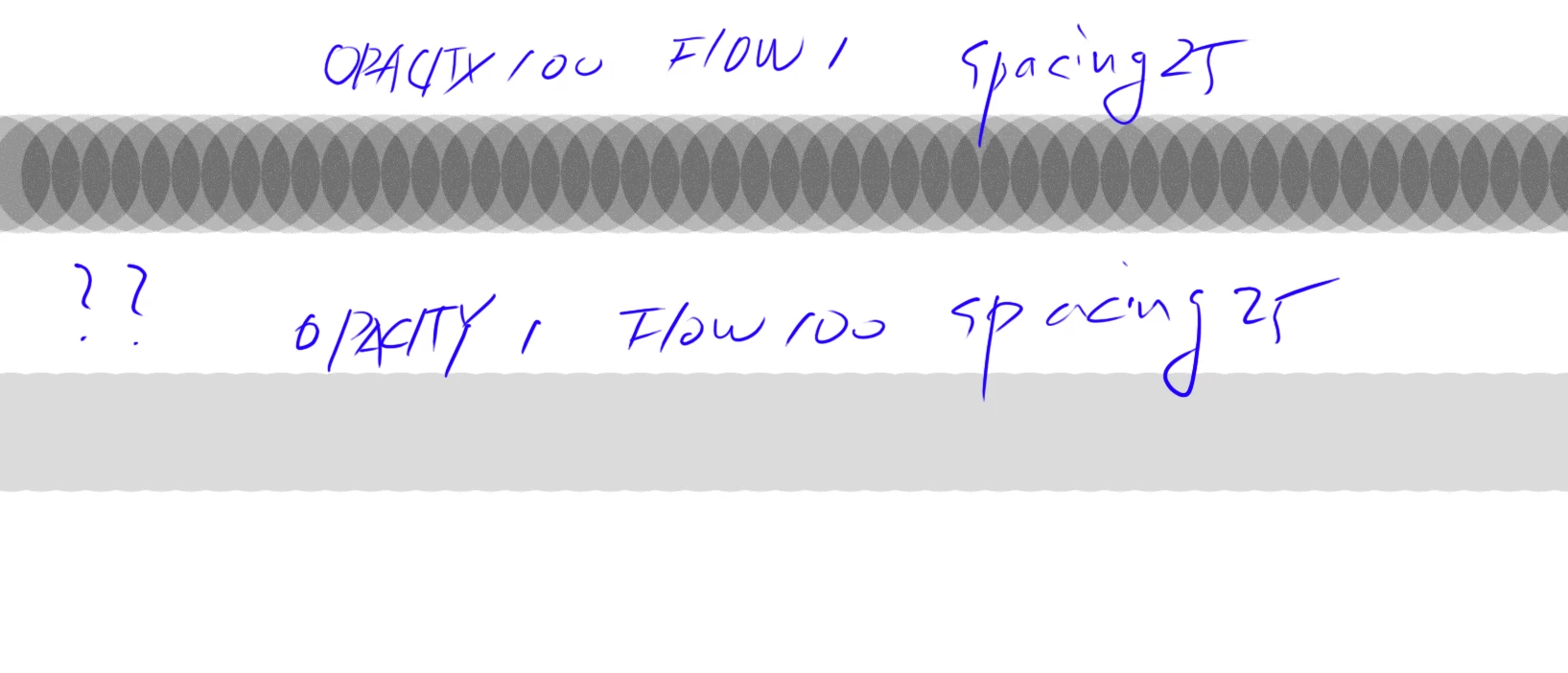
I know what i'm doing. And know how works Opacity and Flow.
The two sliders have to be different when painted multiple times.
The picture above is exactly one brush applied. Don't repeat or blend it. Just onc Stroke.
They painted exactly the same color, but they showed completely different results.
If reduce spacing to 1 and minimize the overlapping area of the brush, cannot get a flow effect.
Think about this.
Set the Black color, and paint.
If I want to get black,
For the opacity 1% and flow 100% setting, have to paint 100 times.(Of course, you have to press the cursor and release it.)
And For the opacity 100% and flow 1% setting, have to paint movement almost 100times. (as you know For flow settings, don't need to release cursor.)
Which means there's a different way for the same result. The start and end must be the same.
But you can see, I applied the brush only once storke, but the result is really different.
And on further observation, the value of lightness is almost twice as different.
Which means that you can never get a 1% Black test with the opacity100% flow1%setting.
At some point, I set the flow to 1% when I applied the brush, but it felt too strong and I wondered.
Finally, let me summarize the problem.
1. When painted black only once stroke, the two results should be the same lightness. But its not now. (not multiple time, only one stroke)
2. What this problem says is that people who use flow settings in general were getting results that weren't as progressive as they thought.
3. Once again, the difference between opacity and flow is the difference in how they stack and blend up.
4. But there's already a lot of difference in brightness from the first brush stroke. Which means you can never get a brush one stroke in the Opacity setting in the flow setting.
it have to fix this..
 AdChoices