
Inspiring
May 14, 2021
Question

Why has SAVE changed again in Photoshop? PS 22.4.0 Update changed behavior

  • May 14, 2021
  • 8 replies
  • 7980 views

sometimes i ask myself "are the coder at adobe actively searching ways to annoy the user"?

with the latest update to 22.4.0 they changed something how SAVE works.


it behaves different now.

i can´t save a layered image in PS out to the JPG format ... i have to flaten them first.

before update 22.4.0 the files where flattend automatically using the save as dialog and JPG as file format.
now i only get file formats that supports layers in the save dialog, when the image is not flattened.


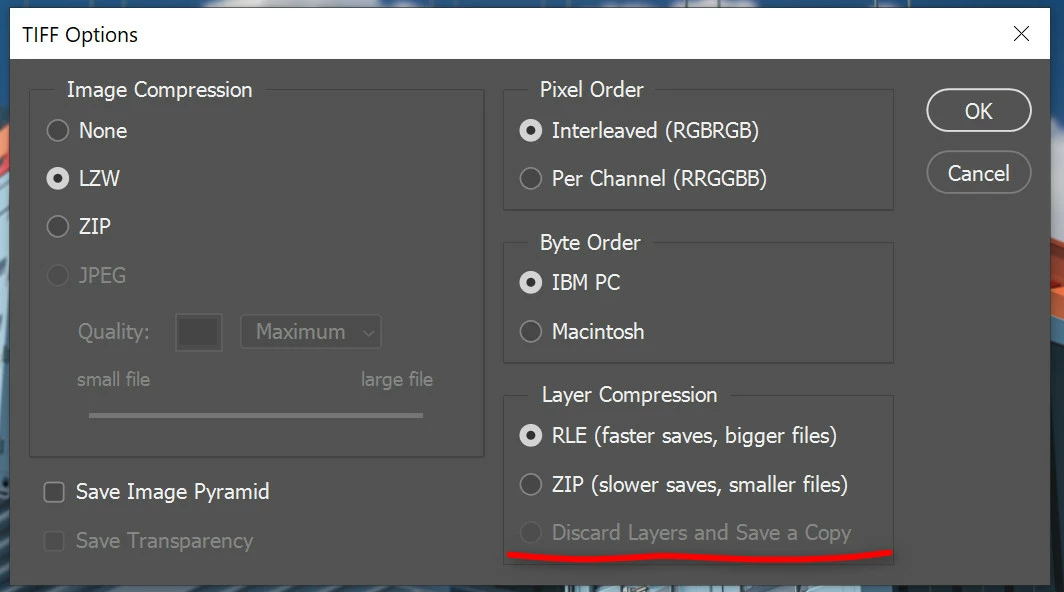
also something with saving TIFF is broken.

i can´t choose "discard layer save as copy"... i have to flaten the files first so that this option is not greyed out anymore.

this was also not the case before update 22.4.0.
 

This topic has been closed for replies.

8 replies

Ok-how-about-this
Participant
February 18, 2022

I totally agree, they just make it less functional and more laggy with every update. I dont know who works at adobe but their software is the worst. I dumped indesign and now i think im done with photoshop too. I dont understand what is the point of flattening the image first ...... thats the whole purpose of discard layers. Affinity publisher is great, gonna give their photo software a try in lieu of photoshop.

jane-e
Community Expert
Community Expert
August 28, 2021

You're welcome, @EanimeiCCC 


In addition, this post is from 14 May and things have changed since then.
In 22.4.1, you can find png, jpg, pdf, etc., in Save a Copy.
As of 22.4.2 you can revert to the previous behavior in Preferences > File Handling > File Saving Options:

  • Enable Legacy Save As
  • Do not append Copy to filename


See this help page for details and cautions:
https://helpx.adobe.com/photoshop/using/saving-images.html  

~ Jane


soteeoh.7285434
Participant
November 17, 2022

For anyone else reading through all this, THIS solution fixed the problem. 

The current update made it impossible to discard layers when saving a TIFF file. Enable Legacy Save As  and Do not append Copy to filename fixes the issue. 

Not sure why Adobe has to make things so difficult but shoutout to @jane-e  for the fix

jane-e
Community Expert
Community Expert
November 17, 2022

@soteeoh.7285434 wrote:

Not sure why Adobe has to make things so difficult but shoutout to @jane-e  for the fix


Thanks for the shoutout, soteeoh! The reason is that Apple made a change to their API and forced Adobe to come up with a solution.


Jane


davidn29703136
Participant
May 18, 2021

Can't save as PDF???

ET_phone_home
Inspiring
May 14, 2021

Yea, this feature update is absolutely terrible - it really gets in the way.

Trying to save out a PDF file, I have to check a "save as copy" box in the dialog to even see the PDF format (does this obfuscate the "Photoshop PDF" format altogether?). Then PS automatically adds "copy" to the end of the file name even though it didn't appear that way in the file name field of the dialg. WHY? Now I have to go into finder and manually change the file name.

So instead of my normal workflow of flattening all my artboards and then saving the PDF, I decided to try this new and wonderful "save as copy" feature without flattening first. I DID uncheck the "layers" checkbox while saving, so presumably the layers would be flattened in the resulting file. Not only did it still add the "copy" part to the file name (even though the file name I entered would not have overwritten anything) but the file it saved is not able to be opened in Acrobat. I got this error box:

Further, the file was north of 31Mb, when a manually flattened one would have been under 8Mb.

This update is just aweful - they've taken a perfectly intuitive feature that everyone has been used to using as-is for YEARS, and completely buggered it up.

davescm
Community Expert
Community Expert
May 14, 2021

"it behaves different now. i can´t save layered files as JPG... i have to flaten them first."


You never could save a layered file as a jpeg, the jpeg format does not support layers. However you could use the Save dialogue to discard layers and flatten as part of the Save process. That function has now been moved to the separate menu item Save as Copy in order to prevent users from inadvertently losing their layered files.

https://helpx.adobe.com/photoshop/using/whats-new/2021-4.html


Dave


Inspiring
May 14, 2021

she did not wrote she saved a layered file as JPG.

where did you read that?


she wanted to save a files with layers as JPG..... i think it´ s pretty clear what we all want to do.
enought people complained already about this change.


that security might be a reason why adobe decided to do this came to my mind.

did it came to their minds that they break actions for some people?


Inspiring
May 14, 2021

i don´t know what was wrong with the way it was before this 22.4 update.

i sure had no complains how the "save as" dialog worked.


did people complain that the "save as" dialog was too "unsafe"?

i don´t get it.. every PS update they have to break how i work... 😞


jane-e
Community Expert
Community Expert
May 14, 2021


@Lightboxx wrote:

did people complain that the "save as" dialog was too "unsafe"?


Apple broke the Save As dialog with Catalina. If you are on Windows, you never saw this. Yes, people complained!


~ Jane

Ged_Traynor
Community Expert
Community Expert
May 14, 2021

Apple broke it, didn't fix it, Adobe fixed it and broke it for Windows users, make sense 😜

jane-e
Community Expert
Community Expert
May 14, 2021

@Tanja2014 wrote:


i can´t choose "discard layer save as copy"... i have to flaten the files first so that this option is not greyed out anymore.

this was also not the case before update 22.4.0.


You can choose File > Save a Copy instead of Save As.


~ Jane

Tanja2014Author
Inspiring
May 14, 2021

that is no option as i have the "save as" dialog in actions.

i added that info to my post but for some reason it was removed.


of course i can change all my actions..... thanks adobe!


i wonder how many software engineers had to think hard to come up with the clever idea to change the save as dialog. what an improvement!!!!

JJMack
Community Expert
Community Expert
May 14, 2021

Adobe has changed "Save As..." in Photoshop 22.4  the way your Action Works may create a document state where save as jpeg or an other file type is no longer a valid option like in prior Photoshop version.  You Action step is not compatible with the changed Save As feature.   You most likely need to change that "Save AS " step to a "Save A Copy" step   That should be able to save the file type you want. However that step may append  " copy" to to the file name which you may not want.  There are compatibility issues between versions of  Photoshop.  In CS4 Adobe added the adjustment panel that has a fly-out menu with items that are more like Photoshop Preferences than a adjustment option that may break Actions that add Adjustment layers.  I reported this issue when I installed CS5. I skip CS4 for Adobe  was adding GPU support in CS4. I knew there would be issues. Here in Photoshop 2021 Adobe is changing GPU support there are issues.  Anyway Adobe  Emailed me that the may fix the cs4 issues in some future release.  I have not waited  for  that release the CS4 issues are still in Photoshop 2021 as  are other reported  issues reported more than five years ago.  Many may fine they have issues with action that have save as steps.  Save as has been altered and not well tested.  Adobe's "BS" states "Save As" now protects your work.  I see no added protection. I see a new save a copy interface and a changed Save As interface. I see there are compatibility issues. I see no added document protection feature.

JJMack
Ged_Traynor
Community Expert
Community Expert
May 14, 2021