
DiinoCake
Participant
June 14, 2017
Question

Why i can't use the Field Blur, Iris Blur and Tilt-Shift?

  • June 14, 2017
  • 3 replies
  • 1980 views

Hi

I get a new notebook at 2 weeks ago, it's an ASUS X555Q, WINDOWS 10. i've installed Photoshop the last week. I have problems to use filters, especially Blurs, like Field Blur, Iris Blur and Tilt-Shift, and others like Lighting Effects. What can i do?! I want to make a Bokeh Effect and edit my photos. Please, help.

Thanks

Camila
This topic has been closed for replies.

3 replies

c.pfaffenbichler
Community Expert
Community Expert
June 14, 2017

Also: Does Filter > Blur > Lens Blur work?

c.pfaffenbichler
Community Expert
Community Expert
June 14, 2017

What are the »Use Graphics Processor« settings in the Performance Preferences?

What have you done for trouble-shooting so far?

Restoring Preferences after making sure all customized presets like Actions, Patterns, Brushes etc. have been saved might be a good starting point:

https://helpx.adobe.com/photoshop/kb/basic-trouble-shooting-steps.html

Trevor.Dennis
Community Expert
Community Expert
June 14, 2017

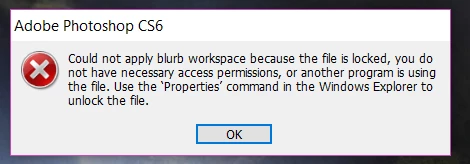
Well it looks like an operating system warning saying that the file is open in another program.  Try Save As and use a new file name, and see if that frees it up.