
muhammadfaizan
Participating Frequently
January 17, 2018
Question

Why in Photoshop progress windows stuck?
  • January 17, 2018
  • 14 replies
  • 11347 views

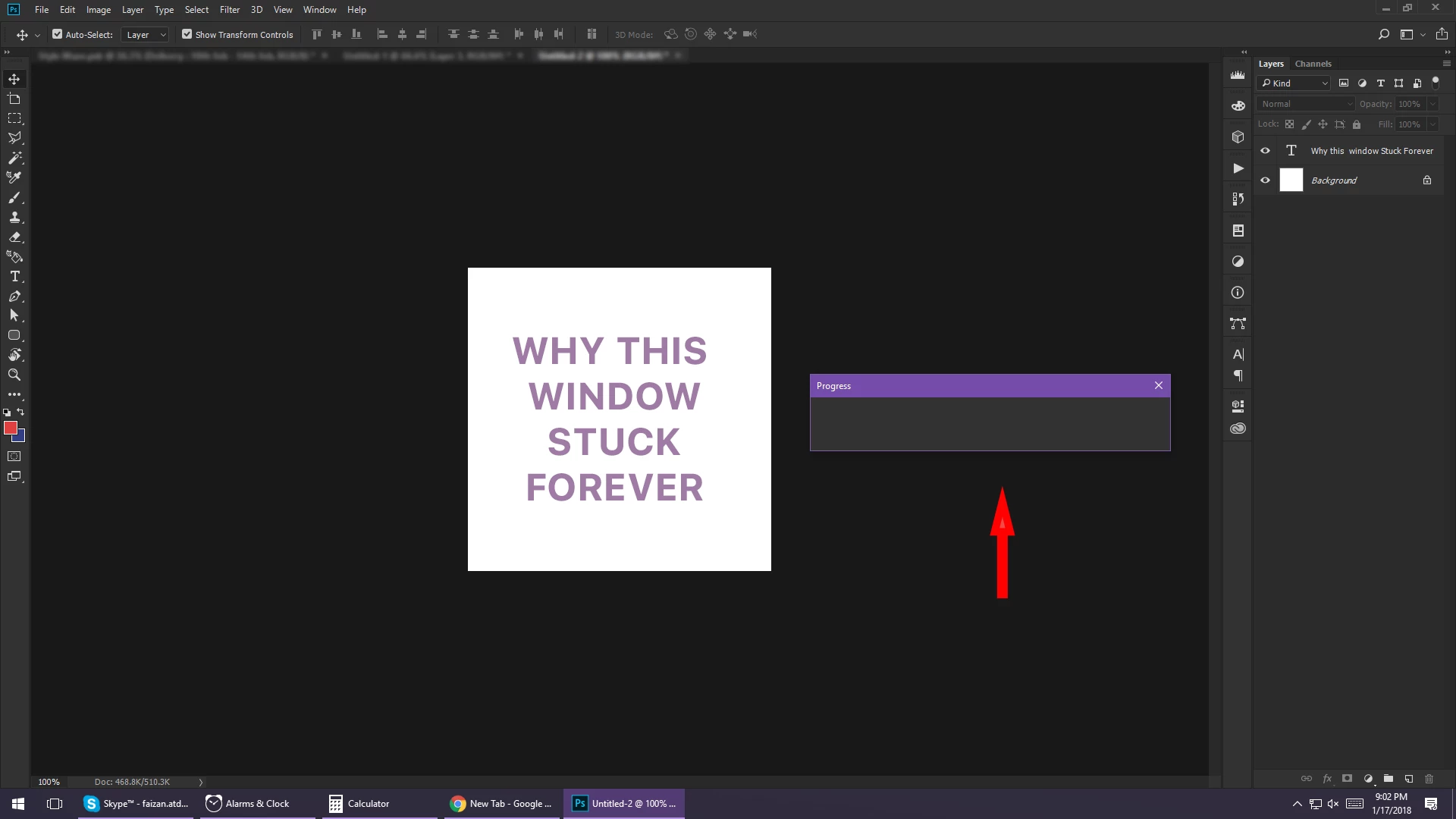
Can anyone explain why the progress windows stuck when there is no progress going on?
Even it is not closing on clicking the close button.

Performed some action, for eg - applied gaussian blur

  • Progress window open & shows the progress of applying blur
  • Progress completed
  • Blur effect applied
  • Window still remains there
This topic has been closed for replies.

14 replies

kuantou
Known Participant
July 13, 2020

Same here. When I go edit a photo from lightroom, i got the progress window stuck there. Very annoyng. It's not all the time, but most of the time. 2020 and everything up to date. 

Participant
July 13, 2020

Me too!  Same Progress Bar not closing when I import an image from Lightroom.  It seems to only be AFTER the 1st image I open.  The first image of the set opens without the stuck progress bar and when I open the second image of the set is when I see the stuck progress bar.  Doesn't seem to be having any influence on performance, just a nuisance really. 

Known Participant
September 10, 2020

Same for me! - It seems JJMack hasn't got a clue. So many people with the same issue. Help! So annoying.

Participant
July 8, 2020

I have the same bug and it happens when I port a photo from lightroom to photoshop. I press "edit in photoshop" and when photoshop loads the image the progress window is open and stuck just shy of completion. and the only way to make the progress window go is to restart photoshop and port the photo from lightroom again. 

Participant
July 10, 2020

I have the same problem as well. Every time I use a filter. 

Known Participant
June 30, 2020

I have the same issue since I upgraded to Photoshop 2020. It seems to happen when nothing is happening for me. I go away for a while, when I come back the empty small window has appeared and I cannot get rid of it.  

andremortatti
Participant
July 2, 2020

Exactly the same with me..

Participant
July 3, 2020

I am having the same issue. This happens to me when I open photos from Lightroom using the "Edit in Photoshop" feature. The "processing" pop up doesn't go away even after the photo opens in Photoshop. There isn't even a lag. The photo opens in photoshop pretty quickly yet the processing pop up remains. 

JJMack
Community Expert
Community Expert
January 17, 2018

It sound like you either have a Photoshop bug and Photoshop hangs.  Or your machine is failing.  Of there is a problem with you Photoshop's installation. 

The first thing you should do is to reset all Photoshop Tools and your User ID Photoshop Preferences.   See if that clears up you Photoshop hanging problems.

If Photoshop still hangs you need to provide more information.

Supply pertinent information for quicker answers

  • The more information you supply about your situation, the better equipped other community members will be to answer. Consider including the following in your question:
  • Adobe product and version number
  • Operating system and version number
  • The full text of any error message(s)
  • What you were doing when the problem occurred
  • Screenshots of the problem
  • Computer hardware, such as CPU; GPU; amount of RAM; etc.
JJMack
Participant
April 28, 2018

This also happens to me.  It started a month or two ago.  Updating and reinstalling Photoshop CC has no effect.  Happens on several machines, so it's definitely a bug.  The only way to get rid of the window is to restart the program, or just move it off to the side and ignore it, as it seems to have no effect on actually using the software.

JJMack
Community Expert
Community Expert
April 28, 2018

What is getting stuck? the original poster stated gaussian blur as one tool that may hang but the append seemed to indicated other functions may also hang.  I think you need to try to track down what triggers the bug to bite.  Some document condition, a particular sequence of steps.  Random Hangs are not easy to trouble shoot. Something triggers the bug to bite what bates the bug into action. Check to see if the bug has been reported to ADone one ther site Photoshop Family Customer Community . If you can not find it has please report you bur to Adobe there Photoshop Family Customer Community 

It seem like your Photoshop is not actually hanging it is just that Progress bar window does not close when the process has completed. Photoshop keep on working you can use.   If you click on the Progress bar window will it get focus and will Alt+F4 close it if you use Windows.

JJMack