
Participant
August 31, 2017
Question

Why is my High Pass filter causing problems?

  • August 31, 2017
  • 1 reply
  • 1652 views

Hello Everyone,

I'm trying to sharpen my photo with a high pass filter, but for some reason any time I have that layer visible and try to render or merge to a new layer everything looks entirely different.

Here is what my layers look like:
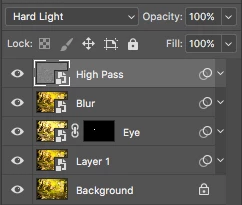
The blur is a Gaussian Blur with a Soft light blending mode, and the other two are camera raw filters with normal blending modes.

This is a screenshot of the image with that set up:
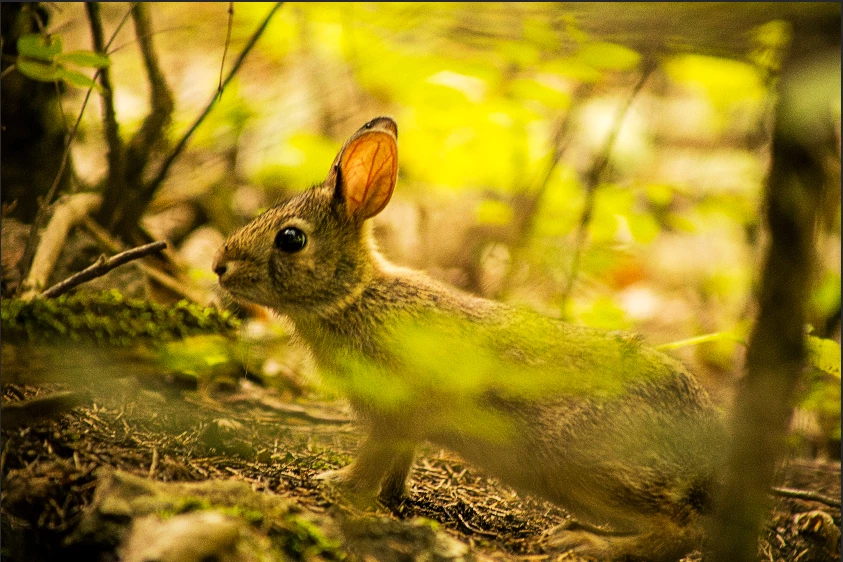
However, without changing anything I exported the photo and got this:

The difference is pretty clear.

This is the point where I admit that I'm far from an expert when it comes to photoshop, and that the fix could be something obvious that I have not noticed, but I have been struggling with this one problem for hours to no avail. Anyone have any idea what's going on?

This topic has been closed for replies.

1 reply

Stephen Marsh
Community Expert
Community Expert
September 1, 2017

The high pass set to a contrast blend mode acts like a sharpen (if the high pass is small enough).

I am guessing here…

The blur directly under the high pass that is set to a contrast blend mode is interacting with the high pass layer, the high pass is affecting the blur and the blur is affecting lower layers, so the interaction of both the high pass and the blur is affecting lower layers.

What is the value of the high pass filter?

What is the value of the Gaussian blur filter?

Participant
September 1, 2017

Thanks for the reply!

The high pass is set to 8 pixels and the Gaussian blur is 3 pixels.

I tried setting the high pass to 4 pixels and putting the blur on a normal blending mode, but got the same problem.