
Participant
July 6, 2019
Question

Why is my layer mask filling with black instead of texture I created?

  • July 6, 2019
  • 2 replies
  • 2850 views

Hi,

so, I am new to Photoshop (CC 2018) and I am trying to replicate a fire effect tutorial on YouTube Fire effect in Photoshop - YouTube .

At moment 5:08 of the video, we are rescaling a layer with a mask. So far, so good.

However, when I press enter to confirm the transformation, my mask is filled with black, instead of keeping the original texture made for it.

Can anyone help me find out why?

Here is a print screen right before I press Enter to confirm, in case it helps:
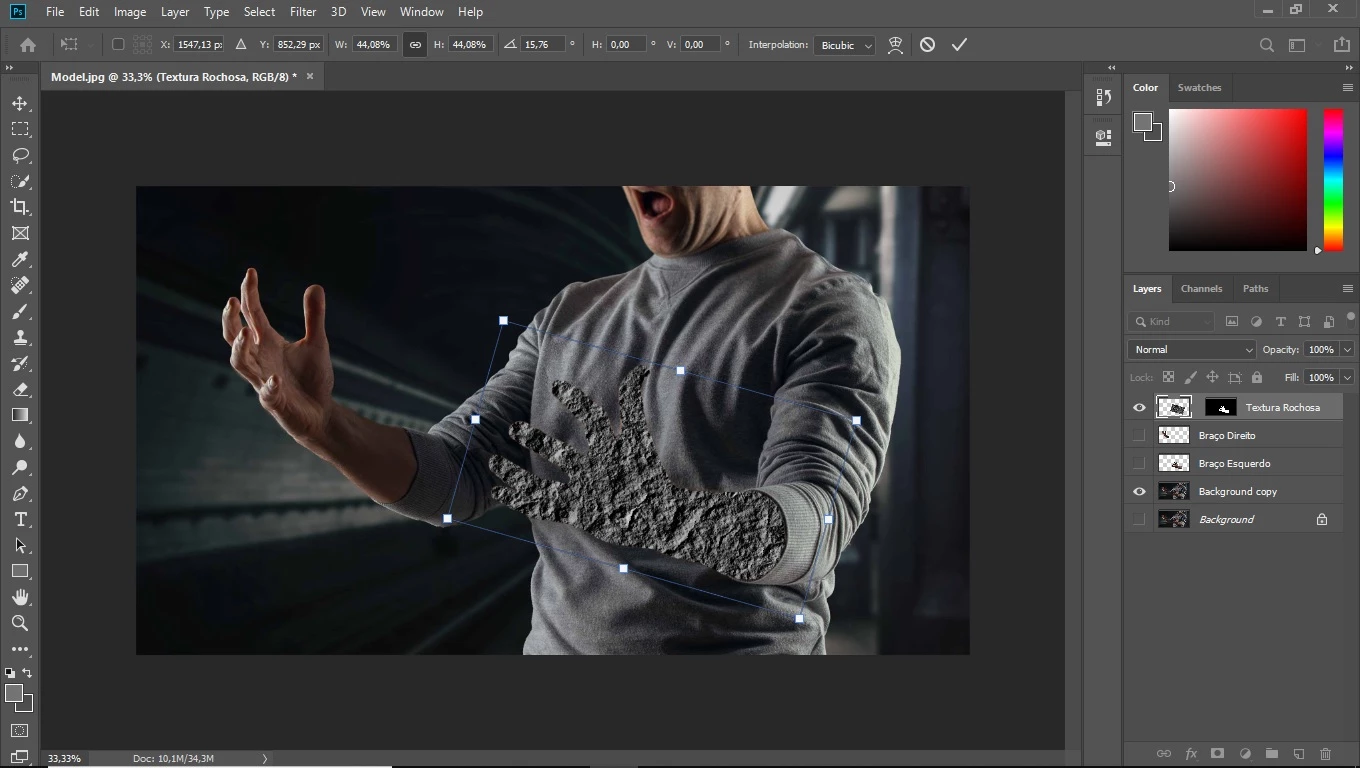
This topic has been closed for replies.

2 replies

Mohammad.Harb
Community Expert
Community Expert
July 6, 2019

I would suggest the following workarounds:

  1. go to Preferences -> Performance , then check Legacy compositing and restart photoshop

    if you get the same result,   create a NEW document and follow all steps again

JJMack
Community Expert
Community Expert
July 6, 2019

What video your screen capture show a layered document open in Photoshop with which has no video layers a background copy layer is visible as is the top rotared rectangular texture layer that has a hide all layer mask that is filled with white in a area that maps  to the subject  left hand and arm in the Background copy layer.

JJMack
JJMack
Community Expert
Community Expert
July 6, 2019

Your screen capture show a layered document open in Photoshop with a background copy layer is visible as is the top rotared rectangular texture layer that has a hide all layer mask that is filled with white in a area that maps  to the subject  left hand and arm in the Background copy layer. It look the sane ase the layer masj in tht later in that video.

JJMack
JJMack
Community Expert
Community Expert
July 6, 2019

I tried resetting my preferences, even closed the program and opened it again. Still having this problem, though. Would very much appreciate other recommendations.


You have posted two different screen captures of your document  with basically the same layer visible.  However, looking at the top layer Textura Rochosa layer's content thumbnails the content of the layer has been changed to black pixels in the second screen capture.  In your first screen capture you show an Path around the rotated rectangular texture. After rotating the texture you must have done some Photoshop step the turn the layer black or Photoshop is not rendering your layers correctly. Have you tried check use legacy composition in your Photoshop Preferences Performance section.

JJMack