
Exit
  • Global community
    • Language:
      • Deutsch
      • English
      • Español
      • Français
      • Português
  • 日本語コミュニティ
  • 한국 커뮤니티
0

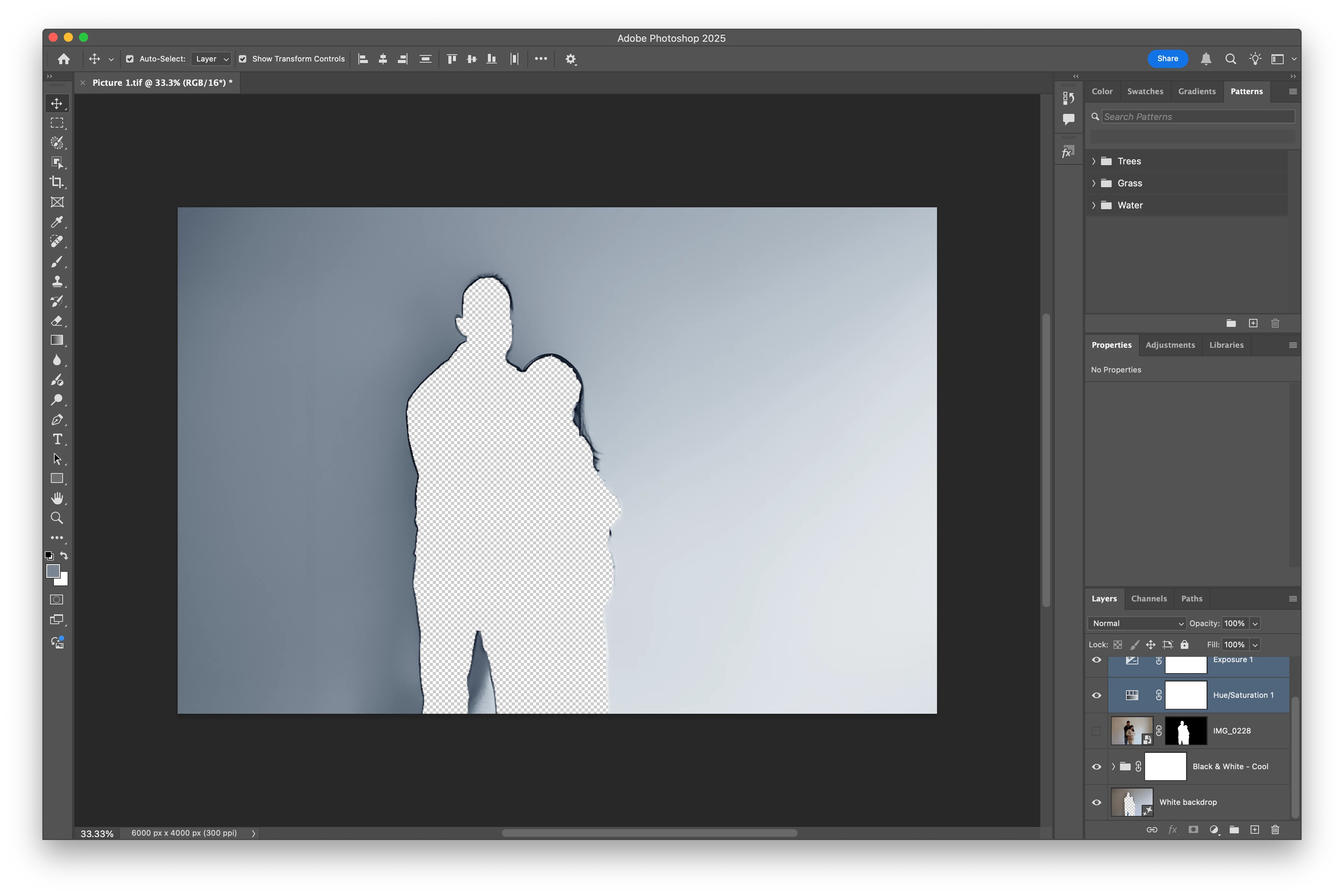
Why is there a cut out on this generative fill backgroundimage?

Community Beginner ,
Feb 10, 2025 Feb 10, 2025

I removed the background of this image and kept the subject. I made a new background using generative fill and it looks great. However, when I turn off the subject layer, there is a cut out. Is there a way to resolve this? I would like to use this background for other pictures. Screenshot 2025-02-10 at 11.55.34 AM.png
TOPICS
macOS
160
Translate
Report
Community guidelines
Be kind and respectful, give credit to the original source of content, and search for duplicates before posting. Learn more
community guidelines
Adobe
Community Beginner ,
Feb 10, 2025 Feb 10, 2025

For clarification, when I save the image as you normally would, the cut out seems to be imprinted to the image so that is what I wanna resolve.

Translate
Report
Community guidelines
Be kind and respectful, give credit to the original source of content, and search for duplicates before posting. Learn more
community guidelines
Enthusiast ,
Feb 11, 2025 Feb 11, 2025
LATEST

I've watched many Youtube videos by great instructors; they always seem to gloss over this issue, and seemingly skip a step.

What I do in this situation (others will have a more elegant method) is use the Lasso tool, surround the ghosts loosely, command-delete (Mac), then use one of the fills under the Edit menu --  Content-Aware or Generative.

Larry
Translate
Report
Community guidelines
Be kind and respectful, give credit to the original source of content, and search for duplicates before posting. Learn more
community guidelines