
Participating Frequently
June 29, 2019
Answered

Why No More Photoshop 2018 version? We want it back its better then 2019 !!!

  • June 29, 2019
  • 4 replies
  • 1622 views

Why No More Photoshop 2018 version? We want it back its better then 2019 !!!

I still have 2018 installed on my computer and it works fine and better and way more faster then 2019 version, 2019 version keeps lagging and crashing and freezing up and I can't do my work in that and my business and my work consist of me using Photoshop or a program like it!!

and if Adobe does not bring back 2018 version for my business you'll lose me and my funding and my business!!

and I will start to use Serif Affinity Photo instead I got it installed on my system, and it seems to be more stable and user friendly compare to the Newer version of Adobe Photoshop 2019!!
This topic has been closed for replies.
Correct answer davescm

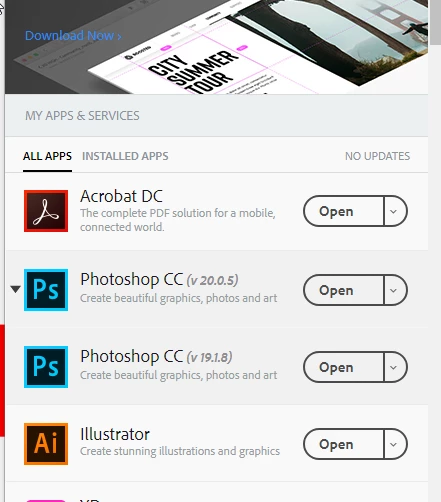
I am not sure where you are getting your information but CC2019 (currently at v20.0.5) and CC2018 (currently at v19.1.8) and CC2017 (v18.1.7) can currently be installed together. I have CC2019 and CC2018 both installed here.

Earlier CC versions up to and including Photoshop CC2017 18.1.6 have been withdrawn

Dave

4 replies

Participating Frequently
June 30, 2019

I was told this in an email from Adobe.com that they are not supporting Photoshop 2018 version anymore and it won't be on the list anymore for download, and so, where I will be formatting my main SSD drive ,soon for Windows 10 Pro 64,bit OS, I want Photoshop 2018 version still on the list so i can re-install it again to use, cause the 2019 version "SUCKS ASS" badly !!

it freezes up and lags out and the buttons and switches on it does not respond fast at all, even when i first installed the 2019 version of Photoshop it did that from the get go!!

and I do not want to be stuck using crappy Photoshop 2019 version sure it has new features but still has major memory leaks in it and the app does not work good like the older version do!!

I need this fro my business I do digital art and T-shirt designs and Comic books, and if I can't use Photoshop like I need to for my business and I am stuck with just lame ass Photoshop 2019 version I will sue this company for whatever loses I have from it for my work, and I will also go to another app that is better then Photoshop 2019 version!!!

davescm
Community Expert
Community Expert
June 30, 2019

You are repeating the same thing and may be misreading the version numbers (which are confusing). Photoshop 2018 is on the list in the desktop app for download

The versions that have been withdrawn are CC2017 v18.1.6 and earler.

Photoshop CC2017 v18.1.7 , CC2018 v19.1.8 and CC2019 v20.x.x are still available from the CC desktop app

Click on the down arrow next to Photoshop and choose Manage :

Then other versions:

You will now see a list of available versions that you do not already have installed:

This article explains which versions of the app have been withdrawn and which are still available for download via the desktop application

https://prodesigntools.com/adobe-limits-software-downloads.html

Dave

Nancy OShea
Community Expert
Community Expert
June 29, 2019

From your Creative Cloud preferences, click on Show Older Apps .   See screenshot.

Go back to Apps.  Click the drop-down list.  Select Manage > Other Versions.  See screenshot.

Nancy O'Shea— Product User & Community Expert
Derek Cross
Community Expert
Community Expert
June 29, 2019

Have you tried resetting your Photoshop preferences for CC2019, you can do it under the General tab in Photoshop preferences.

davescm
Community Expert
davescmCommunity ExpertCorrect answer
Community Expert
June 29, 2019

I am not sure where you are getting your information but CC2019 (currently at v20.0.5) and CC2018 (currently at v19.1.8) and CC2017 (v18.1.7) can currently be installed together. I have CC2019 and CC2018 both installed here.

Earlier CC versions up to and including Photoshop CC2017 18.1.6 have been withdrawn

Dave