
Participating Frequently
January 29, 2020
Question

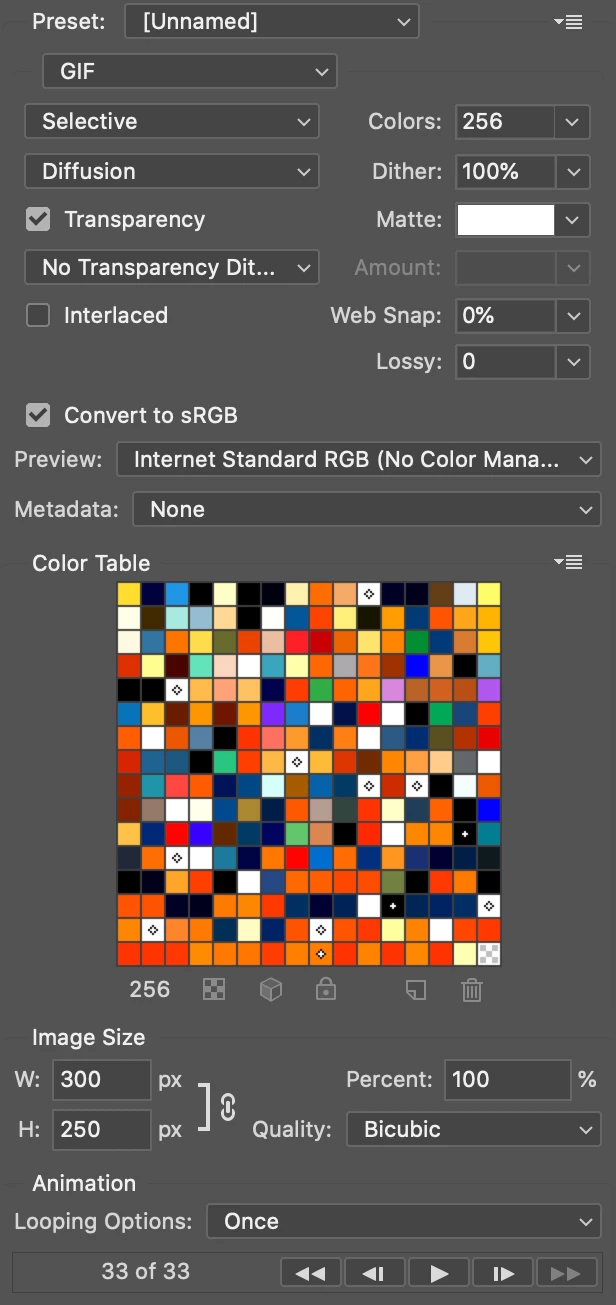
Why the color table of my animated gif has so much white squares rather than other colors?

  • January 29, 2020
  • 4 replies
  • 1977 views

Hi. I am exporting an animated gif and the color table has 9 white squares, marked with that diamond icon. Is any motive? Because those extra colors would be helpfull rising the gif quality. Thks.


This topic has been closed for replies.

4 replies

Participating Frequently
January 29, 2020

I believe is something to do with the color menagement. Maybe was at e-SRGB and changed to default SRGB and now the blocked white colors are gone. Thks.

davescm
Community Expert
Community Expert
January 29, 2020

Are you saving the GIF from a file that already has a restricted range of indexed colours (e.g a previous GIF)?

Dave

Participating Frequently
January 29, 2020

A previous GIF not. Just assets like images and shapes from another PSDs. But it is strange. I did a test copying merged from two frames and placing in another canvas. The white colors restrictions keep. I did the same test but taking a screenshot from two frames and cropping in the banner size. No white squares fixed, just one regular white square.

Any possible hint on how to reset the PSD color restrictions?

D Fosse
Community Expert
Community Expert
January 29, 2020

As far as I can tell, the diamond represents "web safe" colors. Whatever that means these days.

c.pfaffenbichler
Community Expert
Community Expert
January 29, 2020

When you double-click the fields are there really pure white? 

Participating Frequently
January 29, 2020

Yes, all 255. Running on Photoshop 2020, imac 5k. 

c.pfaffenbichler
Community Expert
Community Expert
January 29, 2020

Can you provide the file? 

What happens when you change the number of Colors (and then change it back to 256)?