
sandrapjb
Participant
February 6, 2018
Question

WHY there is no color management option in my printer setting dialog box???

  • February 6, 2018
  • 1 reply
  • 3817 views

Hello,

Can someone help me find the Printer's color management in my photoshop setting dialog box, please????

I have all right:

- working space in Adobe RGB (image profile in RGB as well)

- a calibrated monitor

When I use the printer manages the color to print, the colors come out very close to what is on the monitor. When I try the paper's ICC the photo print gets a magenta cast (actually all colors get messed up). I understand that I have to disable the printer's color management, but I can't find where to click. All dialog boxes I found on the internet are different than mine - below!

Help, please!!

tks
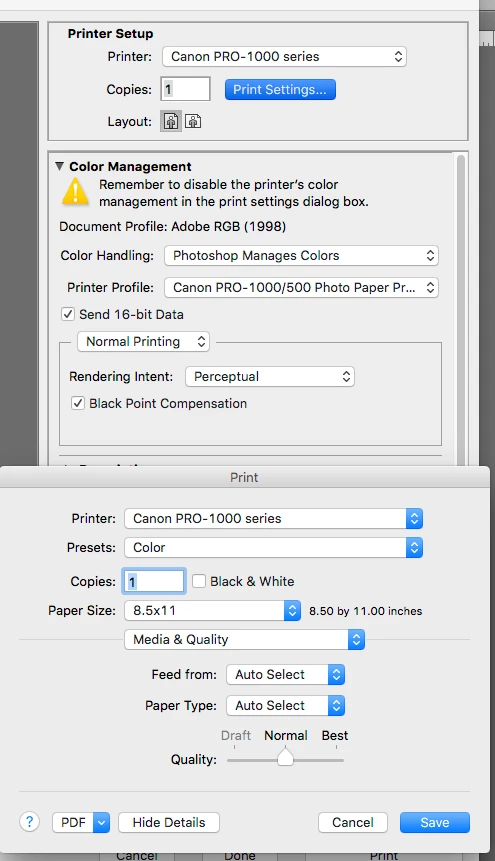
This topic has been closed for replies.

1 reply

gener7
Community Expert
Community Expert
February 6, 2018

Perhaps this may help: Color Management Confusion - Canon PRO 1000 printer

D. Fosse is still part of the community. I'll try and get him if this doesn't help.

sandrapjb
sandrapjbAuthor
Participant
February 6, 2018

Thank you gener7! I saw this! I'm all good with ICC and profiles, but I just cannot find the printer driver to turn off the printer's color management (her last step)! my dialog box seems to be different from everyone else!

sandrapjb
sandrapjbAuthor
Participant
February 8, 2018

The key word is Print Settings or the settings dialog the Print driver shows.

Adobe Photoshop does not control that anymore than your Canon's on/off switch. You can even go into Printers under Apple's System Preferences and see if you can do it there, but I have a feeling what you see in Apple's Preferences is what the Adobe Print dialog sees.

So that's what makes me think Canon would have the better answer.


Hey gener7, just stopping by to say thank you! You were right, Canon community worked! I needed to update the driver version!!! Just that! Incredible!

Tks,

Sandra