Inspiring
February 1, 2022
Answered

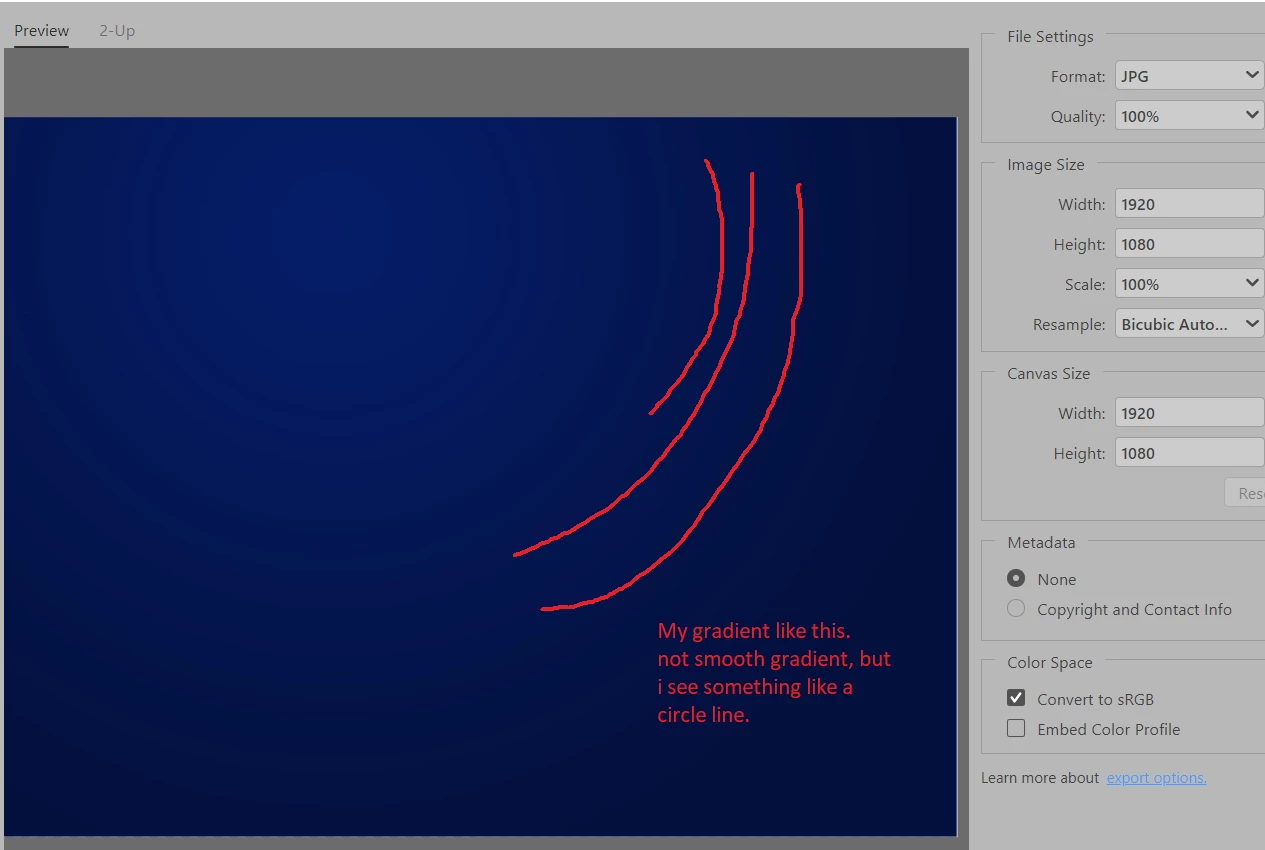
Why when i export my gradient to JPG, the image become like this

  • February 1, 2022
  • 4 replies
  • 7045 views

Dear community, what is it called? my gradient become like this when i export to JPG.

And what is solution? thanks.
Correct answer c.pfaffenbichler

One can avoid the effects of lossy compression by not employing it. 

So why not use tif or png instead of jpg? 

4 replies

Inspiring
February 1, 2022

Thanks for all of your replies of this Banding thing. Exporting not to JPG is best solution . Thanks.

######Raizen 7, 40Gb Ram, RTX 3060, Win 11 -- All of Software in the world are just tools. Buy it if it works for you :)
D Fosse
Community Expert
Community Expert
February 1, 2022

Banding happens whenever data are reduced to 8 bit color depth, where you only have 256 discrete steps per channel.  Banding is cumulative. In a chain of several 8 bit conversions, they will pile on top of each other.


The usual source is the display system, which always operates at 8 bits (unless you have a 10 bit capable monitor). As long as your original file is 16 bit, the display-induced banding may not be immediately visible or significant. 


But jpeg is an 8 bit format. And not only that, the jpeg compression works more aggressively on the color component than on the luminance component. Close colors are squashed together. So you get additional jpeg-banding in addition to standard 8 bit banding. It all adds up.


A very effective way to reduce or eliminate banding in 8 bit data is to introduce a little bit of noise. Not much, just enough to break up the banding.


Michael Bullo
Community Expert
Community Expert
February 1, 2022

It's called Banding. Are you seeing it in your Photoshop document or only when you export?

Inspiring
February 1, 2022

Hi @Michael Bullo  I see it when export, it is just fine on my photoshop document.

######Raizen 7, 40Gb Ram, RTX 3060, Win 11 -- All of Software in the world are just tools. Buy it if it works for you :)
TheDigitalDog
Inspiring
February 1, 2022

Mostly due to JPEG compression. Even at 100%, you are still losing data by virtue of saving off as JPEG.

Author “Color Management for Photographers" & "Photoshop CC Color Management/pluralsight"
Inspiring
February 1, 2022

Hi @TheDigitalDog , do you have a solution to fix it? thanks

######Raizen 7, 40Gb Ram, RTX 3060, Win 11 -- All of Software in the world are just tools. Buy it if it works for you :)
c.pfaffenbichler
Community Expert
c.pfaffenbichlerCommunity ExpertCorrect answer
Community Expert
February 1, 2022

One can avoid the effects of lossy compression by not employing it. 

So why not use tif or png instead of jpg?
