
Known Participant
May 24, 2021
Answered

Why won't it jpg for me?

  • May 24, 2021
  • 3 replies
  • 1014 views

In PSCC I am working with an iPhone pix and cropped and reduced the size.

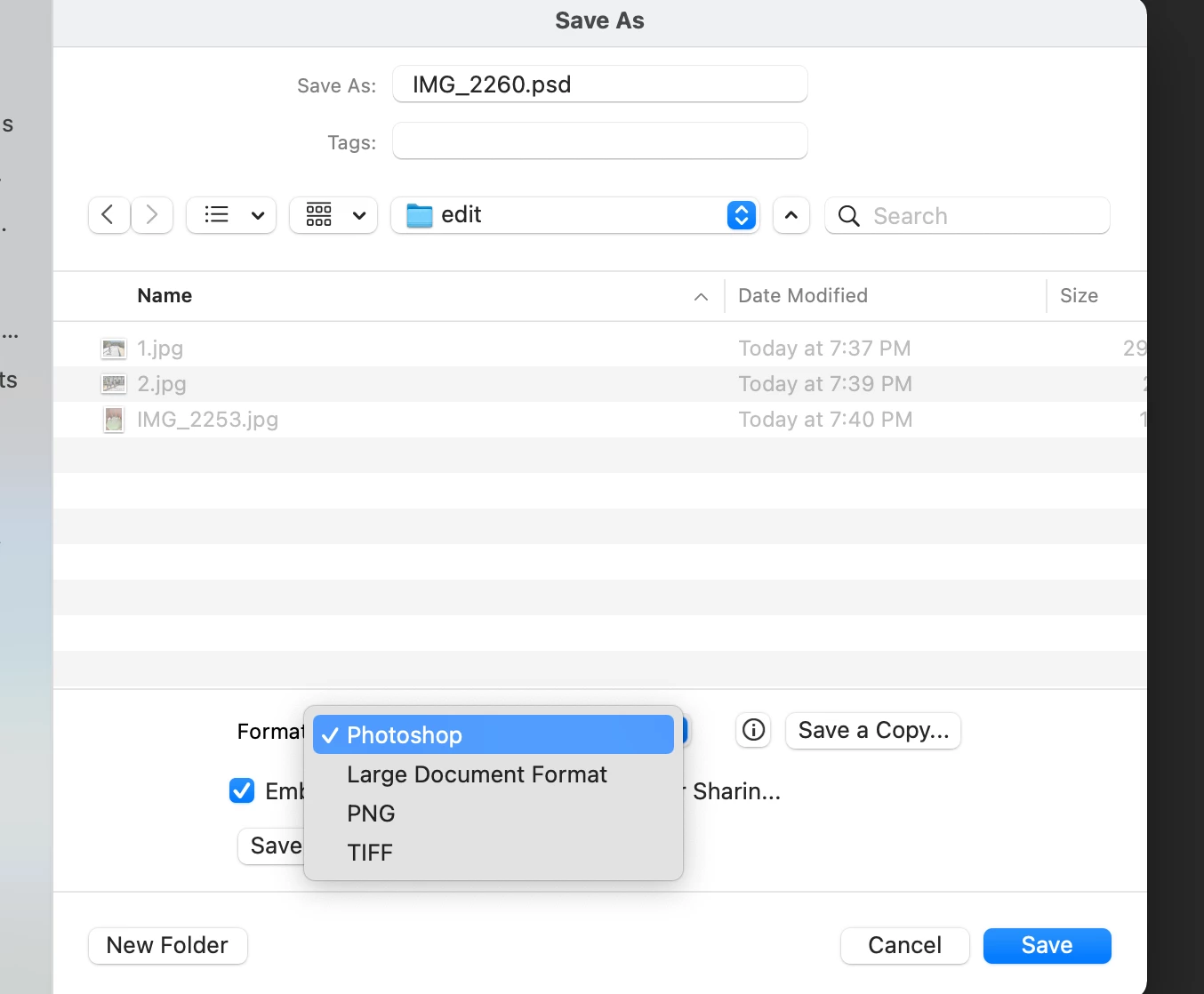
The I went to change and it to a jpg & it only gave me these options.  So I typed it in anyhow and the files became unreadable to PS.   This has never happened before.   Thanks in advance
 

This topic has been closed for replies.
Correct answer jane-e


@PenniSummer wrote:

The I went to change and it to a jpg & it only gave me these options.  So I typed it in anyhow and the files became unreadable to PS.  


Hi Penni,

Your image shows you were saving a PSD. Typing "JPEG" as the extension does not convert a PSD to a JPEG. If you rename it back to PSD then you will be able to open it again. 


Due to changes in macOS, Adobe had to make changes while keeping PS platform consistent. Choose File > Save a Copy (not Save As) to be able to save a JPEG. 


More info here:
https://helpx.adobe.com/photoshop/using/whats-new/2021-4.html#save-a-copy 
https://petapixel.com/2021/05/18/photoshops-save-as-function-has-changed-on-mac-heres-why/ 


~ Jane

3 replies

jane-e
Community Expert
jane-eCommunity ExpertCorrect answer
Community Expert
May 27, 2021


@PenniSummer wrote:

The I went to change and it to a jpg & it only gave me these options.  So I typed it in anyhow and the files became unreadable to PS.  


Hi Penni,

Your image shows you were saving a PSD. Typing "JPEG" as the extension does not convert a PSD to a JPEG. If you rename it back to PSD then you will be able to open it again. 


Due to changes in macOS, Adobe had to make changes while keeping PS platform consistent. Choose File > Save a Copy (not Save As) to be able to save a JPEG. 


More info here:
https://helpx.adobe.com/photoshop/using/whats-new/2021-4.html#save-a-copy 
https://petapixel.com/2021/05/18/photoshops-save-as-function-has-changed-on-mac-heres-why/ 


~ Jane

Known Participant
May 28, 2021

Hi Jane,

  I am up to date on PS at 22.4.1

The origional problem I had was with an iPhone picture not saving as a jpg after cropping it.

   I just tried it with a picture I took with my digital camera which I use professionally and it worked in Save As and as Save A Copy.     

   So it's just from iPhone pictures?

Also, what's the big difference between Save As and Save a Copy?

  Thanks you and to the PS community for helping me

Penni

davescm
Community Expert
Community Expert
May 28, 2021

It depends how you crop. If, when using the crop tool, 'delete cropped pixels' is unchecked in the options bar, then after cropping you have hidden pixels in your document. Jpeg does not support hidden pixels so that file format will be moved to Save A Copy.

Dave

Jumpenjax
Community Expert
Community Expert
May 24, 2021

In the layers panel does it say layer or background? If it says layer you need to go too bar layers> flatten. Then you can save and should have the jpeg option.

Lee- Graphic Designer, Print Specialist, Photographer
JJMack
Community Expert
Community Expert
May 24, 2021

Adobe changed Save As in the 22.4 update. in the desktop Photoshop.  iPhone can not run desktop to save files.  If you use Desktop Photoshop and cropped a iPhone Jpeg. If you did not have the Crop tool delete the crop off pixels the way Save as was change you not be able to save you document as a jpeg.  For that would delete the cropped off pixels and not preserve you Image.  Even image file type that I thought preserve your work no longer can be saved using Save As. For example Photoshop PDF image file.   I do not have a clear understanding of which image file type now require you to versions "Save a Copy"  It seems like you can always use version.   So substitute  "Save A Copy" as your new "Save As"  in your work-flow you can not go wrong with a copy.

JJMack