
P.M.B
Legend
February 18, 2018
Answered

Why would PS XP Pen pressure be working?

  • February 18, 2018
  • 2 replies
  • 17032 views

Hi there,

So I recently updated to the latest version of Photoshop and Updated my XP Pen Artist 22HD drivers to the Latest version and now Photoshop is no longer recognizing pen pressure.

The pressure is working in Illustrator and other apps, just not Photoshop.

Anyone have any similar problem or suggestions?

Thanks,

PAul

As an aside:   Why does PS, a program largely known and used for digital painting have such a hard time with Pen Pressure?

Searching the forums for answers I seethat Photoshop in particular is notorious for have problems recognizing pressure.

I would think this is something of a priority to get worked out.

If the illustrator team can get it worked out, why can't the Photoshop team?

Just wondering
    This topic has been closed for replies.
    Correct answer Trevor.Dennis

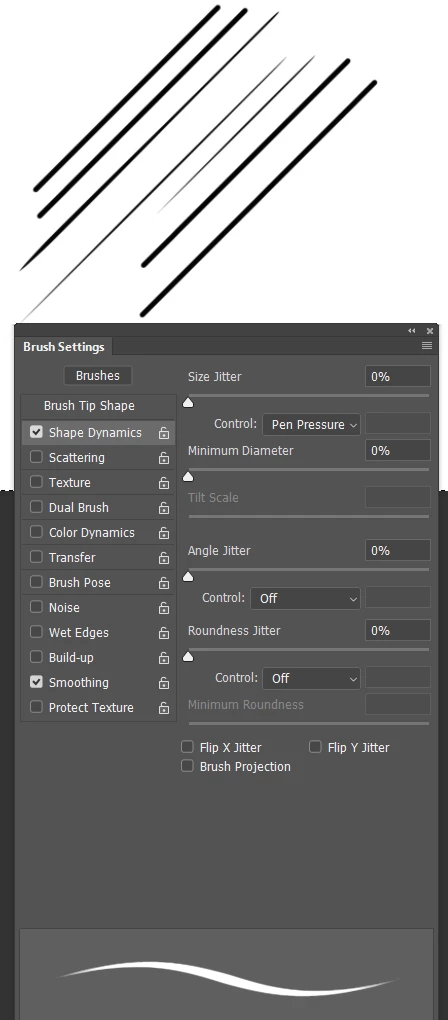
    What operating system are you using?  I am on Windows 10.  I see a parallel preview until I touch down with the pen, but if I then use the mouse with the same preset, the preview remains tapered.  The lines below were applied left to right.  CC2018 btw

    2 replies

    P.M.B
    P.M.BAuthor
    Legend
    February 19, 2018

    Thanks Guys,

    Funny I don't rember that being the case previous to these updates.  My brush previews were always tapered.

    Also it's normal that even after PS recognizes you're using a pen, it forgets as soon as you switch back to the brush tab?

    I don't mean choosing a new brush, I mean just clicking the brush tab and immediately back to the settings tab and PS forgets I'm using a pen?

    ~Gutterfish
    Trevor.Dennis
    Community Expert
    Trevor.DennisCommunity ExpertCorrect answer
    Community Expert
    February 19, 2018

    What operating system are you using?  I am on Windows 10.  I see a parallel preview until I touch down with the pen, but if I then use the mouse with the same preset, the preview remains tapered.  The lines below were applied left to right.  CC2018 btw

    JJMack
    Community Expert
    Community Expert
    February 18, 2018

    I do not see which OS you are using and do not know anything about your XP Pen Artist 22HD what API it device drivers uses for pen support.   On Windows Photoshop CC 2018 defaults to using Microsoft's INK APIs but can be configured to use Wintab API.  Wacom Tablets can also be be configured to use either INK or Wintab APIs.  I configure them to use WinTAB api.  I believe INK may be too integrated with Windows and feel Photoshop performance is better using WinTab APIs.

    I do not use Illustrator its Adobe Vector editor  how well can you paint with it. Does it has a good brush engine

    JJMack
    P.M.B
    P.M.BAuthor
    Legend
    February 18, 2018

    Thanks JJ,

    Sorry, I'm using Windows 10 creators update.  I just noticed from reading another thread that even my brush previews in the brushes panel are not showing tapered strokes, not any of them.

    I guess I'll try what I've read in other posts about manually enabling WinTab in the configuration file.  It just seemed from what I read that

    that was a fix for people who were disabling Windows Inkspace.  Pressure doesn't work for me whether or not I have Inkspace on or off.

    The pressure was working prior to the latest update...I have had issues in the past but was always able to fix it by disabling flicks or messing with inkspace or whatever.  I don't understand why it so often requires hacking to get pen pressure to work in Photoshop?!

    I honestly can't tell how good Illustrator's brush engine is or isn't.  I may be biased but I would have to say it's at least more stable than Photoshop's.  I mean they're under the same umbrella you would think someone from the photoshop team might call someone from the illustrator team and ask; "Hey, how do you get your pen pressure to work consistently"?

    I guess i'll try the config file hack but I really don;t want to and don't understand why i should need to. 

    ~Gutterfish
    P.M.B
    P.M.BAuthor
    Legend
    February 18, 2018

    UPDATE: So I added the text file:

    # Use WinTab

    UseSystemStylus 0

    To my Photoshop settings and pressure is now working.

    However my previews still do not show any tapering until I make a stroke on the canvas.

    For example:

    I turn off "always use pen pressure", go into the shape dynamics setting's, enable pen pressure & I get the exclamation point warning.

    However once I make a mark on the canvas the exclamation point goes away and the brush preview switches to a papered stroke.

    But is click back over to the brushes tab & then back to the settings then the exclamation warning is back and the brush preview has no taper....until I make a stroke.

    At least it's working again but what a hot bloated mess.  Like I said, for a program that is widely used as a drawing and painting application...It's really confounding

    ~Gutterfish