
(Win) Photoshop toolbar text input field bug
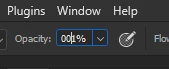
I've been ignoring this one for years. Very simple. I select a tool such as Clone Stamp, or a brush, or dodge, burn, etc tool. I press enter which places the focus in the dialog box for "opacity" as shown in the screen shot. It high lights everything in the box. I begin to type a number. In this case, I typed 100. But as you can see, the cursor repositions itself and the result is shown in the image. I type 100 and I get 1%. I used to do this at high speed without even looking at the dialog. Press enter, type 20 and keep working. But now, I have to look at that box because maybe 4 times out of 10, it will make this mistake. It has been a problem through all versions of Photoshop for the past several years including the very newest which I've updated a couple days ago.
{Thread title updated by moderator}
 AdChoices