
Known Participant
August 21, 2023
Answered

(Win) PS 2023 v24.2 Control alt m for previous made curves not working with thw short cut keys

  • August 21, 2023
  • 1 reply
  • 851 views

Dear Sir,

This is Ronak here,

I have this problem facing in Photoshop 2023 version 24.2 , control+alt+M which is for previous curves on the new photo which doesnt not works. rest control+alt+L for levels working fine.
I have searched here but coudnt get the proper answer. In one of the post I also got to know ot is because the key is alloted to geforce experience for microphone toggle even I have change there but still it doesnt works.


I have even reset the software to normal but still it doesnt works. Please help me I really need curves a lot and cant make again and again curves settings on each photo


{Thread title updated by moderator}
Correct answer Sameer K

Hey, @ronaks64071727. Welcome to the Photoshop Community. I'll help you figure this out. Before anything else, please update Photoshop to the latest version (24.7) via the Creative Cloud desktop app.


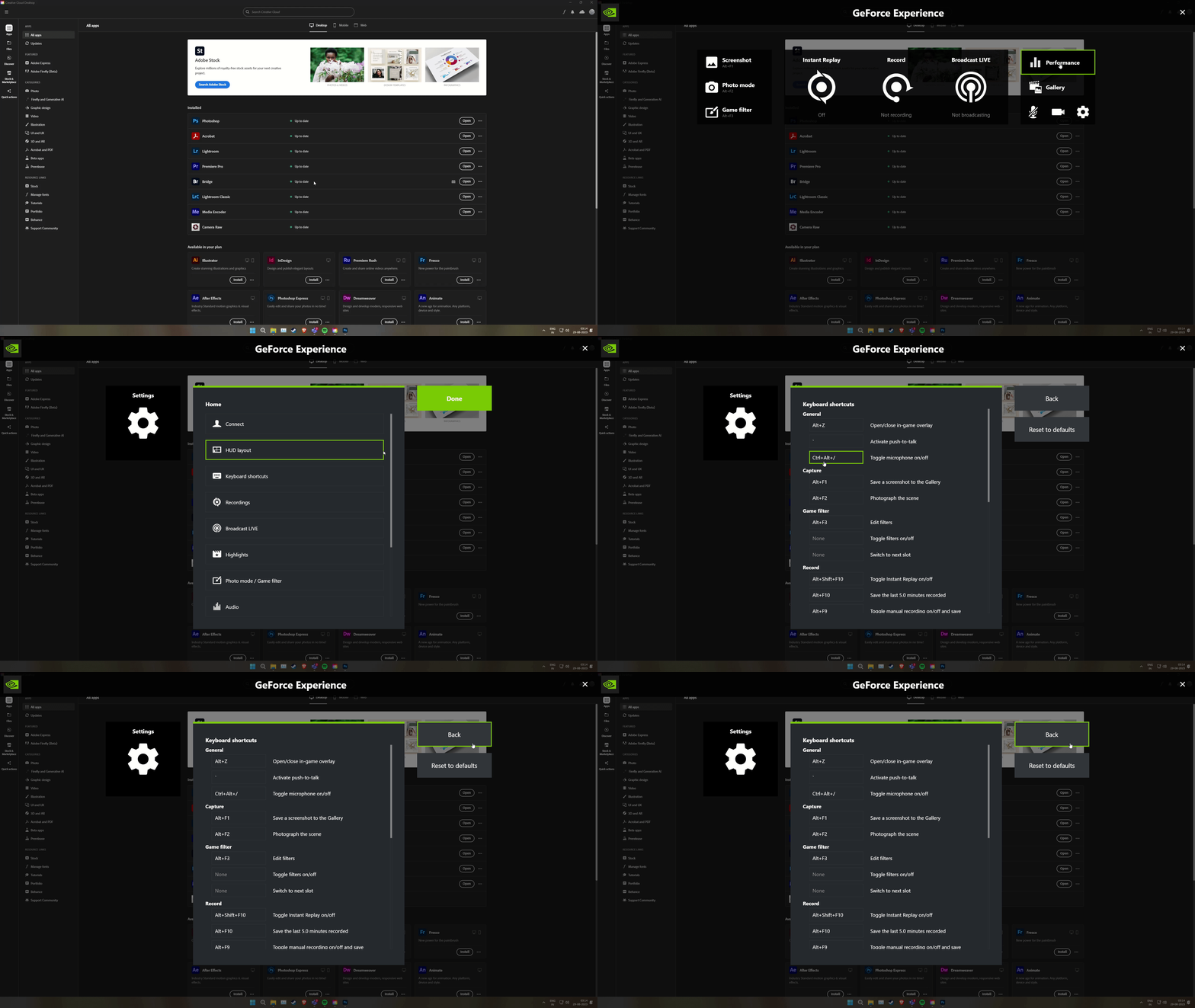
I've tried using the shortcut, which overlapped with the Nvidia GeForce gaming overlay shortcut. Here is what I did:

  • Closed Photoshop.
  • Press ALT + Z to open the overlay > Settings (gear icon) > Keyboard Shortcuts > Define a different combination; I've just used a forward slash 

  • Launched Photoshop & it started working as expected.


Let me know if this helps. Thanks!
Sameer K

1 reply

Sameer K
Community Manager
Sameer KCommunity ManagerCorrect answer
Community Manager
August 28, 2023

Hey, @ronaks64071727. Welcome to the Photoshop Community. I'll help you figure this out. Before anything else, please update Photoshop to the latest version (24.7) via the Creative Cloud desktop app.


I've tried using the shortcut, which overlapped with the Nvidia GeForce gaming overlay shortcut. Here is what I did:

  • Closed Photoshop.
  • Press ALT + Z to open the overlay > Settings (gear icon) > Keyboard Shortcuts > Define a different combination; I've just used a forward slash 

  • Launched Photoshop & it started working as expected.


Let me know if this helps. Thanks!
Sameer K

Participant
September 13, 2024

Thank you so so Much, I Have suffering thsi problem with long days finally fixed Thank you 

Mohit Goyal
Community Manager
Community Manager
September 13, 2024

We're glad it worked for you. Thank you for the update.


Have a great day!
Mohit