
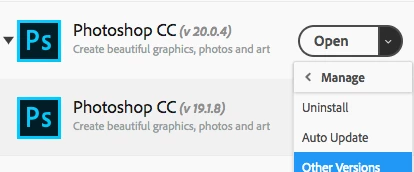
Window Size problem with update 20.0.4
After a recent update the Filter Window sizes are no longer remembered by Photoshop.
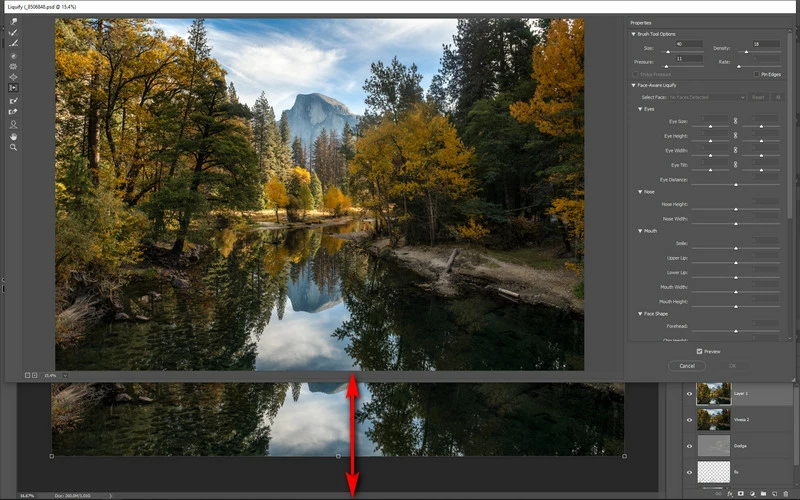
For instance if I open any image, then go to the Filter ? Lens Correction it only fills 3/4 of the screen vertically.
I can pull down the window to fill the screen of course.
Next time I open it, it reverts to only filling 3/4 of the screen vertically.
This problem also effects:
Filter Gallery
Adaptive Wide Angle
Camera RAW (though it has a work around using the full screen button)
Lens Correction
Liquify
Vanishing Point
Shake Reduction
....
None of these seem to remember the screen size set during previous usage.
It's a huge impact on my workflow to now have to resize the window each time I go to use the filter.
This was not a problem prior to the update.
Windows 10 64 bit, current build.
Nvidia GeForce 650 Ti Driver 25.21.14.1681
32 GB RAM
Photoshop 20.0.4 update
1920x1200 Dual 24" Displays
Any help greatly appreciated.
As you can see from the image below, the filter doesn't fill the screen.
Dragging it down will work but then the next time it's opened it reverts to this size.
 AdChoices