Participating Frequently
November 23, 2024
Answered

Wo finde ich in PS 2025 den Preset Manager

  • November 23, 2024
  • 2 replies
  • 1481 views

Hallo.

Um eine Aktion zu exportieren soll ich zu Bearbeiten > Presets > Presets exportieren.

Bei meiner Mac PS 2025 finde ich jedoch unter > Bearbeiten kein > Presets Menü.

Wie kann ich bitte eine Aktion exportieren, um sie auf einem anderen MAC zu verwenden?


This topic has been closed for replies.
Correct answer Olaf Giermann

You have to save an action from the Action-set (you can not export a single action) panel's menu: 
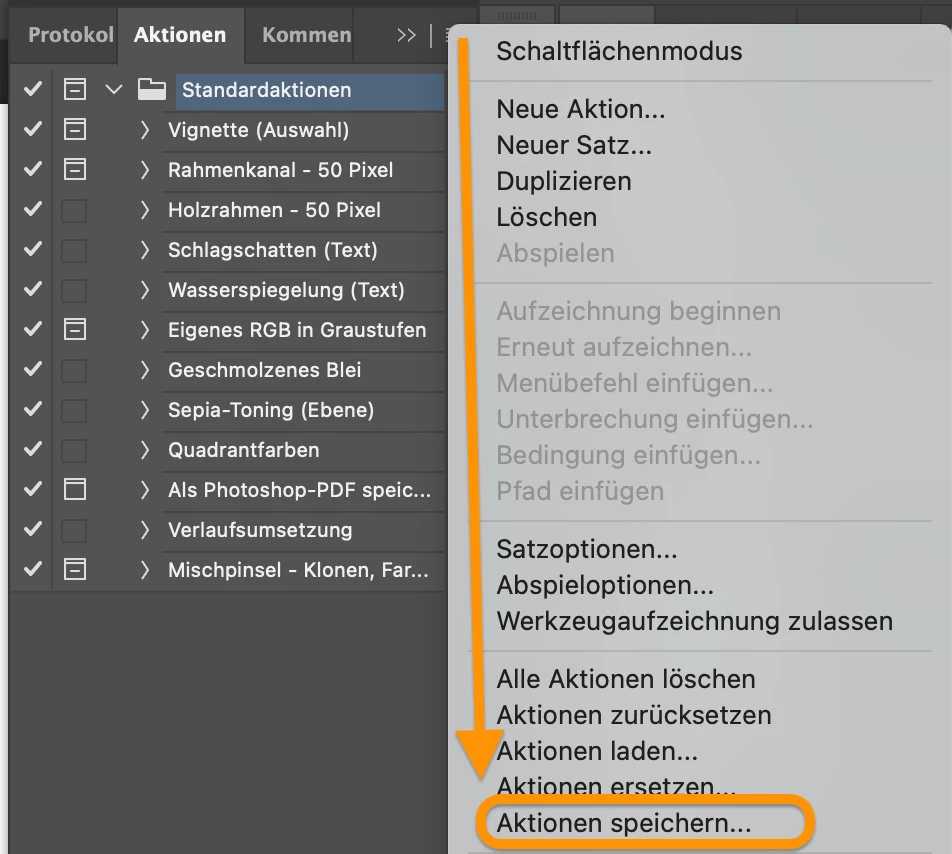
 I would not recommend to copy and paste the file "Actions Palette.psp" (in the preference folder), where your action is temporarily saved.

2 replies

Jeff Arola
Community Expert
Community Expert
November 23, 2024

File>Presets>Export/Import Presets has been removed from Photoshop and for what reason i'm really not clear on that.


Depends on where the other Mac is.


If you have access to the other Mac you can use File Sharing under Apple>System Settings>General>Sharing

or copy the action to a flash drive or similar and use that to copy over the action.


Have you saved out the action from the Actions panel to

Macintosh HD/Users/UserName/Library/Application Support/Adobe/Adobe Photoshop 2025/Presets/Actions

Participating Frequently
November 27, 2024

Hello.

I created the action "FUSSBALLBILDER" within the PS Action Panel, and it still works.

The described Folder "Actions" is empty.

Do you have another idea?

Andreas


Olaf Giermann
Community Expert
Olaf GiermannCommunity ExpertCorrect answer
Community Expert
November 27, 2024

You have to save an action from the Action-set (you can not export a single action) panel's menu: 

 I would not recommend to copy and paste the file "Actions Palette.psp" (in the preference folder), where your action is temporarily saved.

---------Adobe Community Expert: "Gewusst wie, spart Energie." 😉
kglad
Community Expert
Community Expert
November 23, 2024

in the future, to find the best place to post your message, use the list here, https://community.adobe.com/

p.s. i don't think the adobe website, and forums in particular, are easy to navigate, so don't spend a lot of time searching that forum list. do your best and we'll move the post (like this one has already been moved) if it helps you get responses.


<"moved from cc desktop">
