
Participant
February 1, 2024
Answered

workspace background is red when image is loaded in PS

  • February 1, 2024
  • 2 replies
  • 446 views

I don't know what I did to cause it but suddenly the workspace has become red when I load an image (See screenshot attached). I have tried changing in preferences but as soon as I load image this background re-appears. It happens with any file I load. I am on Windows 10 and PS CS4. Just before, I had started to use the ellipse tool. At some point I could pick a color and picked that red (for the ellipse)
This topic has been closed for replies.
Correct answer Per Berntsen

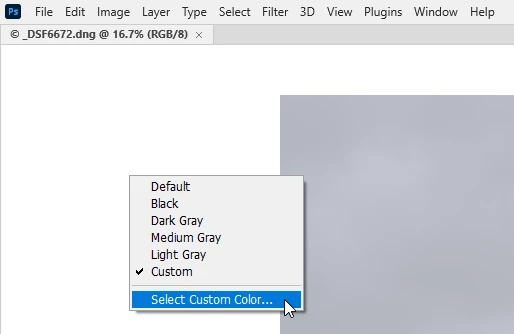
You have probably changed the background color by accident.

Right click on the background and choose the color you want.


2 replies

hstiver1Author
Participant
February 1, 2024

I found the solution although I'm a bit embarrassed about how easy it is. Right-click on the offending background and pick something suitable

Per Berntsen
Community Expert
Per BerntsenCommunity ExpertCorrect answer
Community Expert
February 1, 2024

You have probably changed the background color by accident.

Right click on the background and choose the color you want.


hstiver1Author
Participant
February 1, 2024

Thank you Pers!!