Inspiring
February 25, 2023
Answered

Workspaces vanished

  • February 25, 2023
  • 3 replies
  • 12170 views

Workspaces have vanished in PS 2023. Any ideas how to get them back? thanks.

Correct answer jane-e

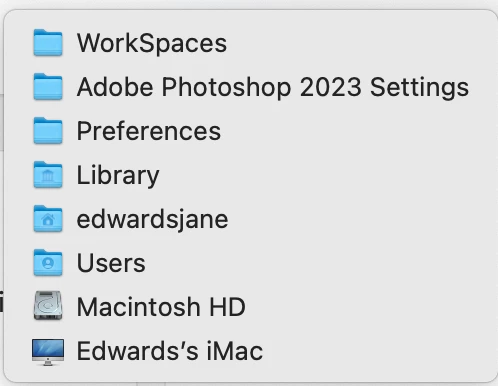
Jane, yes know hidden, but (side tagent, not even looked for my lost workspace yet in TM, but I will tonight), What I'm saying is your screenshot is one I believe/ trust, while ADobe link, says app dat roaming which I do not find anywhere, even drilling down into libary no app data, romaing, so that wierd no?   app data/ romaing? never heard of it, and cant find that anywhere, yet Adobe put that on their link,     Confusing that ADobe does that?


@larry45 

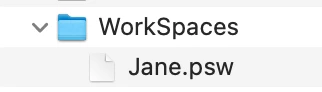
Here are screenshots from my own computer. macOS has several libraries. Go to the right one.



Jane


3 replies

Zen Creative Agency
Known Participant
May 21, 2023

Yep, ALL my workspaces keep vanishing, whenever I do an update of AI, INDD or PS.

I have to go and MANUALLY  copy my saved workspaces into the preferences folders in the Library, it's a massive pain.

BUT SERIOUSLY ADOBE, ARE YOU EVEN THINKING AT ALL?

OBVIOUSLY, when the workspaces disappear, we have to copy them back in, as described above. BUT that fully stuffs up the UI in ALL 3 apps – the tools and panes all disappear when quitting and restarting the apps. The only way to get them back is to tap the TAB key twice, and then go and reset the workspace. I HAVE TO DO THIS EVERY SINGLE [cursing removed] TIME AND I AM JUST SO SO SO SO SO SICK OF IT!


FIX IT. ADOBE!!!! GRRRRRR

jane-e
Community Expert
Community Expert
February 26, 2023

@larry45 


If you mean something else, show us a screenshot of what you are seeing so we can better assist.


Jane


larry45Author
Inspiring
February 26, 2023

Thanks Myra , Jane.


Here is what I'm seeing: I'm on PS 2023 - mac


Before there was one called Larry, which had the workspace that I have tweaked over the years. Seems to be gone all of the sudden. Never see that happen before.  (recently I've deleted past versions of PS, ie 2022, 2019 and preferences to those versions, but if have any idea what search for on my hardrive, let me know , thanks!)

larry45Author
Inspiring
March 1, 2023

BTW Jane, Myra, my keyboard shortcuts (which Jane given great tips on in past, thanks), is also vanished, and I did check my preferences was indeed, selected to import previoius:  see screenshot


Tried to open file with PS and says does not recognize it . Hopefuly someone from Adobe will come to pipe in.

Myra Ferguson
Community Expert
Community Expert
February 26, 2023

Do you mean that there's nothing listed when you go to the Workspace icon in the upper right or go to Window > Workspace?


If so, you might try resetting Photoshop's preferences: