
Exit
  • Global community
    • Language:
      • Deutsch
      • English
      • Español
      • Français
      • Português
  • 日本語コミュニティ
  • 한국 커뮤니티
0

You are NOT a Tool anymore :-(

Participant ,
Nov 05, 2025 Nov 05, 2025

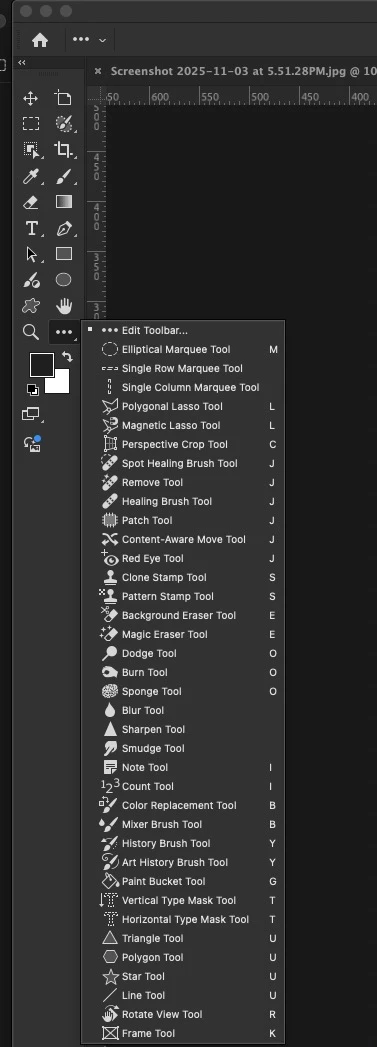
I have what I think is a very basic interface problem. My toolbar with smudge, select, clone stamp, and shapes is very out of order. I have square, ellipse, and custom shape taking up 3 different spaces., when they use to be all in one that required a click and hold to access. ( think the 4 eraser tools in 1 tile with that little arrow that let you know it was a stacked tool tile)
I would prefer not to use the 3-dot menu to look through 20 tools to find one. I would prefer a stack of related tools. 

HOW do i get these tools to restack into their default states like pre-2023 versions did by default? 
Screenshot 2025-11-05 at 5.46.42 PM.jpg

TOPICS
macOS
101
Translate
Report
Community guidelines
Be kind and respectful, give credit to the original source of content, and search for duplicates before posting. Learn more
community guidelines

correct answers 1 Correct answer

Community Expert , Nov 05, 2025 Nov 05, 2025

Edit > Keyboard Shortcuts, or Settings > Keyboard Shortcuts (Win/Mac).


Shortcuts are fully customizable and can be saved with a workspace.

Translate
Adobe
Community Expert ,
Nov 05, 2025 Nov 05, 2025

Edit > Keyboard Shortcuts, or Settings > Keyboard Shortcuts (Win/Mac).


Shortcuts are fully customizable and can be saved with a workspace.

Translate
Report
Community guidelines
Be kind and respectful, give credit to the original source of content, and search for duplicates before posting. Learn more
community guidelines
Participant ,
Nov 05, 2025 Nov 05, 2025

I wish i could delete this post. I just figured it out. Sorry folks. 

Translate
Report
Community guidelines
Be kind and respectful, give credit to the original source of content, and search for duplicates before posting. Learn more
community guidelines
Participant ,
Nov 05, 2025 Nov 05, 2025

I have no idea how this was changed. cause i have always liked the tool layout in PS and I never change them.


Translate
Report
Community guidelines
Be kind and respectful, give credit to the original source of content, and search for duplicates before posting. Learn more
community guidelines
Community Expert ,
Nov 05, 2025 Nov 05, 2025
LATEST
quote

I never change them.

By @Mr. Content


One way the tools could change is because, as DFosse said, keyboard shortcuts can be assigned to a workspace and you were using that workspace. This may or may not have been the reason for you.


Jane

Translate
Report
Community guidelines
Be kind and respectful, give credit to the original source of content, and search for duplicates before posting. Learn more
community guidelines