
Participant
June 9, 2023
Answered

Your new gradient tool is AWFUL!!!!

  • June 9, 2023
  • 7 replies
  • 21246 views

WHY. 

Why did you take a perfectly functioning part of your program and turn it into a permanently vector based tool? This single handedly is the kick I need after 3 years of bugs, glitches and program malfunctions ever since you forced us to update from 2019 to 2020. I can no longer build off gradients effectively to use with my artwork, something quintissential to my process. I just spent too much time in my life trying to figure out how to reverse the gradient tool, realizing I literally need to install a previous version in order to do my professional work.

I am no longer using photoshop to teach my students at my university. I will no longer recommend this program to anyone. You refuse to give us a functioning program. Photoshop has been a long standing joke in the artistic community and you've finally convinced me to follow suit. 
 

Correct answer jane-e

@Corinne5D3A 


Hi Corinne,


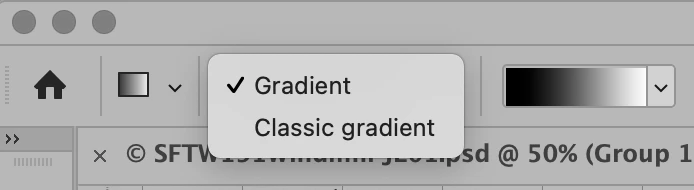
If you don't like the new gradient tool, you can change the mode in the options bar from Gradient to Classic Gradient to work the old way.


Since you are teaching, you might also want to understand the benefits of working with the new revised version.

https://jkost.com/blog/2023/05/discover-the-new-gradient-tool-in-photoshop.html


Jane

Forum volunteer


7 replies

Participating Frequently
August 2, 2023

Same complaint here. I work at a company that rhymes with Fisney as a concept artist, and boy oh boy do I hate that. I use gradients nonstop in painting, I tend to lock pixels and then make the gradient for a nice blended effect with one color on one side and NO color on the other side, and now the hotkey doesn't work at all. It keeps trying to get me to use 2 colors at least, instead of one color and then transparent pixels which many of us use in our office. It really.... really slows us down. If Photoshop 2023 is going to force that annoying Beta box to appear everywhere, the least they can do is not to fix something that wasn't broken in the first place.

c.pfaffenbichler
Community Expert
Community Expert
August 2, 2023

Could you please post screenshots with the pertinent Panels (Toolbar, Layers, Options Bar, …) visible? 

What settings for the Tool did you choose? 


Edit: 

Participating Frequently
July 14, 2023

I have to get on board with this, ever since CC long standing tools have routinely gone haywire. Having a STATIC GRADIENT IS USELESS, and I don't need a preview with extra UI, Or a tool that just sits there open waiting for me to mess with it. Gradien DROP DONE. I just need tools to work. Seriously, Adobe! you are breaking the programs and driving us to find better solutions. Stop listening to whoever is telling you to change your tools all the time! 

c.pfaffenbichler
Community Expert
Community Expert
July 14, 2023

As @jane-e explained you can disable the new behaviour of the Tool, so the change may be annoying at first, but the issue can easily be remedied. 

Participant
July 5, 2023

I agree. Adobe please stop making changes like this. Don't have time to spent mucking around tyring to figure out what's 'gone wrong' when I commit to an urgent job that is supposed to be quick and turns out to be a drama because of unnecessary changes you have made.

Trevor.Dennis
Community Expert
Community Expert
July 5, 2023
quote
By @lisac70325485


You were able to use this forum to quickly find out that there is still a 'classic' option, and it would be a pitty to draw a line in the sand regarding updates and improvements...

Participant
June 12, 2023
Copy
I couldn't agree more with you. The older PS gets, the [profanity removed by moderator] it is. It feels like I'm constantly doing workarounds in order to use the program. I used auto select for product photography. It would save me a lot of time and it worked ok. Nowadays, it works worse than ever. In demos you see them showing hot it perfectly selects hair and complex textures but in real life it can't even distinguish
 
I couldn't agree more with you. The older PS gets, the [profanity removed by moderator] it is.
It feels like I'm constantly doing workarounds in order to use the program.
I used auto select for product photography. It would save me a lot of time and it worked ok. Nowadays, it works worse than ever. In demos you see them showing hot it perfectly selects hair and complex textures but in real life it can't even distinguish an object on a white background with studio lighting. I would understand if the technology wasn't there yet, but it worked much better a few years ago! Also, sometimes, on a dress, for instance, one side would have feathered edge and the other side a sharp cutoff. How is that possible if everything is focused and has the same depth of field?
To make things better, the quick selection tool doesn't work either. There's a clear visual difference, and the tool just selects a large part of the image, like I'm working on a white background instead of selecting just the collar, for instance. It used to work fine before!

Participant
June 12, 2023

I had to copy/paste my comment and repost it. Now it's patched and I can't edit it. Not even the posting works here. Oh, the irony.

Conrad_C
Community Expert
Community Expert
June 10, 2023
quote

I just spent too much time in my life trying to figure out how to reverse the gradient tool, realizing I literally need to install a previous version in order to do my professional work.

By @Corinne5D3A


No, it isn’t literally necessary to do that.


I understand your frustration; the first time I worked with the new gradients I could not find some options. But as soon as I realized that Adobe did the smart thing and consolidated all of the options into the Properties panel…I was very happy. Everything in one place!


Many of us here are also trainers/educators, and for years we have been asking Adobe to modernize the gradients. Up until now, configuring Photoshop gradients could require a stack of nested dialog boxes up to three deep (see the left example in the picture below). It was like working with a UI from over a quarter of a century ago…because that is exactly what it was. It was an obstacle to efficiency, because not only might you have to open multiple dialog boxes just to edit a certain option, it meant that to finish editing a gradient, sometimes you click three OK buttons (or hit the Enter key three times) to get all the way out of the stack of dialog boxes. And on top of all that, when working on a small screen like a laptop, the multiple dialog boxes often got in the way of the image itself! (You can clearly see that in the left example too.) What a mess it was.


Other current software is much more streamlined than that. So if you want to know why they changed, it, that’s why: They had to update the old 20th century UX into the present, as many of us had been asking Adobe to do for years.


Photoshop 24.5 finally caught up to other modern software. Adobe made gradient options available in the Properties panel, greatly reducing the need to go in and out of dialog boxes. As long as you have the Properties panel open, it’s all right there in front of you…including the Reverse option you were looking for (see the right example in the picture below). Also, the Reverse option is still in the options bar when the Gradient tool is active. And, the gradient stops are now right there on the gradient itself, making them easier to understand and control. All without blocking the image…finally!


Another powerful advantage of the new way is being able to use a gradient on a mask, and nondestructively. That is a compelling reason to make a gradient a vector object. We are no longer subject to the inconvenience of having to completely redo a mask gradient from scratch only because we wanted to make a slight adjustment to it. So if you want to know why Adobe changed gradients, that is why. They are a thousand times better now.


And it is worth teaching that to your students. They’ve been exposed to other current mobile and desktop apps where gradients are highly interactive and nondestructive. In other words, the new way Photoshop does gradients is more consistent with what students will expect, having seen other modern apps. The old Photoshop gradients will seem unusually inflexible and convoluted.


If you are working with a gradient fill layer, you can still work with the options the old slow way: Just double-click the gradient thumbnail in the Layers panel.


Now, maybe there is something you used to do that still doesn’t work right in the modern gradients. Ask us about that and we might find a way. Or, as jane-e showed earlier, you can switch it back to the Classic Gradients. Without having to install an old version.

Jeff Arola
Community Expert
Community Expert
June 10, 2023

One huge gotcha to installing older no longer available from Adobe versions of Photoshop like CC 2019 is that your installing the base CC 2019 with no updates and no practical way to get the updates that were provided when CC 2019 was still supported by Adobe, so you actually might have more bugs in the older CC 2019 (ps ver 18.0) version than the latest 2023 (ps ver 24.5).


Then there's the compatibilty issue on Macs with Apple Silicon Processors.


Nancy OShea
Community Expert
Community Expert
August 6, 2023

...you're installing the base CC 2019 with no updates and no practical way to get the updates.

Then there's the compatibilty issue on Macs with Apple Silicon Processors.

===========

Two excellent points to consider before rolling back.


I keep old installations of software on my system, just in case I need to revert back to them. 

I don't uninstall until I'm certain I'll never need them again.


Nancy O'Shea— Product User & Community Expert
jane-e
Community Expert
jane-eCommunity ExpertCorrect answer
Community Expert
June 9, 2023

@Corinne5D3A 


Hi Corinne,


If you don't like the new gradient tool, you can change the mode in the options bar from Gradient to Classic Gradient to work the old way.


Since you are teaching, you might also want to understand the benefits of working with the new revised version.

https://jkost.com/blog/2023/05/discover-the-new-gradient-tool-in-photoshop.html


Jane

Forum volunteer


Participant
June 9, 2023

Hi Jane. 
I am simply not going to recommend this program to my students. The cost vs the amount of bugs, glitches and unecessary changes, compared to other programs out there, do not make photoshop a favorable option anymore.


The only way I would continue to teach this in my classroom is if photoshop allowed its users to revert to the 2019 version. Otherwise, it just isn't worth the time or money for any creative to have to deal with the sheer frustration of a glitchy program.

Thank you for your insight on how to revert the gradient tool back. I am however, going to switch back to a previous version entirely (again), as it seems this version has exhaserbated pre-existing issues and I do not wish for my hair to fall out. 🙂 

jane-e
Community Expert
Community Expert
June 10, 2023

Hi Corrine,


ProDesign Tools has direct downloads that work with your paid subscription:

https://prodesigntools.com/adobe-cc-2019-direct-download-links.html

Turn off automatic updates in the CC app.


The cost for the Photography plan (annual) is deeply discounted and payable at $9.99 per month or in a lump sum for the year.


Jane