
spdorsey6969
Inspiring
December 20, 2017
Answered

Z key isn't zooming dynamically. (Windows 10)

  • December 20, 2017
  • 2 replies
  • 3487 views

I'm not sure if it was a PS setting, or maybe something in the system. Suddenly, I cannot dynamically zoom when holding the Z key. It only lets me drag a rectangle and zooms to that size.

Is there a way to reverse this? Thanks.
This topic has been closed for replies.
Correct answer gener7

That means for some reason your graphics card is not supporting it all of a sudden.

Check Preferences > Performance and be sure "Use Graphics Processor" is checked on.

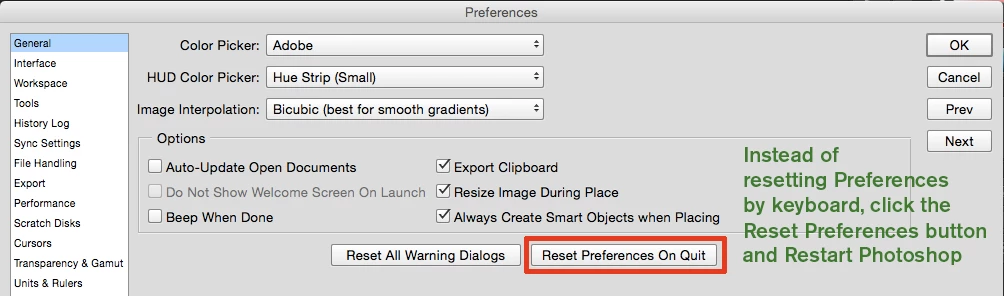
A simple fix may be to reset Preferences:

2 replies

spdorsey6969
Inspiring
December 20, 2017

The issue was the Graphics Processor box being unchecked. Thank you very much!

gener7
Community Expert
Community Expert
December 20, 2017

Thanks for letting me know. I guess for some reason your card wasn't detected and the GPU got checked off.

Gene

gener7
Community Expert
Community Expert
December 20, 2017

Checkmark "Scrubby Zoom" in the Zoom Tool's Option bar at the top. Let me know if that works.

spdorsey6969
Inspiring
December 20, 2017

Scrubby Zoom is greyed out. Not sure why.

gener7
Community Expert
gener7Community ExpertCorrect answer
Community Expert
December 20, 2017

That means for some reason your graphics card is not supporting it all of a sudden.

Check Preferences > Performance and be sure "Use Graphics Processor" is checked on.

A simple fix may be to reset Preferences: