
Participant
March 5, 2024
Open for Voting

Adobe Photoshop Generate image assets action

  • March 5, 2024
  • 2 replies
  • 327 views

I'm trying to export a large number of files with an action that will allow me to export individual layers as a png with transparency file.. and I've seen that there is no way to select Generate Image Asset into an photoshop Action.


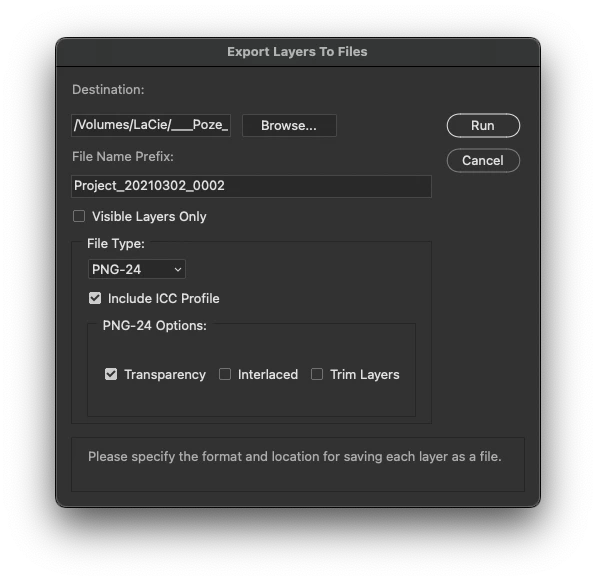
I've tried including a Export Layers to Files step into my action but then all the files are exported with the first opened file name as a prefix and layers keep getting renamed (Pic1)


Also.. when I'm using Generate Image asset on a file to export layers as pngs with transparency the resulting files are trimmed and there is no way to avoid that.


Making a way to include a shortcut (to Generate Image Aseets in this particular case) as a step in an action would be awesome.


2 replies

Stephen Marsh
Community Expert
Community Expert
March 14, 2024

@iomihai11 – how did you go with the script?

Stephen Marsh
Community Expert
Community Expert
March 5, 2024

@iomihai11 


I realise that this is an "idea" (feature request), however, I don't think that Generator is the answer with an action, that's a separate post for later.


The Export Layers to Files script wasn't intended to be recorded into an action.


So I believe that you require a custom script without an interface that can export layers to files and be used in a batch action. The filename could be a combination of the layer name + filename (or vice versa) or only the layer name if that was unique (so as not to overwrite dupes).


Here is one example. You can record the execution of the script into an Action, then use File > Automate > Batch:


/*
All top level layers saved to PNG for Batch.jsx
v1.0 - 6th March 2024, Stephen Marsh
Based on:
https://community.adobe.com/t5/photoshop-ecosystem-discussions/how-do-i-export-layers-as-png-without-loosing-the-size-and-placement-of-the-particular-layer/m-p/12734226
Note: Existing files will be overwritten!
*/

#target photoshop

try {
    var outputPath = app.activeDocument.path.fsName;
} catch (e) {
    var outputPath = Folder.selectDialog("Unsaved base file, select the output folder:");
}

for (var i = 0; i < app.activeDocument.layers.length; i++) {
    for (var j = 0; j < app.activeDocument.layers.length; j++) {
        app.activeDocument.layers[j].visible = false;
    }
    var layerIndex = i;
    app.activeDocument.layers[layerIndex].visible = true;

    var layerName = app.activeDocument.layers[layerIndex].name.replace(/[^a-z0-9 _-]/gi, '').replace(/ +|-+|_+$/g, '');
    var filename = app.activeDocument.name.replace(/\.[^\.]+$/, '');
    var file = new File(outputPath + "/" + filename + "_" + layerName + ".png");

    var saveOptions = new PNGSaveOptions();
    saveOptions.compression = 0; // 0-9
    saveOptions.interlaced = false;
    app.activeDocument.saveAs(file, saveOptions, true, Extension.LOWERCASE);
}
 
I'm happy to make adjustments as needed for your workflow.