
Open for Voting
Change default for Move Tool (Auto-Select)
The Move Tool currently defaults ot Auto-Select being enabled by default. This was changed a few years ago, we're past all the confusion this caused, so we've had time to see how well this change worked (or not).
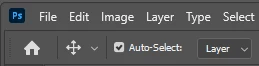
Argument for keeping it:
- New users who don't understand layers can click on this on the image to move them, and this can be intuitive for someone completely new to Photoshop.
Unfortunately, in my experience (doing support on /r/Photoshop and holding Photoshop classes) this option being enabled by default causes more problems than it solves, and experienced users tend to turn it off.
- With overlapping layers it is easy to move the wrong layer as it will usually grab the top layer, making it "impossible" to move the desired layer.
Example: Here, clicking the icon will grab the text layer. Not what new users expect!
Example: Here, clicking the icon will grab the adjustment layer on top. Not what new users expect!
- Inexperienced users who are not aware of this setting might get stuck, being unable to move the desired layer. Yes, I've seen multiple times people posting online struggling with this. Even with the correct layer selected, once they try to move it grabs another layer.
- It's easy to with a click (that doesn't appear to do anything) change what layer is active and being worked on. Imagine finding out a bit late that you've been drawing on the wrong layer for some reason. Not fun.
I notice it has been improved to not grab unmasked adjustment layers, and while this definitely helps, it doesn't do enough to fix the above. So I think the default should be changed to Auto-Select being disabled (for a fresh install of Ps).
 AdChoices