
Participant
October 27, 2023
Open for Voting

icon covering layer masks

  • October 27, 2023
  • 14 replies
  • 4178 views

I'm not really sure how to describe this problem.  I believe it is part of the latest Photoshop CC release for Mac.  I noticed today that all of my layer masks have a weird square icon with a circle in the center, in the preview.  It's covering up about 50% of the mask, so i cant tell which mask is which by lookign at them.  I'm not sure what this is supposed to indicate but it's really annoying and I am looking for a way to turn it off, so i can see my layer masks.  see screenshot below.


I'm running Photoshop 2024 25.1.0 release on Mac running Ventura 13.6.1
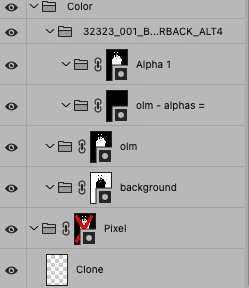
14 replies

Participating Frequently
December 5, 2023

Right? This was not a good idea!! Can't glance at your masks and navigate your layer stack easily. I see the 1 correct answer but I do not see where to turn this option off. I'm updating now to see if it does, in fact, become OFF by default. Can anyone tell us what the point of this little icon is? Soes it DO something?

Participant
December 4, 2023

100% agreed.  I use a 30" and 27" and the badges did nothing but make it more difficult to view.  I'm not sure how it would benefit anyone...  Glad to hear there is an update.

James Brown Photo
Participating Frequently
December 2, 2023

I use 27" screens so IMO they are big enough. If one isn't doing intricate masking then okay, but for detailed full frame work the badge gets in the way no matter how big your thumbnails are. Furthermore, what is the point of it anyway? Experienced PS users know how to identifiy a mask thus it serves zero purpose.

Trevor.Dennis
Community Expert
Community Expert
December 2, 2023

I wonder what percentage of Photoshop users use small screens?  It seems reasonable that most professional users use at least one large monitor if not two or three.  As I said back this thread (or one of the other threads on this subject) if you have the screenspace and use the large thumbnails, the badges are not a problem.

It would still have been better if they rolled out the badges on the beta pre-release only to get feed back.  They would surely have held back on adding the feature to the full release version, until the option to disable the badges was sorted out.  We have to remember that there are 30 million paid for Creative Cloud subscriptions and most, if not all, of them use Photoshop, so a handfull of vocal objectors on these forums, does not represent meaningful feedback.


Participating Frequently
December 1, 2023

@James Brown Photo thanks for letting all us fellow sufferers know this has been fixed!

James Brown Photo
Participating Frequently
December 1, 2023

Thank goodness someone was listening at Adobe. Version 25.2.0 was release and it fixed that dreadful layer mask icon issue, it's now gone and back to how most if not all of us prefer it.

JL0428
Inspiring
November 21, 2023

Unbelieveable, I wasted all morning trying to figure this out after I did the latet update. WHY MESS WITH SOMETHING THAT DOES NOT NEED TO BE MESSED WITH!

Participant
November 21, 2023

Completely obsolete function without any other purpose than stealing 1 hour from my morning at work after the old version magically dissappeared from my CC App and I had to install the current version only to then install an older version again. I would be very interested in an explanation by Adobe, somehow the requirements for commercial users seem to be irrelevant. This function has no purpose, it only slows Ps even more and makes my companies workflow impossible. Also looking forward to the 25th legacy option in the settings.

barbara_a7746676
Community Expert
Community Expert
November 19, 2023

I agree, Rachel. The mask badge is extremely annoying and distracting!!! I hope that there will be a fix very soon !!!

Kevin Stohlmeyer
Community Expert
Community Expert
November 15, 2023

@Primary22381017g6ii @StephenWebster this is an option in the panel menu in an upcoming release.

EDIT - version 25.2 has been released and the option can be found in the layers panel menu. By default it is now off.