
Peter - ArtistAnimator
Inspiring
January 20, 2024
Open for Voting

Marching Ants: Change strength of visibility / Or alternative selection

  • January 20, 2024
  • 3 replies
  • 1154 views

Hi there, 

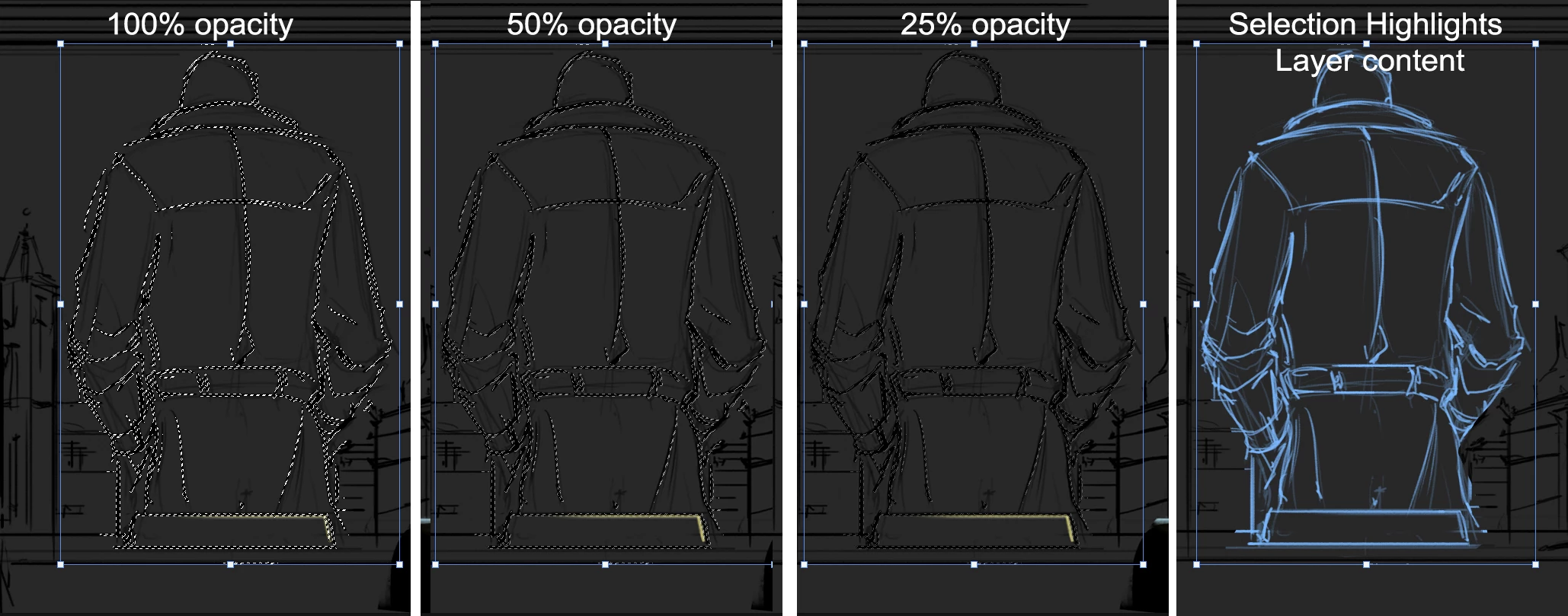
Could we add a visibility/opacity strength attribute to change the visual intensity of the Marching Ants, or create an alternative visible selection of whats selected.   Yes, I know you can hide them, but the bounding box also hides (for skewing), and, I would like to still see what is selected rather than have it visible or not, as well as know where the corners are of the bounding box.


The issue is that thin line art or thin contents are proving difficult to see if I'm skewing, move, rotating, etc, and when making minor adjustments the marching ants are very dominant.  Even if there an alternative selection view instead of marching ants, such as the content of a layer, determined by it's opacity is given a bright colour.

Im not looking to replace what is there, but, give an alternative option for ease of use, it's very distracting to have a moving selection when trying to make changes to line art.


Peter

3 replies

Peter - ArtistAnimator
Inspiring
January 21, 2024

The purpose isn't to mask, it's to move, skew, rotate the selection, and the machine ants influence the visibility of the changes being made.  I might be misunderstanding you solution, here's a quick example of very fast sketch, which need quick alterations.  As you can understand, hiding the marching ants also hides the transform controls.

The point of this is that it's extremely quick to do while sketching.

Semaphoric
Community Expert
Community Expert
January 20, 2024

You can simulate variable marching ants in a Quick Mask channel by using the Trace Contour filter preview. You wouldn't want to commit the filter, of course, just preview it.

D Fosse
Community Expert
Community Expert
January 20, 2024

Just a suggestion in the meantime (we all have our working habits): you can switch to Quick Mask mode, where you can adjust opacity and color of the mask to whatever you like.


The marching ants have a very big limitation: it doesn't show how much selected, only that it's more than 50%.


FWIW, I mostly treat the marching ants as a confirmation that there is an active selection. For any precision work, I normally work directly in a layer mask, even sometimes adding a temporary adjustment layer just so I can work on the mask. When finished, the mask can be moved to where you need it - or it can be turned into a selection if that's what you need.


As the story goes, there was a fierce discussion right at the beginning with the first release of Photoshop: should they make the marching ants or the quick mask the default way to show selections? The marching ants won, but not by much.