
Exit
  • Global community
    • Language:
      • Deutsch
      • English
      • Español
      • Français
      • Português
  • 日本語コミュニティ
  • 한국 커뮤니티
7

P: Ability to recover deleted items in Libraries panel

LEGEND ,
Feb 02, 2015 Feb 02, 2015

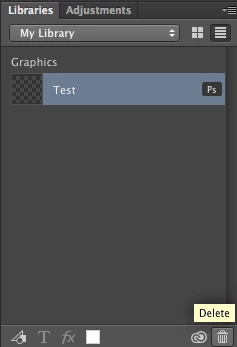
Be able to "Undo", when I accidentally Delete an item in the Creative Cloud Libraries panel.
Or that deleted items are transfered to Trash, where you have to Empty Trash.
Right now, accidentally deleted items are lost forever.
Idea Released
TOPICS
macOS , Windows
1.2K
Translate
Report
Community guidelines
Be kind and respectful, give credit to the original source of content, and search for duplicates before posting. Learn more
community guidelines

correct answers 1 Correct answer

Adobe Employee , Oct 03, 2016 Oct 03, 2016
This has been implemented. Make sure your Photoshop is up to date: https://helpx.adobe.com/photoshop/kb/uptodate.html

You get a small warning for a few seconds after you delete a item that lets you undo. If you need to undo something later, you can go to the web interface for synced assets, go to Libraries > Archived to restore deleted items: https://assets.adobe.com/assets/libraries?filter=archive
Translate
13 Comments
Guest
Nov 03, 2015 Nov 03, 2015
Adding my voice here.

Adding complex items to the library has an element of risk to it.

When working on screen design I might have a lot of items in here, some of which have been removed from all current designs.

If I delete an item from the library, even if I have used the linked object in another design, I cannot recover it.

If it does exist as a linked object in a document and I try 'edit contents' it asks me to locate the (deleted) item, so all I have available is a flat graphic.

Some items in my libraries can be quite complex. It'd be great to have some kind of failsafe for this.
Translate
Report
LEGEND ,
Jan 04, 2016 Jan 04, 2016
I can't fathom how Adobe released this library feature and allowed the deletion of something as important as a linked object with NO undo, recovery, history or archive.

This is a massive miss. I'm so thankful I tested this in a dummy document before putting anything of value into Creative Cloud Libraries.

Please fix this... If someone places a complex linked object with countless hours of work that's gone into it and discover if they accidentally delete it that there is no recourse, well that's about as bad as a user experience can be.

Even if you, minimally, threw a confirm dialog before the action was completed, it'd offer some measure of protection. Right now, one click, and POOF! That's insane.
Translate
Report
LEGEND ,
Jan 26, 2016 Jan 26, 2016
Same thing happen to me. Beyond Frustrated!
Translate
Report
LEGEND ,
Mar 24, 2016 Mar 24, 2016
Same here,
What is wrong with you adobe. Now all my icon are lost. I didn't notice that everything that I add on my documents goes inside a test library for month now... and I've just push the "delete" button on this library. 

<removed abusive language> - admin
Translate
Report
Participant ,
May 09, 2016 May 09, 2016
A possible half-solution to this would be to have a "Cache locally" option on each library that saves it to your CC Files location in a "Libraries" folder. This would allow users to keep a local backup without having to make the Libraries cloud maintain massive archives of legitimately deleted data.
Translate
Report
Explorer ,
Oct 03, 2016 Oct 03, 2016


Please add version history to Photoshop Library (Cloud) elements. This is to help users that inadvertently destroy Library items when sharing local documents with Library items inserted into them. Currently, updating a Cloud items is permanently destructive without any opportunity for recovery. No es bueno.
Translate
Report
Adobe Employee ,
Oct 03, 2016 Oct 03, 2016
This has been implemented. Make sure your Photoshop is up to date: https://helpx.adobe.com/photoshop/kb/uptodate.html

You get a small warning for a few seconds after you delete a item that lets you undo. If you need to undo something later, you can go to the web interface for synced assets, go to Libraries > Archived to restore deleted items: https://assets.adobe.com/assets/libraries?filter=archive
Translate
Report
Explorer ,
Oct 03, 2016 Oct 03, 2016
@J453, unless I'm implementing your instructions incorrectly, this is not working. When I delete the Library item, all I can do is restore the most recently saved version which is no longer the correct design. Is there a method for restoring an earlier version of the Library asset. This is the functionality I need to recover the Library to an earlier state in design. Unfortunately, the changes I did appear to have permanently destroyed the old design with my new design changes. Does that make sense?
Translate
Report
Adobe Employee ,
Oct 03, 2016 Oct 03, 2016
Ahh. Let me ask about versioning...
Translate
Report
Adobe Employee ,
Oct 03, 2016 Oct 03, 2016
The team working on Libraries confirms that versioning in on the roadmap.
Translate
Report
Adobe Employee ,
Oct 03, 2016 Oct 03, 2016
Sorry, mis-merged. Versioning is on the roadmap.

Please reference the new conversation here: Photoshop: File versioning for Libraries panel items
Translate
Report
LEGEND ,
Jan 19, 2018 Jan 19, 2018
This feature sucks. just lost hours of work.
Translate
Report
Community Beginner ,
Apr 14, 2023 Apr 14, 2023
LATEST

Files from shared libraries do not show up in deleted items. Total fail. Thanks Adobe.

Translate
Report