
Inspiring
October 18, 2011
Released

P: Rotate Brush Tip 'On the fly' (Keyboard shortcut, Mouse-wheel or Click + Drag)

  • October 18, 2011
  • 143 replies
  • 28198 views

This may seem wild, but many ideas might've seem that way when first introduced, so bare with me as I believe it would be rather sexy addition to using brushes in Photoshop.

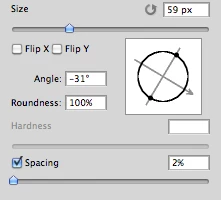
Imagine you choose a brush tip and are ready to use it in your art. But it's not quite right and you could use the Brush Tip to rotate few degrees. So you go to your Brush Palate and Brush Tip Shape Palate and manually rotate the wheel in that Dialog Box or type the number of degrees in a Angle Box(°).
Then you go back to your art and continue using the newly set up brush. Until - you need to adjust the rotation of the Tip again, and again... you get the point.

Wouldn't it be fantastic if we can rotate the Brush Tip 'on the fly' without having to go to the brush palate over and over again, just like we can now change it's size and softness?

Perhaps Left Bracket and Right Bracket would rotate the brush Tip CCW and CW by a 1° (by 10° with Shift) or in increments you set up in Preferences?
Wouldn't that be something?
I am aware of similar function can be achieved using the Pen Tool. This idea however would be available for both, Pen and Mouse and for all Tools using Brush Tip, including Stamp (Clone) Tool.
If this is already possible and I was living in the dark, please enlighten me.
143 replies

Inspiring
January 29, 2016
OS Events are how the hardware/drivers communicate changes to applications.
StrongBeaver
Legend
January 29, 2016
Could this not be done by listening in on the rotation of the brush then communicating with the hardware device ?
Inspiring
January 29, 2016
The events that the OS gives to the application for key presses, mouse movement, tablet changes, etc.
StrongBeaver
Legend
January 29, 2016
What do you mean OS events, and tablet events ?
Inspiring
January 29, 2016
Looks like they're injecting OS events fairly quickly or adding tablet events.
Currently the only way to directly change the brush angle is via tablet events (acting like a wacom pen with rotation).
StrongBeaver
Legend
January 29, 2016
I wonder how they got Photoshop to communicate with their hardware, what was their technique. 
Inspiring
January 28, 2016
All looks to be user-mappable on the fly according to your preferences; can even save multiple profiles so you can use different functions across the adobe suite!

From what I can gather on their website, it's installed as an extension or a plugin, and yes, I'm sure they've created drivers for the specific use of their hardware (which is first of its kind, as far as I know).

Since it's able to do things that aren't mapped to any keyboard shortcuts, they must've written custom scripts and then connected it all together with nice looking GUI at the user end:

TESTED: https://www.youtube.com/watch?v=5MdGq...
PALETTE YOUTUBE: https://www.youtube.com/user/paletteU...

Brush angle + size confirmed as mappable via this video (SO STOKED!):
https://www.youtube.com/watch?v=J_UVa...

They do say you need to be using Adobe CC for their full functionality, so a good reason to upgrade for anybody that's not using it already.
StrongBeaver
Legend
January 27, 2016
ryze - How does the Palette gear automatically map the brush rotation to the device is it in the drivers ?
Inspiring
January 27, 2016
Well, after lurking on this topic for the past couple years, I have to say, it's a crying shame it hasn't been implemented yet, but they must have their reasons.

However, it got me thinking that if I had programming skills, I could map the functionality onto my MIDI DJ controller and possibly assign the knob to brush angle....but no. I'm a designer, not a programmer after all, and though it'd probably be feasible, my time is worth more than the $$ I'd pay to have something that does exactly that for me.

And then, I stumbled upon this piece of gorgeous genius:
http://palettegear.com/photoshop

As per their Nov '15 release notes (http://palettegear.com/release_notes), they've added "Photoshop new functions - Brush roundness and Brush Angle" (CUE: NERDGASM!)

It's not a cheap piece of hardware, nor does it look like it, but having a little dial I can adjust brush angle with on the fly and a slider to control size for EVERY brush I want is about as close as you can get to perfect in the digital paint realm. Plus I can map a few more buttons for undo+redo, AND still have an extra slider for something? SOLD.
Inspiring
January 7, 2016
Why hasn't this been done yet?! Do they have a licensing agreement with Wacom to sell Art Pens or something?