
Inspiring
October 18, 2011
Released

P: Rotate Brush Tip 'On the fly' (Keyboard shortcut, Mouse-wheel or Click + Drag)

  • October 18, 2011
  • 143 replies
  • 28160 views

This may seem wild, but many ideas might've seem that way when first introduced, so bare with me as I believe it would be rather sexy addition to using brushes in Photoshop.

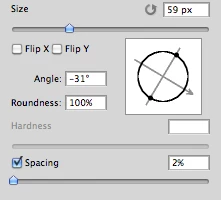
Imagine you choose a brush tip and are ready to use it in your art. But it's not quite right and you could use the Brush Tip to rotate few degrees. So you go to your Brush Palate and Brush Tip Shape Palate and manually rotate the wheel in that Dialog Box or type the number of degrees in a Angle Box(°).
Then you go back to your art and continue using the newly set up brush. Until - you need to adjust the rotation of the Tip again, and again... you get the point.

Wouldn't it be fantastic if we can rotate the Brush Tip 'on the fly' without having to go to the brush palate over and over again, just like we can now change it's size and softness?

Perhaps Left Bracket and Right Bracket would rotate the brush Tip CCW and CW by a 1° (by 10° with Shift) or in increments you set up in Preferences?
Wouldn't that be something?
I am aware of similar function can be achieved using the Pen Tool. This idea however would be available for both, Pen and Mouse and for all Tools using Brush Tip, including Stamp (Clone) Tool.
If this is already possible and I was living in the dark, please enlighten me.
143 replies

Inspiring
November 18, 2015


You can rotate the brush angle through the brush dialogue box, but anyone actually using the brush tools in Photoshop will tell you that it would be great if you could do it with a control wheel or keyboard shortcut. Its a no brainer.
Inspiring
September 28, 2015
In the meantime while waiting for a dedicated shortcut, just click in the angle box on the brushes palette and use the up/down arrows to rotate anti/clockwise by one degree, use shift to rotate by tens.... been that way for as long as I can remember.
I find it surprising that Chris, being so long winded, in his reasons why a shortcut still has not been implimented after 4 years didnt see it fit to mention this!
Inspiring
April 3, 2015
Dedicated brush angle short-cut please Photoshop.

I would like to see brush angle short cut also. It could work like this, when you press down the hotkey you could see a little widget that shows the angle your brush is presently at and then this widget could change with any adjustments made. It would also be helpful if it could to be snapped incremental angles. This would be nice and im glad to see other feel the same...
StrongBeaver
Legend
March 22, 2015
There is one option, that has been mentioned by JPierre earlier in this thread, and that is to rotate your canvas.

I too want to see an option to rotate the brush though some sort of short-cut, I'm hoping this is the year.

In the mean time, I'm sure by now, or atleast I hope by now Adobe has got the message alot of people want to see a short-cut to rotate brushes.
lostsoundzz
Participant
March 22, 2015
yep, just rotate the monitor/screen for getting the Brush rotated,

some comments from adobe photo shop...:DDD very helpful.
Inspiring
March 22, 2015
i am just finding the short cut of rotating the bursh
and see this thread...
JPierre33 you are so funny hahahahha

i am using the shoutcut "R" to rotate the picture,
so that i can use my bursh at different angles,
but it still very annoying......

COME ON ADOBE!!! IT IS 2015 !!!!
Participating Frequently
March 22, 2015
I am NOT and never were looking for this 'shortcut'; the shortcut I would like to see is of using the wheel on my mouse to change the SIZE of the brush as I go. Nothing more nothing less, but I guess I'm the only one who would use that feature from the lack of response on this particular issue. ...3 years now...still waiting.
Inspiring
March 17, 2015


Hello. We are here a lot of graphic designers how really want a shortcut to rotate the brushes without opening the window each time. There is already one to resize and change hardness. Regards, Philippe.
Inspiring
February 4, 2015
This is perfect! Thank you for this workaround, candra nur rokhman!
Inspiring
February 4, 2015
I've been wanting this for years. It would increase my productivity when using the clone tool, paint brush tool, etc. Why doesn't Adobe implement this?