
Participant
June 28, 2020
Beantwortet

Can my Laptop run photoshop?

  • June 28, 2020
  • 4 Antworten
  • 4142 Ansichten

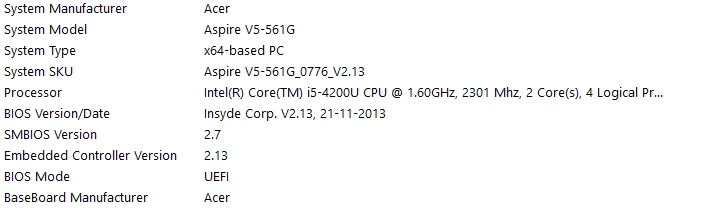
I am a noob when it comes to technology.My daughter is interested in photoshop as she's fascinated with all the youtube tutorials.Can someone tell me if the laptop specs posted below fit the requirements for the latest version and if not then which version should i purchase?
Dieses Thema wurde für Antworten geschlossen.
Beste Antwort von gener7

These are the specs that can tell us something:

  • Intel Core i5 4th Gen 4200U (1.60 GHz)
  • 6 GB Memory 500 GB HDD
  • AMD Radeon R7 M265 2 GB
  • 1366 x 768
  • Windows 8.1


Specs look good.

8 to 16 GB RAM is a good memory to start. The AMD Radeon G7 is a Photoshop certified card.

Optional:

HDDs are old school and a real bottleneck. buy a SSD (solid state drive) and use Macrium Reflect to copy the system over and replace that drive if you can do that.


4 Antworten

D Fosse
Community Expert
Community Expert
June 29, 2020

The official system requirements actually leave out the most important component for running Photoshop efficiently: enough free disk space for the scratch disk. It's a rather conspicuous omission, and I don't know why they left it out.


Photoshop moves large amounts of data around, much more than available RAM in any computer. So Photoshop's memory management relies on temporary files written to disk to hold it all, and then RAM is just a sort of fast access cache to keep things fluent.


This is known as the scratch disk. There should be at least 100-200 GB free space for most "normal" use, but if you're working with large files a practical minimum would be 500 GB.


The system requirements only say you need 3.1 GB disk space to install Photoshop. I'm sure that's correct as such, but the application couldn't possibly run with that amount of disk space.

bivadoAutor
Participant
June 29, 2020

Thanx for the insight.


Nancy OShea
Community Expert
Community Expert
June 28, 2020

If your daughter is in K-12, get her Photoshop Elements.  It's cheaper than Photoshop CC and has an easier learning curve for beginners. 

https://www.adobe.com/products/photoshop-elements.html


Also the PSE system requirements are closer to the equipment you already have.  

https://helpx.adobe.com/photoshop-elements/system-requirements.html


For a college/university student pursuing a degree in graphics design, see best laptops for Photoshop CC below.

https://www.creativebloq.com/features/best-laptops-for-photoshop


Nancy O'Shea— Product User & Community Expert
bivadoAutor
Participant
June 29, 2020

Thanks for the links.

Daughter is not really in favor of Photoshop elements , I guess she wants to jump directly over to the advanced level Ha Ha.I agree with you,though.

gener7
Community Expert
gener7Community ExpertAntwort
Community Expert
June 28, 2020

These are the specs that can tell us something:

  • Intel Core i5 4th Gen 4200U (1.60 GHz)
  • 6 GB Memory 500 GB HDD
  • AMD Radeon R7 M265 2 GB
  • 1366 x 768
  • Windows 8.1


Specs look good.

8 to 16 GB RAM is a good memory to start. The AMD Radeon G7 is a Photoshop certified card.

Optional:

HDDs are old school and a real bottleneck. buy a SSD (solid state drive) and use Macrium Reflect to copy the system over and replace that drive if you can do that.


bivadoAutor
Participant
June 29, 2020

Thank you very much.


This statement in particular was very helpful "The AMD Radeon G7 is a Photoshop certified card".

I googled it and now i do know which AMD Graphics card are tested.


The laptop has 8GB RAM and 2GBVRAM and running on WIN 10.


Thanks for the other suggestions as well.

Community Expert
June 28, 2020
bivadoAutor
Participant
June 29, 2020

Tx.