Known Participant
December 5, 2016
Answered

crop tool settings for ppi/dpi

  • December 5, 2016
  • 2 replies
  • 4118 views

It used to be possible to set the resolution in the crop tool. In my newest version of psd this option seems gone.

I want to crop large images (300dpi) to a smaller size and lower resolution (72 dpi).

Does anybody know how to do this in the latest psd version?

Thank you very much

Carolien

    Correct answer davescm

    In Photoshop, choose the crop tool

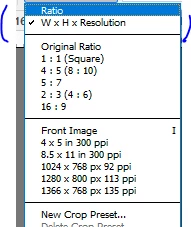
    Go to the left box in the options bar and click on the down arrow then choose "W x H resolution"

    Fill in the boxes with whatever dimensions and resolution you require

    Dave

    2 replies

    Participating Frequently
    September 25, 2021

    WHY change the interface and dumb down what was already in my menu? I set up a workflow that has saved me time processing projects. Now when I update Photoshop, it takes hours to find hidden interface changes. ALL the time I saved over the past few years is LOST to the UI being dumbed down.

    davescm
    Community Expert
    davescmCommunity ExpertCorrect answer
    Community Expert
    December 5, 2016

    In Photoshop, choose the crop tool

    Go to the left box in the options bar and click on the down arrow then choose "W x H resolution"

    Fill in the boxes with whatever dimensions and resolution you require

    Dave

    Known Participant
    December 5, 2016

    Thank you Dave!

    davescm
    Community Expert
    Community Expert
    December 5, 2016

    You're welcome

    Dave