leitedepo
Participant
December 9, 2016
Answered

How can I apply gradient overlays to individual letters?

  • December 9, 2016
  • 2 replies
  • 7240 views

I want to contain a gradient overlay within an individual letter, instead of having it affect the entire text layer.

I could make each letter their own layer, but is there a more efficient way to applying gradient overlays to letters individually?

Thanks!

This topic has been closed for replies.
Correct answer davescm

As always - there are 15 ways to do everything in Photoshop so here is an alternative

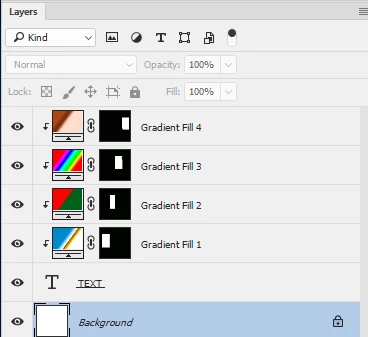
I used Gradient Fill layers - clipped to the text layer each with a Mask which was just a quick rectangular selection round the relevant letter(s).

Dave

2 replies

davescm
Community Expert
davescmCommunity ExpertCorrect answer
Community Expert
December 9, 2016

As always - there are 15 ways to do everything in Photoshop so here is an alternative

I used Gradient Fill layers - clipped to the text layer each with a Mask which was just a quick rectangular selection round the relevant letter(s).

Dave

leitedepo
leitedepoAuthor
Participant
December 10, 2016

Yay, thank you so much!

davescm
Community Expert
Community Expert
December 10, 2016

You're very welcome

Dave

Trevor.Dennis
Community Expert
Community Expert
December 9, 2016

There is a split text script her

how to - How do I break apart text in Photoshop? - Graphic Design Stack Exchange

That will break it into separate layers, so you could apply your gradients with Layer Styles.  However, I not sure if that saves you much work.  If you were to rasterize and copy the Type layer so you had as many layers as you had letters, and locked transparency, then select the first layer, drag a selection around the first letter and add a layer mask, and so on and so on.  I don't think there is a quicker way than that.