



Nick V1
Participant
January 28, 2018
Question

How do you set the button on Microsoft Surface Pen 3 to eraser tool?

  • January 28, 2018
  • 2 replies
  • 14435 views

Hello,

I have a Microsoft Surface Pro 3 pen which I am using with a Microsoft Surface Pro 4 tablet. I am using Photoshop CC (19.0 Release).

It works fine to draw with the brush tool, but by default holding down the first button changes the brush tool to the alternate/background colour, but remains on the brush tool. I want to change to the Eraser tool when I hold down the first button. How can I set up/customise the button to select the Eraser tool when it is held down.

Many thanks

Nick

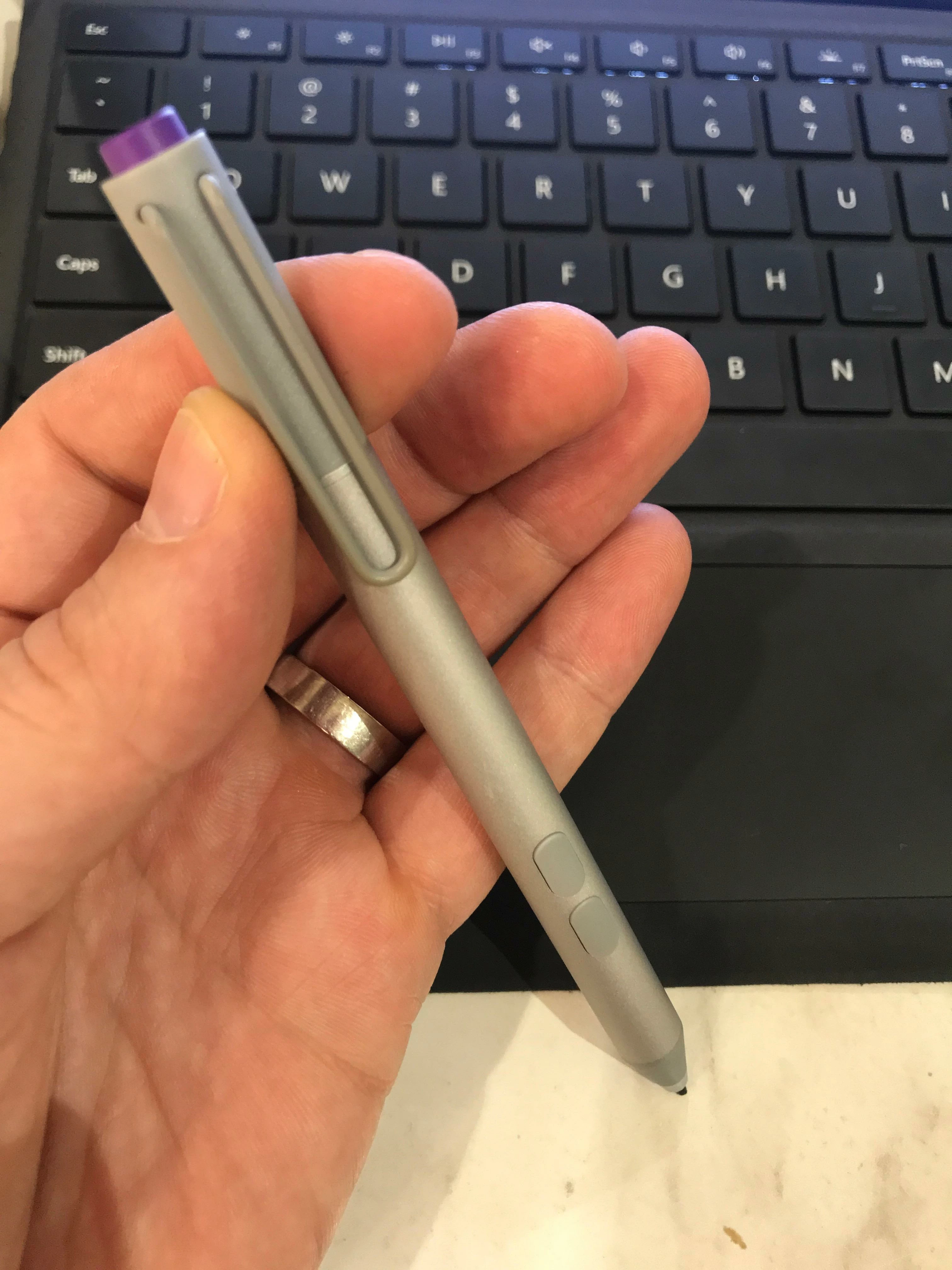
See photo of the pen below. The first button i'm referring to is the one closest to the tip of the pen. Please note, the Surface Pro 3 pens do not have an eraser function on the back of the pen - only a button.
This topic has been closed for replies.

2 replies

JJMack
Community Expert
Community Expert
January 29, 2018

The top buttom on the surface Pen is not supported like a Wacom pen eraser end. Microsoft just supports it as a button and what you can assign the button to part of Windows setting for Pen and touch.

JJMack
Nick V1
Nick V1Author
Participant
January 29, 2018

Thanks for responding. To clarify, I am trying to change the first button (closest to the writing tip of the pen) to the eraser tool.

I am not trying to reconfigure the top button at the back of the pen, or the second button... it's the one closest to the writing end of the pen I'm trying to change. Thanks again

JJMack
Community Expert
Community Expert
January 29, 2018

My bottom button is the eraser tool in Photoshop. It always has been the default.  There was an Microsoft  App called Surface the you could use to make changes to the pen but Microsoft changed the app and move many  features into settings. I do not see button setting in there  just the top button all I see is a switch on the bottom allow Apps to override shortcuts button behavior.  The thing is I in Photoshop to do that But in Windows Control panel there is a pen and touch the has check boxes for pen buttons.

The surface pro 3 Pen has two buttons and I believe then Microsoft Pen only has one.  Wacom I also believe makes a pen for surface type machine.  I believe it only supports Microsoft ink api like the surface pens.  However Microsoft also has a Wintab pen driver you can download.

JJMack
Trevor.Dennis
Community Expert
Community Expert
January 29, 2018

These two people have Surface Pros. They will get an email notification of being mentioned in this thread, and I am sure will respond if they are able to.

JJMack

Chuck Uebele

Chuck Uebele
Community Expert
Community Expert
January 29, 2018

Not sure, my wife is using it now, as her computer died.