Participant
August 23, 2017
Answered

Is there a tool to create curved arrow?

  • August 23, 2017
  • 2 replies
  • 44351 views

I'd like to create a cyclic diagram using curved arrows and text.  Not free pen or brush style as it needs to look professional (my arrows look wobbly like a young child's).  Is this tool available?

This topic has been closed for replies.
Correct answer Nancy OShea

Yes.  The Custom Shape tool.   See screenshots.  Adjust shape Fill & Stroke values to suit.
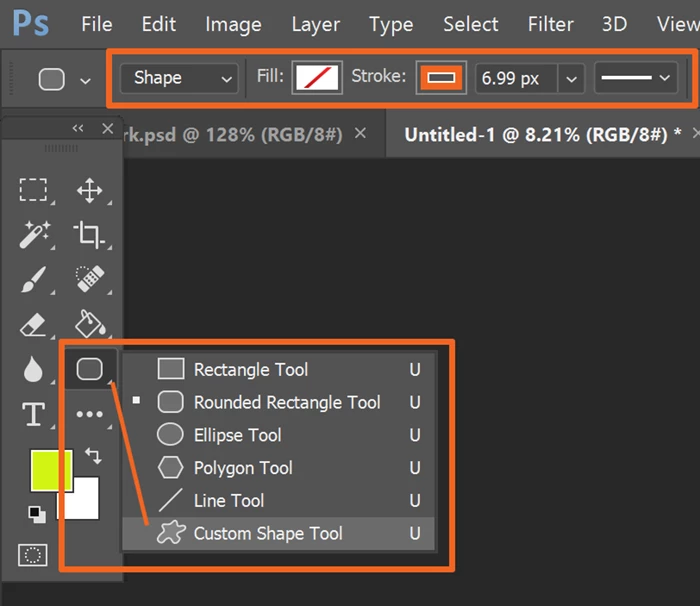
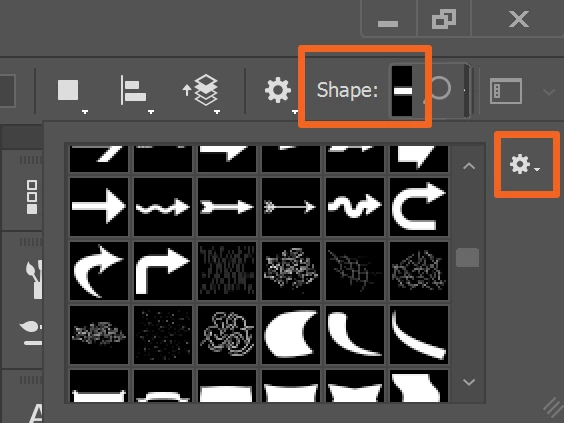
PS comes with many pre-loaded vector shapes.  If you don't see one you like, click on the GEAR icon to load more.
2 replies

Nancy OShea
Community Expert
Nancy OSheaCommunity ExpertCorrect answer
Community Expert
August 23, 2017

Yes.  The Custom Shape tool.   See screenshots.  Adjust shape Fill & Stroke values to suit.

PS comes with many pre-loaded vector shapes.  If you don't see one you like, click on the GEAR icon to load more.

Nancy O'Shea— Product User & Community Expert
Participant
August 23, 2017

Thanks for your response.  I tried these arrows but I am unable to adjust any of them to create a cyclic diagram similar to Word (Insert; SmartArt; cyclic). 

Nancy OShea
Community Expert
Community Expert
August 23, 2017

Photoshop is nothing like Word.  I'm not sure what a cyclic diagram in Word is.   But you can select the Shape path with the Path Selection Tool and then Free Transform the shape with Ctrl+T.

Nancy O'Shea— Product User & Community Expert
WILDCAT54
Inspiring
August 23, 2017

There are a number of ways this can be done.

The quickest way would be to use a brush. Here you can find a ton of them for free - https://design.tutsplus.com/articles/350-free-graphics-vector-arrow-symbols-and-shapes--vector-5210

Another way (perfered way) would be to use your pen tool (p) and draw out your arrow and making adjustments with your anchor points.

This can also be done in Illustrator and brought into photoshop.

You can also download custom shapes. Here are a few free ones - Abundant Arrow Shapes Pack | Free Photoshop Shapes at Brusheezy!

Also, incase you need some help with the pen tool if you decide to go that route - Draw with Pen tools in Photoshop

Participant
August 23, 2017

Thanks for your response.  Unfortunately, I cannot get to grips with the pen tool - I have tried many times and looks like a massive plate spaghetti endlessly producing points and curves I have no control over.  I already looked at the first tutorial you suggested with the satisfied response, and even with the second more simplistic instruction I couldn't manage it.  It may have to do with having a particular type of dyslexic brain.  I tried to more or less replicate one of the cyclic diagrams in Word (the Word model is too restrictive for my purposes). In the end I used the ellipse tool without a filler and then the free drawing brush following the rim of the circle then the clone tool to erase the lines in between then added text.  I tried to make it look 'interesting' to camouflage its wobbliness with enhanced colour and filters.  It looks fine but would rather not have to keep adapting diagrams and really I need someone to show me so I can get my head around that weird PS pen.