Participant
December 6, 2019
Question

Save for web error - Mac OS Catalina

  • December 6, 2019
  • 42 replies
  • 81316 views

Hello everyone,

I have an issue saving gif for web with my OS to Catalina (10.15.2).

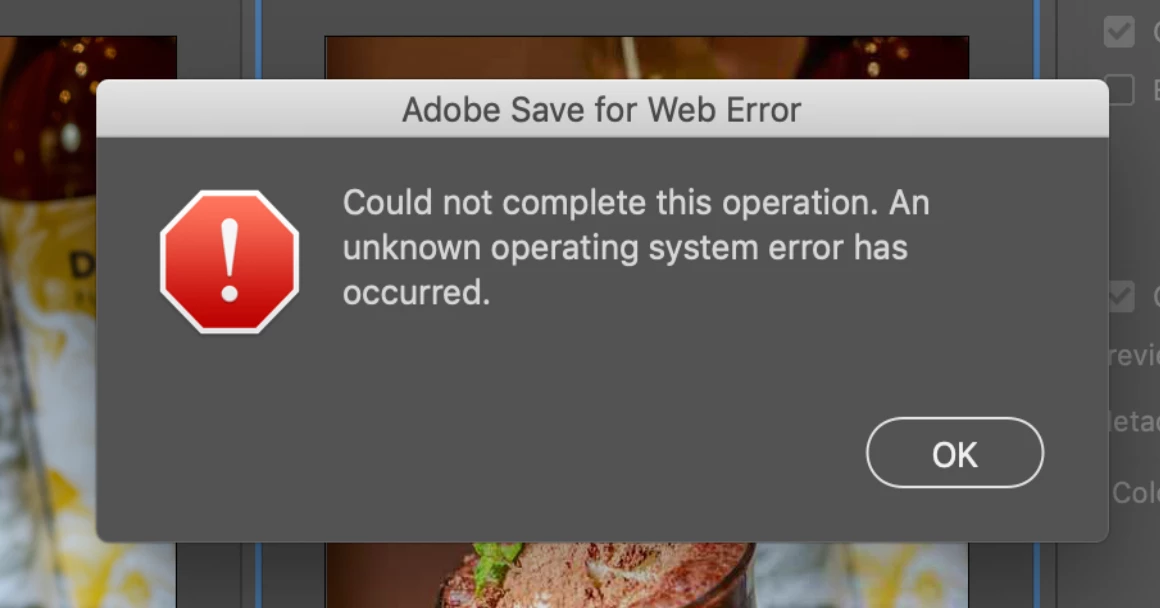
When I try to save, there's a message saying :

"Adobe save for web error. Could not complete this operation. An unknown operating system error has occured."

I tried to delete "save for web prefs.psp" but nothing has changed.


42 replies

Participant
June 10, 2020

I just recently started having this issue. So I did everything each post says but nothing worked. After hours of trying everything, I created a blank photoshop file and tried to Save For Web without doing anything and the Window popped up! Now I was curious about this and thought maybe my old file was corrupt so let me drag my images into this file. I was still able to open the Save For Web window, so I thought I solved it. I went ahead and saved the file to my computer as PSD, then I tried to do Save For Web and the same error came back. I was puzzled now. So one more thought hit me, I decided to save the file as a PSDC (Cloud Document) then try to Save For Web; and that WORKED!

So it looks like Photoshop only allows Save To Web when using Cloud Documents and I don't know why! I hope someone from Adobe can explain this, but for everyone else, I hope you all found this useful!


EDIT: Spoke too soon. What I solved was the Save For Web opening, not the actual saving of the GIF I want which I now see the error the OP had, ugh...

Participant
June 11, 2020

yes, it makes me still crazy too. it works if I just load a jpg, but when saved as psd - no way. I need that export 100 times on some day and it still is a pain! I really stick on PS, it´s the most easy tool for me.
But in the end - Affinity Photo do what it should do for just 50$ once, I think I will switch now. It doesnt have the 4 previews but when you know what you want the same shortcut works and it´s cool to get back the peace on work. 

I can not understand that this BUG is not solved. Adobe got 22k employers but maybe Photoshop isn´t important enough to fix? 

NB, colourmanagement
Community Expert
Community Expert
June 11, 2020

Beware: I found a few issues with colour management on Affinity Photo for Mac recently, for example no way to use a custom printer profile on mac. They just use the Epson driver so if Prihter Color Management doesn’t suit, you've had it. 

Another example:

If I open a CMYK test file then export as a TIFF [with "use document profile" checked] my CMYK original is automatically converted to sRGB - and that’s not only the exported file, but also my open copy in the application is sRGB now too. 

It's cheap but there's stuff missing 


I hope this helps


neil barstow, colourmanagement.net :: adobe forum volunteer

[please do not use the reply button on a message within the thread, only use the blue reply button at the top of the page, this maintains chronological order]

the-javacado
Participant
May 27, 2020

Another long-time user completely flustered. I have reset prefs, updated photoshop, updated catalina. Everything in the latest version. Still save for web doens't work. I get the same error as everyone else in this thread. I now must save-as each file, re-choosing the new save-folder, having to manually rename my saves with web-friendly names. I am doing a few hundred of these and this doubles my time. 


There are other UI quirks with save-for-web which i can't reproduce now because I can't even get the save for web modal window to show. 


Participant
May 30, 2020

This worked for me. Right-click on the layer > Export As...


Participant
May 30, 2020

yes, of course, that works. but with some dozen pics you got crazy missing the shortcuts and the pre preferences for saving the pics. with legacy web export its just 2 time hands on the keyboard, no mouse. 


I can live with that if I wouldn´t pay adobe months for months. I expect a running software, thats the business they do and they have large divisions of coder to solve such a problem. It is Photoshop and not Microsoft Paint! 

Participant
May 23, 2020

Hey guys, I've had a same issue.

Have a SOLUTION: I used  ⌥⌘S, which appears to be legacy stuff.

What to use? ⌥⇧⌘W

Works as a charm!

PECourtejoie
Community Expert
Community Expert
May 19, 2020

Hello, according to the release notes, Ps 21.1.3 fixes this very issue: https://helpx.adobe.com/photoshop/kb/fixed-issues.html#photoshop-desktop-fixed-issues 

Participant
May 19, 2020

It worked for me. After months, I'm back to exporting web files ... just in time to teach my class next week.

Participant
April 20, 2020

dont save file directly, click on preview (bottom left) it will open the file in safari, download from there!

valeuthi
Participant
April 13, 2020

Para quem ainda não conseguiu resolver o problema, eu consegui resolver no meu mac dessa forma.


Participant
April 2, 2020

I have the updated version and am still experiencing this problem. After being frustrated and trying everything to fix it on photoshop I FINALLY got something to work. So what worked for me was going to my render settings in after effects and changing my format to "PNG sequence" and channels to "RGB+Alpha" (for transparent backgrounds) then under my save settings when I export I click the check to save in subfolder and named it (because its gonna be a bunch of still image files and you don't want those floating around everywhere) then when I open it in photoshop I just selected one of the still image files and the checkbox for "image sequence" which open it up like normal in photoshop with a timeline. After that my export -> save for web settings worked like normal and I was able to export it as a gif without the error pop up. 


hopefully, this works for everyone else here too but I almost cried tears of joy when I figured this out, maybe photoshop was having trouble because it was previously a video file idk


sash13
Participating Frequently
February 8, 2020

Yes! Yes! Yes!

Worked! 

Im UPDATED to Adobe Photoshop CC 2020

21.0.3 Release! 

And it's worked! Save as for Web (Legacy)!

YES! 

Thank you Adobe team!

no erors  - everythink is great!


Mac Os Catalina 10.15.3 (19D76)

Mohit Goyal
Community Manager
Community Manager
February 10, 2020

Awesome, thanks for the update!


Thanks,

Mohit

laurenwolff
Participant
February 3, 2020

This works now with the new PS 2020.

Yardmax
Known Participant
February 3, 2020

No, it does not. Please read the thread. 

jak100
Participant
February 3, 2020

So what's the point of Export As a GIF? Unless I've missed something

Yardmax
Known Participant
January 30, 2020

The only correct answer to this is that there IS no fix. Adobe started phasing out the Save For Web feature a while ago – it's in legacy versions now. Everything is shifting to Export As... It's not nearly as elegant (and mine seems really slow, after trying to get Save For Web working for 2 days with every possible thing checked and tried), but it works. I just have to get used to doing Command + Option + Shift + W instead of "S". It works, but like I said, it's not as elegant and takes some getting used to. It's Export As from now on, folks! 

Participant
January 31, 2020

Thank you so much! I guess you are right. It is Export As moving forward. Not sure why, but I missed Save for Web...