
Harsh Gogia
Participant
August 1, 2021
Answered

Type Tool Error - Weird Space Below Text

  • August 1, 2021
  • 2 replies
  • 658 views

hello everyone,

there seems to be a problem in the type tool. There is a weird space below the text and I cannot fix it by changing line height or whatever. Cannot even select due to this problem,


Tried resettings preferences but nothing seems to work. pls help

This topic has been closed for replies.
Correct answer c.pfaffenbichler

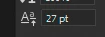
Try changing the Baseline Shift from 27pt to 0pt. 
2 replies

c.pfaffenbichler
Community Expert
Community Expert
August 2, 2021

Could you please post a meaningful screenshot with the pertinent Panels (Toolbar, Layers, Character, Paragraph, Options Bar, …) visible? 

Harsh Gogia
Participant
August 6, 2021

Please have a look at it, i'm getting space below, there is no superscript on, and I'm also not able to select anything, whenever i select 2nd line, it selects first one due to this error. 

I have tried text anti aliasing and everything

c.pfaffenbichler
Community Expert
c.pfaffenbichlerCommunity ExpertCorrect answer
Community Expert
August 6, 2021

Try changing the Baseline Shift from 27pt to 0pt. 

jane-e
Community Expert
Community Expert
August 2, 2021

Hi

If it's not the Leading in the Character panel, then check the Space Above and Below in the Paragraph panel. Leading is a character setting, so if one character is a different size, it affects the entire line. This includes a space and the pilcrow at the end. Select the entire paragraph and check the leading again.


It might also be set to superscript.


If you don't see it, show your Character and Paragraph panels with the text selected.


~ Jane


jane-e
Community Expert
Community Expert
August 2, 2021


The more I think about where the black square is, it's either superscript or a baseline shift.

~ Jane
