- Home
- Photoshop Elements
- Discussions
- Photoshop Elements 2022 is now available
- Photoshop Elements 2022 is now available
Photoshop Elements 2022 is now available


Copy link to clipboard
Copied
We are happy to announce the release of Photoshop Elements 2022!

This upgrade includes several new features such as:
- Instantly turn photos into art.
- Create not-so-still photos.
- Warp photos to fit any shape.
- Add motion to your static image and many more. Check out the What's new page
To buy or upgrade Photoshop Elements to 2022, click here
For getting started or any other help, refer to the Learn & Support page


 34
Replies
34
34
Replies
34




Copy link to clipboard
Copied
. . . and you can download a free trial of Elements 2022 here.

Copy link to clipboard
Copied
Hi I just bought Elements 2021 about a week ago (30 september). If I had known about this release I would have waited a week. Just doesn't feel right to buy a product that is old after one week and I'd rather have te latest version. Tried to find support by phone, but no luck yet. Can you help me with this? Thanks
Copy link to clipboard
Copied
Here is a list of phone numbers for Adobe Support: https://helpx.adobe.com/contact/phone.html.
You should definitely contact Adobe. In the past, Adobe has had a policy of upgrading those who make a purchase within 30 days (I think) of a new release. I don't know whether that policy still exists but it is likely that you will receive some help.
Copy link to clipboard
Copied

Copy link to clipboard
Copied
Sooooo, this new version being released yesterday is why my (legally purchased from a brick-and-mortar office supply store, properly installed and registered, previously working fine for months) version gave me a, "this product must be activated" message this morning? And why, upon correctly typing in my correct serial number gave me a, "the serial number you have entered is invalid" error? And then, upon attempting to contact Adobe to try and rectify this issue, I found that both phone and chat support functions are (currently?) non-existent, and that user forums are my only option for help?
Seriously?
Copy link to clipboard
Copied
Okay, since I can't go back and edit my original comment, here's an update: after 5 1/2 hours of un-installing, re-installing, cussing, getting "error 16" literally 7 times, dumping all my caches and temporary files while restarting my laptop a handful of times, I can now run my 2021 Photoshop Elements. I have to run it as Administrator, and I have have no idea if this will last past the next time it asks me to check for updates, but...we'll see.
Copy link to clipboard
Copied
@defaultjnmyezgjvw0e, please report back what happens.

Copy link to clipboard
Copied
Does PSE 2022 work with Apple M1 chip?
PSE 2021 Organizer simply won't work on my Mac Mini with M1.
Copy link to clipboard
Copied
@Old Tom Moore - apparently not. See this post by an Adobe employee.

Copy link to clipboard
Copied
I JUST DOWNLOAD PHOTOSHOP ELEMENTS 2022, AND I USE CROPPING TOOL ON EXPERT (RAW FILE) IS NOT EASY TO USE AS PREVIOUS.
IF ANYONE FIND A WAY PLEASE LET ME KNOW.

Copy link to clipboard
Copied
Nothing has changed in the usability of the cropping tool for years, It's been unchanged for quite some time.
Copy link to clipboard
Copied
I downloaded photoshop elements 2022 along with Premier but when I try to open the download to install, I keep getting the message to reinstall the installer (damaged). I have repeated tried to install creative cloud which also downloads but does not seem to install properly. Whole thing is useless until I can solve this please!

Copy link to clipboard
Copied
I bought Elements 2022 but received no serial number.
After installing it it asked for my serial and I figured maybe it was looking for my past 2021 version to prove I owned it since I bought as an upgrade. Once I put the old serial number it, my install reverted to 2021 instead of 2022.
I have an art show I'm printing for this weekend, now I'm stuck
HELP!!!
Copy link to clipboard
Copied
@RuthCT, this is a user to user forum. We can't help you with missing serial numbers. You need to contact Elements support. You can start a chat session by clicking on the blue Contact Us button under the Support menu at Adobe.com. Or you can contact Support by telephone using the numbers listed here: https://helpx.adobe.com/contact/phone.html.
Copy link to clipboard
Copied
@garyleelane, try using a different browser for the download. Otherwise, contact Adobe support. (See my last post in this thread.)

Copy link to clipboard
Copied
Copy link to clipboard
Copied
I uninstalled and switched to the photo package and am using Photoshop again.

Copy link to clipboard
Copied
Has PE2022 been tested with MontereyOS? PE2021 won't run with MontereyOS. Frustrating!!!

Copy link to clipboard
Copied
Hi, I purchased and installed PE2022 a couple of weeks ago, the program looks great when running, just that it takes around 5 minutes to load. I can’t find any other mentions of this in your support section or on the forums. I have no issues with any other software, and to be honest, have never seen a program run like this before. Any ideas please?

Copy link to clipboard
Copied
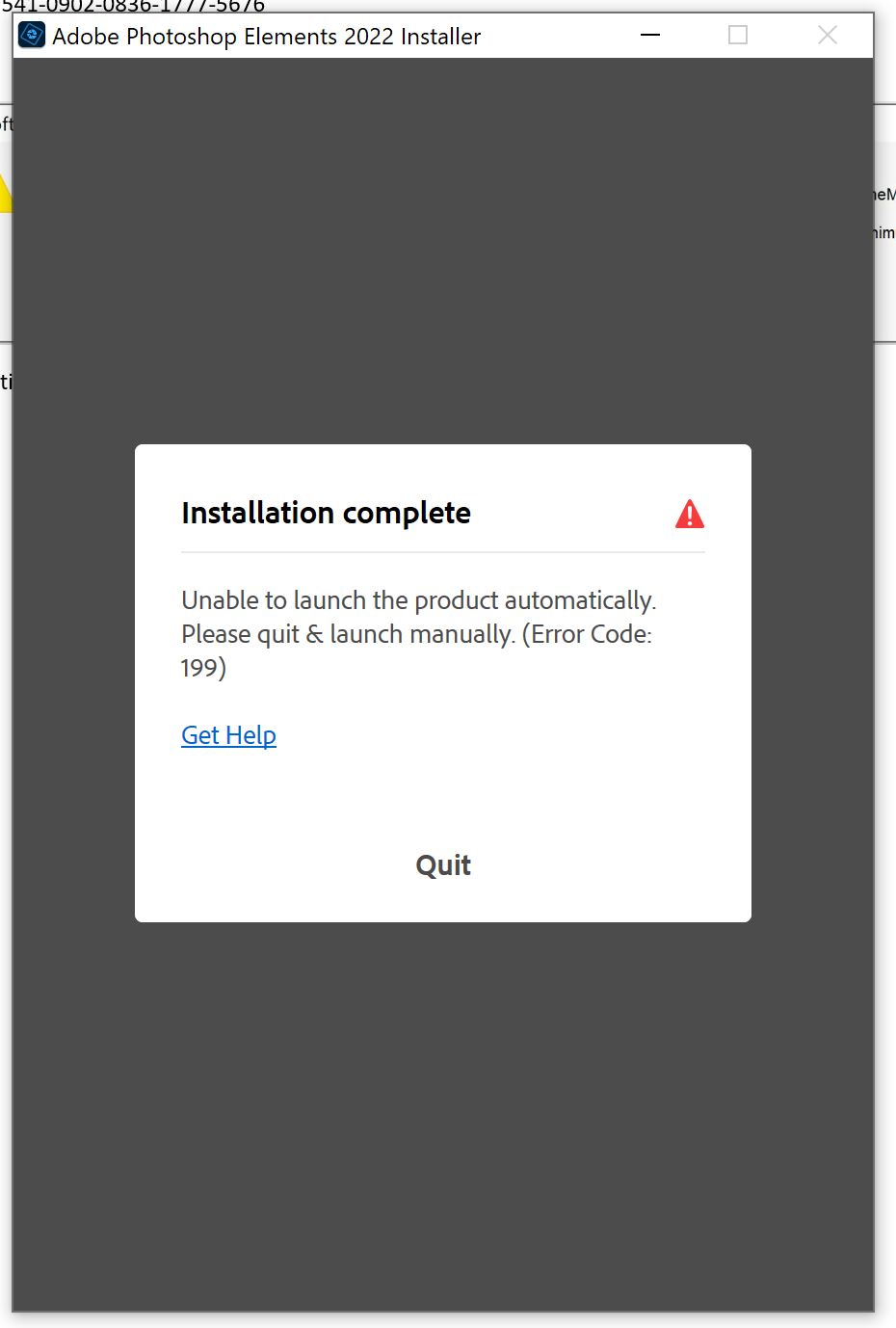
Unable to install Photo Elements 2022. Error msg 199. System Windows 10 Pro 64-bit (all critical updwates current),CPU Intel Core i7 9750H RAM 16.0GB Dual-Channel. Previously installed Elements PSE 14 and PSE 2020. After purchasing and initially attempting to install PSE 2022 without success, have uninstalled previous installed version (2020) using Adobe uninstall & Revo Uninstaller Pro. Removed traces in Registry software. Still receive same error. Screenshots and Install.log attached. Help!

Copy link to clipboard
Copied
Adobe should be patching Elements 2022 to support macOS12/Monterey asap. The support only says:
"We do not have such information yet to share. it might be officially compatible in the future release."
How long can it take? Monterey was previewed in the summer and Adobe has probably had access to code way longer.

Copy link to clipboard
Copied
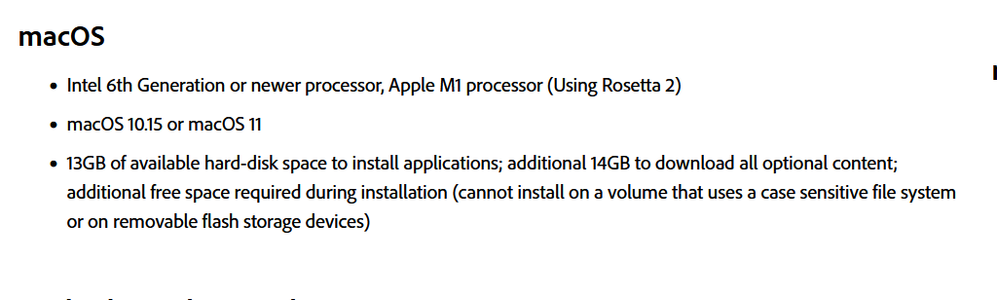
Just found PSE2022 in the Apple App Store here in Germany. Looks like it will work with Monterey: "macOS 10.15 or later".
For me this says in other words: incl. Monterey. Am I right?
Copy link to clipboard
Copied
@Randolph II, I don't know whether you are right or not. But that is certaintly different than the System Requirements on the Adobe website:
Copy link to clipboard
Copied
That is why I am wondering. PSE2022 was not avaiable in the app store in recent weeks. may be a fixed version? I don't know either.

-
- 1
- 2

Get ready! An upgraded Adobe Community experience is coming in January.
Learn more
 AdChoices