Exit
  • Global community
    • Language:
      • Deutsch
      • English
      • Español
      • Français
      • Português
  • 日本語コミュニティ
  • 한국 커뮤니티
0

Scanner in PE2018

New Here ,
Jun 18, 2018 Jun 18, 2018

I am using the PE2018 trial version. The only option I have to import from my scanner is WIA. It is not allowing me to use my Epson scanner software to adjust the photos prescan. I was able to do this using PE12. Any help would be much appreciated.


797
Translate
Report
Community guidelines
Be kind and respectful, give credit to the original source of content, and search for duplicates before posting. Learn more
community guidelines
Community Expert ,
Jun 18, 2018 Jun 18, 2018

Which Epson scanner do you have?

It could be that your scanner software only has a plugin for 32 bit photoshop elements, which is what pse 12 is.

Pse 2018 is 64 bit.

Translate
Report
Community guidelines
Be kind and respectful, give credit to the original source of content, and search for duplicates before posting. Learn more
community guidelines
New Here ,
Jun 19, 2018 Jun 19, 2018

WorkForce WF-3640

Translate
Report
Community guidelines
Be kind and respectful, give credit to the original source of content, and search for duplicates before posting. Learn more
community guidelines
Adobe Employee ,
Jun 19, 2018 Jun 19, 2018

Hello,

Could you please tell me the model of the scanner that you're using? Also, do you get any error message when you click on File → Import → WIA Support?

Thanks,

Medha

Translate
Report
Community guidelines
Be kind and respectful, give credit to the original source of content, and search for duplicates before posting. Learn more
community guidelines
New Here ,
Jun 19, 2018 Jun 19, 2018

There is no error message.

Translate
Report
Community guidelines
Be kind and respectful, give credit to the original source of content, and search for duplicates before posting. Learn more
community guidelines
New Here ,
Jun 19, 2018 Jun 19, 2018

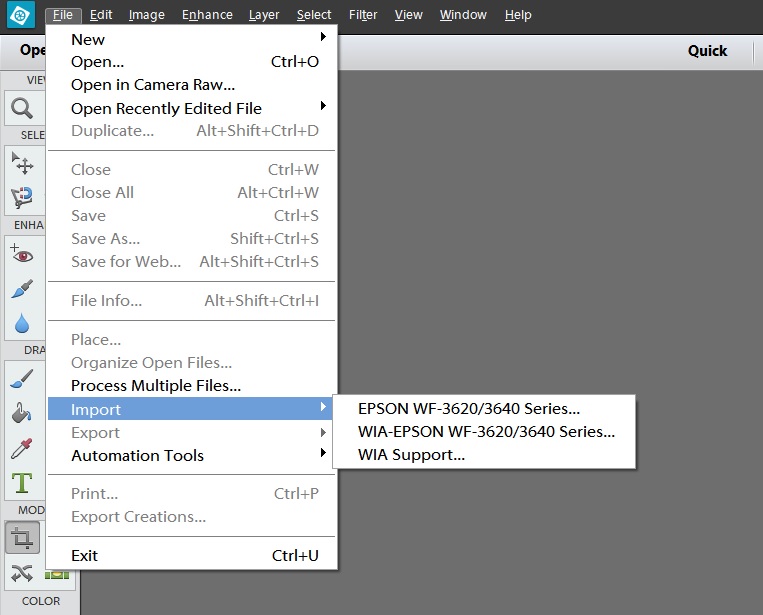
This is what I see when I click on File - Import
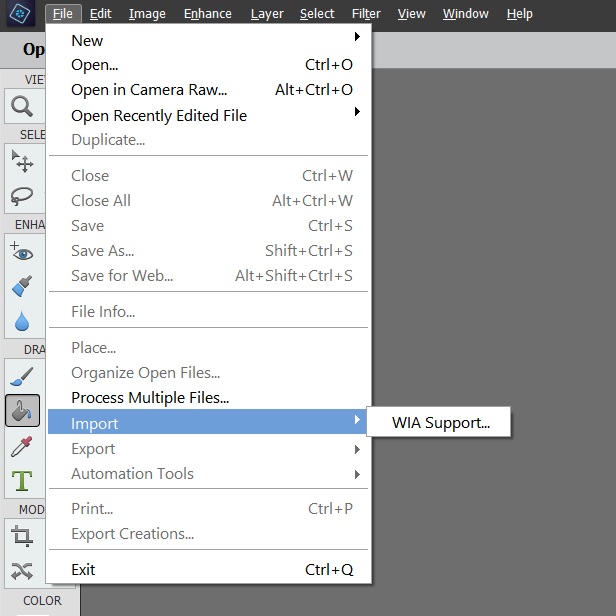
pe2018.jpg

and this is what I see using PEE12

PE12.jpg

Translate
Report
Community guidelines
Be kind and respectful, give credit to the original source of content, and search for duplicates before posting. Learn more
community guidelines
Community Expert ,
Jun 19, 2018 Jun 19, 2018

As far as i can tell, epson uses twain for the scan plugin and windows only supports twain with 32 bit programs like pse 12 and not 64 bit programs like pse 2018, so that's why your scanner is only showing under WIA in pse 2018.

Translate
Report
Community guidelines
Be kind and respectful, give credit to the original source of content, and search for duplicates before posting. Learn more
community guidelines
Adobe Employee ,
Jun 25, 2018 Jun 25, 2018

Thanks for attaching the screenshots, Karen.

The newer versions of PSE no longer list the individual scanners separately under the import option. Upon clicking on File Import WIA Support, a dialog box listing the scanner would open. After making the necessary adjustments in the dialog box, you can use the scanner.

Thanks,

Medha

Translate
Report
Community guidelines
Be kind and respectful, give credit to the original source of content, and search for duplicates before posting. Learn more
community guidelines
New Here ,
Mar 25, 2022 Mar 25, 2022
LATEST

Cannon MG3022 printer & scanner.  No problem printing. Get error message that WIA does support this scanner.

Translate
Report
Community guidelines
Be kind and respectful, give credit to the original source of content, and search for duplicates before posting. Learn more
community guidelines
New Here ,
Mar 25, 2022 Mar 25, 2022

I have Elements 2022, with windows 11.  It worked for a while, and not will not recognize scanner.

Translate
Report
Community guidelines
Be kind and respectful, give credit to the original source of content, and search for duplicates before posting. Learn more
community guidelines