
3D Extruding Roundness
I keep having the issue of my objects looking perfectly fine and then when I go to "3D Extrusion" and pop out my design, it rounds edges and straight lines sometimes get rounded off and corners get rounded instead of being a hard edge. I'm not sure if there are settings I can change to make an EXACT extrusion of my piece rather than it auto tweaking edges and corners etc. I've went through all the settings I can imagine and about to lose hope with Photoshop 3D. PLEASE HELP!!!
In the attached picture, I show an example of what it's doing to a LOT of my items. Also you will notice that when I leave the little floating rectangle above the letter, it extrudes PERFECTLY how I want it. However I don't want the rectangle above the L so I erased it pre-extrusion and then it decides to round off the edge. Thanks for any help on this.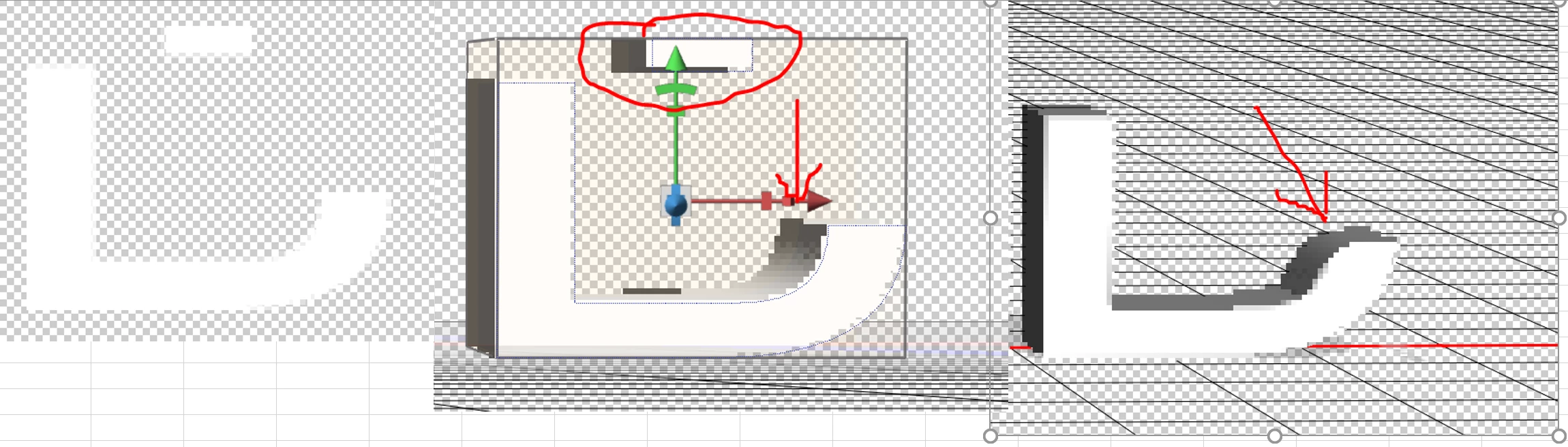
 AdChoices