
Participating Frequently
May 3, 2017
Answered

4k screen scaling has gone madly small

  • May 3, 2017
  • 2 replies
  • 2415 views

I updated to Photoshop CC 2017.1.1 this morning. (Windows 10)

I have a 4K laptop and suddenly all the Photoshop menus, icons and buttons have shrunk to a tiny unreadable size.  (All my other windows applications are fine)

It's like it's become suddenly unaware of the Windows 10 scaling settings.  It used to be OK but now it looks like how very old applications look when I run them on a 4k screen.


Can I change a setting somewhere in PS?  Is this a new bug?

Help! I can't see my photoshop menus properly!
    This topic has been closed for replies.
    Correct answer Trevor.Dennis

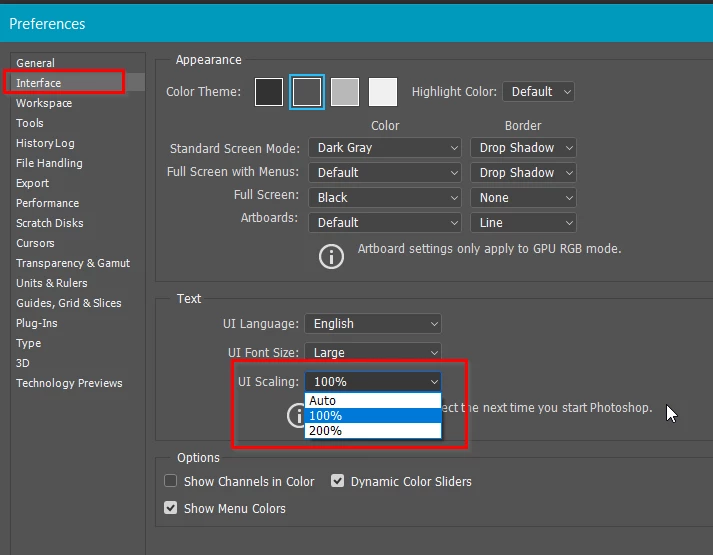
    Do you have UI scaling set to Auto?  If yes, set to 200%  If it is already set to 200%, then there might be a problem, but yours is the first post I have seen about it since 2017.1.1

    2 replies

    Trevor.Dennis
    Community Expert
    Trevor.DennisCommunity ExpertCorrect answer
    Community Expert
    May 3, 2017

    Do you have UI scaling set to Auto?  If yes, set to 200%  If it is already set to 200%, then there might be a problem, but yours is the first post I have seen about it since 2017.1.1

    jbm007
    Community Expert
    Community Expert
    May 3, 2017

    "Auto" will default to 200% scaling on 4K monitors.

    Windows Creator build is supposed to help applications that do not scale properly.

    have not tried it yet.

    Been my biggest beef about PS the UI scaling just sucks.

    Inspiring
    May 3, 2017

    Preferences > Experimental features > Scale UI 200%.......