
Known Participant
October 22, 2020
Answered

Aargh! Photoshop 2020, 2021 & 2022 closes when I try and open ANY file

  • October 22, 2020
  • 3 replies
  • 9924 views

I have installed Photoshop 2021 and also have 2020 installed via Creative Cloud. Although it is not on my Windows 10 'open menu,' 2022 is available from the CC  Desktop.

Anyway, prior to 21/10/2020, Photoshop 2020 was running fine.

Having now installed 2021 and 2022, the programs open, but when I try and open ANY file type, it simply shuts down without giving any error or warning message.

Basically, I cannot open or edit any file.

I can create a new file, but even then when I try and open a previously saved file, it still crashes with no warning message(s.)

I can also save, open and re-edit the file I crteated within Photoshop, but when I attempt to open another previsoulsy saved file, it crashes.

I have turned off Graphics Card Accelaration in Preferences and have updated to the latest Nvidia Graphics driver, so none of these suggestion were any good for me.

I'm forking out £120 a year for this and lightroom and expect it to simply work.

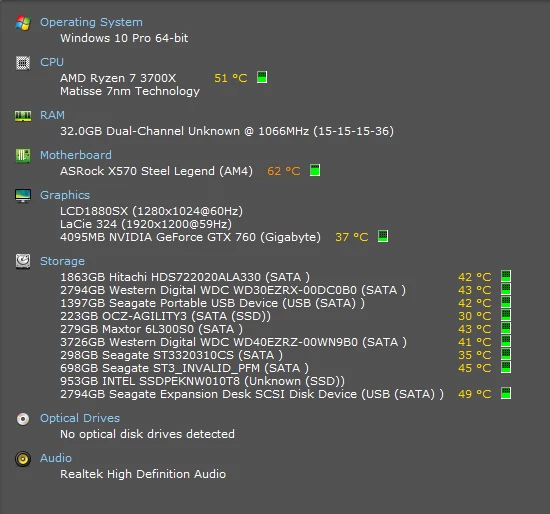
Below are the specs of my system, so it is more than capable of running this program.
********************HELP*************************
This topic has been closed for replies.
Correct answer

Hi

Adobe have basically rendered GPU's older than 4 years useless with this update and I'm afraid your GPU was released in 2014

You can see the GPU FAQ here

https://helpx.adobe.com/photoshop/kb/photoshop-cc-gpu-card-faq.html

Unsupported graphics cards
If your graphics card is older than 4 years, GPU functionality in Photoshop may be limited or not supported.

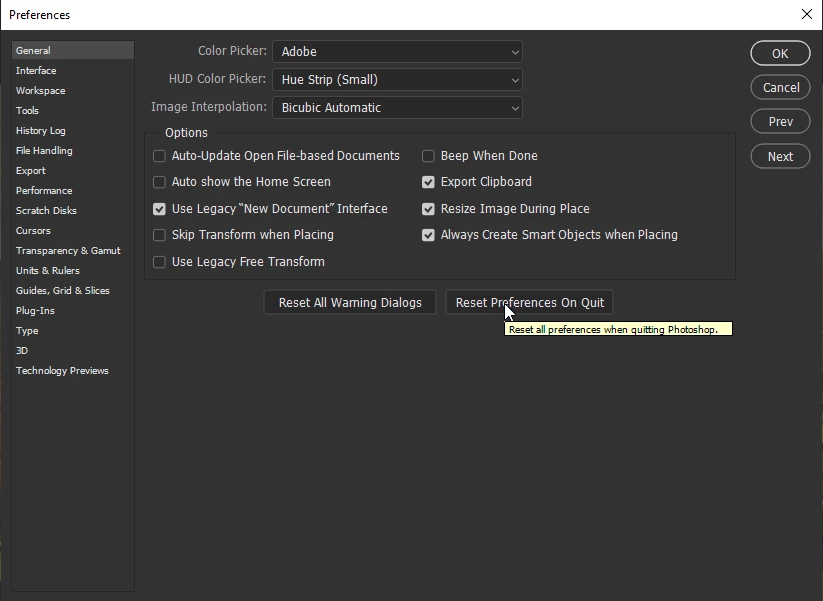
You could try resetting your PS preferences


3 replies

ffff4444
Participant
June 4, 2021

Any update from Adobe?

Are you guys going to fix this problem?

Participant
November 12, 2020
Same issue here.
You can disable the GPU, to prevent the crashes. I went back to Photoshop 2020…
My graphics card: Nvidia Quadro 2000
Participant
November 19, 2020

I installed Photoshop 2021 and also the recent update and I can only open PSDs, PNGs and PDFs in Photoshop.  When I open RAW files, or JPGs or TIFs, Photoshop crashes.  I also do have the Nvidia Quadro K2000, and updated the driver and nothing has changed.  I have used all the workaround and fixes I was supposed to try according to Adobe.  I tried going back and reinstalling (several times) Photoshop 2020 and now that crashes too.  I disabled the GPU several times and nothing changes.  Cache settings are good.  I only get the crash report box and that's it.  I reset all my preferences.  I did it all and nothing changes.  Everything worked until I tried to upgrade!  Won't be in a hurry to do that ever again!  


So does anyone have any other suggestions?  Desperate to get back to work!  

D Fosse
Community Expert
Community Expert
November 19, 2020

You have to disable GPU in Camera Raw preferences. Not main Photoshop. That's where your GPU crashes.


The default is to let ACR open jpegs and TIFFs "with settings", as the wording is in ACR preferences. What this means is that jpegs and TIFFs that already have ACR metadata will continue to open through ACR.


And your ACR is crashing in the GPU.


You can set ACR preferences to disable jpeg and TIFF support. That will also bypass the problem. But it will not solve it.


The Quadro K- series 2000 may be too old. The newer P-series works well (I have a P2000 in one machine and a P600 in another).

Correct answer
October 22, 2020

Hi

Adobe have basically rendered GPU's older than 4 years useless with this update and I'm afraid your GPU was released in 2014

You can see the GPU FAQ here

https://helpx.adobe.com/photoshop/kb/photoshop-cc-gpu-card-faq.html

Unsupported graphics cards
If your graphics card is older than 4 years, GPU functionality in Photoshop may be limited or not supported.

You could try resetting your PS preferences


Known Participant
October 22, 2020

Hi Greg.


As I mentioned in my original post, I have re-set both Photoshop 2020 & 2021 so that neither version uses the Graphics processor, and they still cannot open any files


The program merely shuts down with no warning message(s).


I realise that Adobe want to get the best out of the software, but does this mean that when every every Graphics Card reaches it's 4 year 'expiry' date, it can no longer be used in Photoshop?


Talk about creating a mountain of waste instead of trying to ensure legacy support in the code.


They are simply suggesting that everyone with a perfectly functioning graphics card that was released pre October 2016 should now throw it away and spend undereds of pounds or dollars buying a new graphis card which they may need to again replace in 4 years time.


What idiot came up with this suggestion as a working policy?


I am waiting on delivery of Luminar AI to arrive and if this can do what Photoshop does for me, then it might be time to think of getting an alternative to Lightroom (which interestingly enough still allows basic graphics accelaration with my card,) and moving on from Adobe.


Dominic

Known Participant
October 22, 2020

Sorry, this is not the correct answer even although I have accidentally marked it as such.