
smithcgl9043167
Inspiring
November 28, 2017
Question

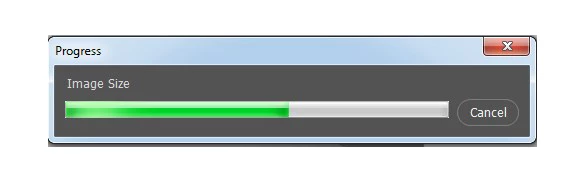
Abort the default Photoshop progress bar
  • November 28, 2017
  • 2 replies
  • 1638 views

Hello everyone! Is there any way to abort or hide this "standard progress bar" when exporting high-quality prints through scripts?

I added a custom progress bar to my script that took too long but I sometimes realize that the two palettes are shown at the same time? It would be possible?

That's the palette I'm using! If someone has another functional model I am very grateful

myPrs = new Window('palette', 'Batch Processing');

     myPrs.orientation = 'column';

     myPrs.alignment = 'right';

     myPrs.ProcessHead  = myPrs.add('statictext',[40,0,260,25], "Batch Processing...");

     myPrs.Process = myPrs.add("progressbar",[40,40,260,65]);

     myPrs.Label = myPrs.add('statictext', [150,75,200,120], "0%");

     myPrs.Process.value = 0;

     var LENGTH = 4;

     myPrs.show();

     for(i=0;i<1;i++){

         var PrCounter = 0;

        ProgressBar(++PrCounter, i+1 , 1);

         Function1();

     }


     function ProgressBar(v, x, y){

         var value = (Number(v) / LENGTH) * 100;

         myPrs.Label.text = Math.round(value) + " % ";

         myPrs.ProcessHead.text = "Batch Processing... [" + x + "/"+ y + "]";

         myPrs.Process.value = value;

     }


      function Function1(){

      // my code

     }

This topic has been closed for replies.

2 replies

Jarda Bereza
Inspiring
November 28, 2017

reply to removed(?) comment:

Hmm scripting native progressbar could override progressbar bundled with certain action. I didn't tested it but it would make sense.

Yes these scripts are mine. What is your request?

smithcgl9043167
Inspiring
November 28, 2017

Jarda Bereza First of all, I want to congratulate you on your beautiful work, and second on thanking you for sharing it with us. As regards my request:

In my workflow I do not work with system fonts. I usually saved all my installed fonts to all adobe programs at:

C / Program Files / Common Files / Adobe / Fonts /

You could do a little modification on "" Advanced Font Remapping v1.0.jsx "list only the sources of this directory: C / Program Files / Common Files / Adobe / Fonts /

That way, only my work sources will be included in the list.

Could you make this change for me? Thank you

As for progress bar:

I have not been able to do what you suggested because I am still an apprentice for scriptting and my level of knowledge does not allow me to do so. If you have a practical example and can have it, I will be eternally grateful!

Jarda Bereza
Inspiring
November 29, 2017

smithcgl9043167​ How works this folder? Are fonts placed here automaticaly available in Photoshop?

Jarda Bereza
Inspiring
November 28, 2017

I have native progressbar here: Magic scripts for Photoshop (Delete all empty layers faster)

Anyway since version 1.1 it's too fast and I almost never see progress bar but it should be here and should be cancelable.

I don't rememeber excatly but progressbar may return true/false value. And you will store this value in variable. And in "for loop" you are checking if true/false and if so, you will break loop with break keyword.

Problem with native progressbar is that it will not let you do some kind of actions like transform.

smithcgl9043167
Inspiring
November 28, 2017

Hi Jarda Bereza what I need in fact is to hide or delete the native progress bar! thus displaying only my custom bar progress palette!

I love these scripts "Magic scripts for PS" mainly the " Advanced Font Remapping v1.0.jsx" Were they all written by you? If the answer is yes, I would like to ask a question:

Have you listed the directory for System fonts? C:\Windows\Fonts