
Answered
Hi Working with customer's photo to create canvas I am always creating extra background to centralise the images. Often this involves copying and pasting similar areas to create an extra background. Is there an Action that could help me do this? Best wishes Josh
This topic has been closed for replies.
You could record your own!
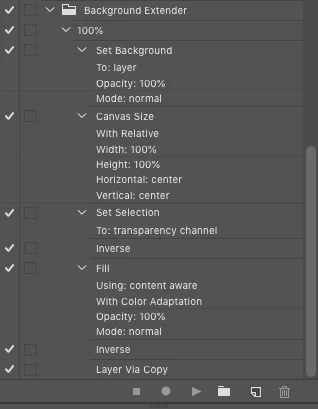
It could be as simple as promoting a Background layer to a "proper" layer, then expanding the canvas, then loading transparency as a selection, inverting the selection and content-aware fill as a start, before possibly more extensive work.

Or it could be much harder than that, depending on the image and other unknown factors...
There are actions or scripts available for extending a background to create a wrap around stretched canvas frame print, however, I don't believe that is your request.
https://www.teckelworks.com/2016/01/canvas-gallery-wrap-script-version-2/
Sign up
Already have an account? Login
To post, reply, or follow discussions, please sign in with your Adobe ID.
Sign inSign in to Adobe Community
To post, reply, or follow discussions, please sign in with your Adobe ID.
Sign inEnter your E-mail address. We'll send you an e-mail with instructions to reset your password.
