I started writing scripts a little over a year ago when I did not find a programmer to solve a specific problem, so maybe my experience will come in handy (I apologize in advance - I use a translator to write all this, so some wording may be incorrect).
For most tasks, three things are enough to write Action Manager code: to know the names of all top-level objects, to have at hand a set of functions for each type of objects from the Photoshop JavaScript Reference Guide ADOBE PHOTOSHOP SCRIPTING, to have an installed script listener plugin to see examples of performing operations on objects.
Names of top-level objects: application, document, layer, channel, path, historyState (snapshotClass), action, actionSet
For all these objects (except for the actionSet), we can get the descriptor of the active object using ActionReference (this is something like the path to the desired object) in the same way (only the class name in the first argument changes):
var r = new ActionReference ();
r.putEnumerated (stringIDToTypeID ("document"), stringIDToTypeID ("ordinal"), stringIDToTypeID ("targetEnum"));
var d = executeActionGet (r);
In this case, the descriptor d stores all the properties of the object. Open the Photoshop JavaScript Reference Guide and see what we can do with this object (without knowing anything about it).
For example, we can get property keys in a simple loop:

var str = '';
for (var i = 0; i < d.count; i++)
{ str += typeIDToStringID(d.getKey(i)) + '\n' }
alert(str)
(we can, of course, use ready-made scripts to get the properties of objects (or write yourself), but for a step-by-step example it will be more clear)
We can find the type of each property (and, accordingly, what function we need to use to get this property from the descriptor):

var str = ''
for (var i = 0; i < d.count; i++)
{ str += typeIDToStringID(d.getKey(i)) + ':' + d.getType(d.getKey(i)) + '\n' }
alert(str)
Further, knowing the name and type of the property, we can get its value using one of the functions from the Photoshop JavaScript Reference Guide.
For example, we need to get the number and sizes of artboards. We do not know exactly where they are stored, so we open the document, create the artboard, get the document descriptor and look for something related to artboard there:
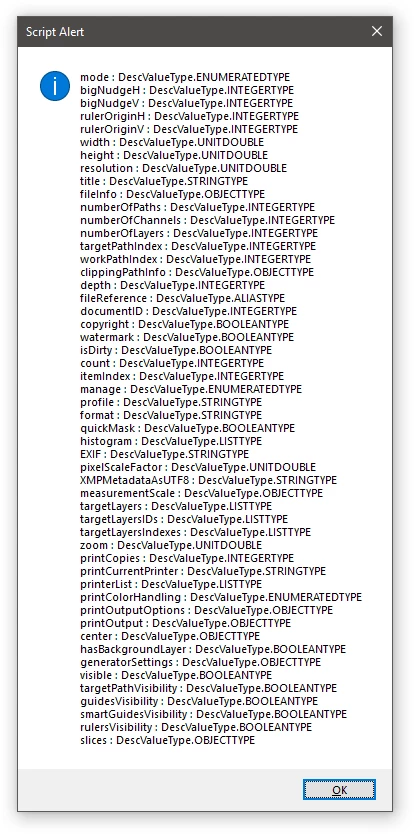
Nothing of the kind. We get the descriptor of the active layer:
var r = new ActionReference();
r.putEnumerated(stringIDToTypeID("layer"), stringIDToTypeID("ordinal"), stringIDToTypeID("targetEnum"));
var d = executeActionGet(r);

var str = '';
for (var i = 0; i < d.count; i++)
{ str += typeIDToStringID(d.getKey(i)) + ':' + d.getType(d.getKey(i)) + '\n' }
alert(str)
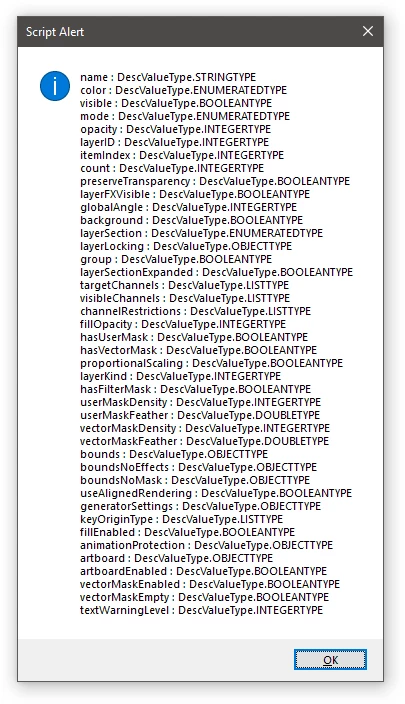
We see the artboard property, which is of type OBJECTTYPE. We find the function to get the object from the descriptor:

So, we change our function to get this object:
var r = new ActionReference();
r.putEnumerated(stringIDToTypeID("layer"), stringIDToTypeID("ordinal"), stringIDToTypeID("targetEnum"));
var d = executeActionGet(r).getObjectValue(stringIDToTypeID("artboard"));
Since it will return an object to us (another ActionDescriptor), we can again get its properties in the same way:
var str = '';
for (var i = 0; i < d.count; i++)
{ str += typeIDToStringID(d.getKey(i)) + ':' + d.getType(d.getKey(i)) + '\n' }
alert(str)
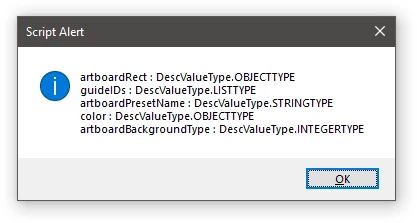
We see artboardRect which again has the OBJECTTYPE type, we again change our function:
var r = new ActionReference();
r.putEnumerated(stringIDToTypeID("layer"), stringIDToTypeID("ordinal"), stringIDToTypeID("targetEnum"));
var d = executeActionGet(r).getObjectValue(stringIDToTypeID("artboard")).getObjectValue(stringIDToTypeID("artboardRect"));
and get the properties of the object:
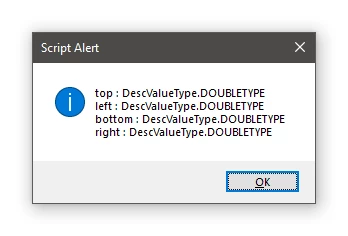
Here it is! Since there are only 4 values, we can not bother with receiving each by name, but by index:
var top = d.getDouble(d.getKey(0)),
    left = d.getDouble(d.getKey(1)),
    bottom = d.getDouble(d.getKey(2)),
    right = d.getDouble(d.getKey(3));
Now we need to think about how to get all artboards from the document. We return to a couple of levels above to obtain the properties of the layer and see what can be found useful. We remember, all that we see, switch to the usual layer and get the properties again. We see that the set of properties is different. We assume that you can use the "arboard" property which the normal layer does not have in order to understand - we have before us a regular layer or arboard. This can be done using the .hasKey function, that is, if:
var r = new ActionReference();
r.putEnumerated(stringIDToTypeID("layer"), stringIDToTypeID("ordinal"), stringIDToTypeID("targetEnum"));
var d = executeActionGet(r).hasKey(stringIDToTypeID("artboard"));
will return true, then this is artboard, if not, then the usual layer
We try on artboard - we get true, we try on an ordinary layer - also true. Error? No. Please note that this property appears in all layers of the document as soon as at least one artboard has been created 😞 This method does not suit us.
We get other properties and try to understand how to distinguish an artboard from an ordinary layer. Notice the potentially interesting layerKind property of type INTEGERTYPE.
var r = new ActionReference();
r.putEnumerated(stringIDToTypeID("layer"), stringIDToTypeID("ordinal"), stringIDToTypeID("targetEnum"));
var d = executeActionGet(r).getInteger(stringIDToTypeID('layerKind'));
we get 7. We switch to a regular layer - we get 1. Create a text layer and everything that can come in
head and regretfully understand that layerKind == 7 can be not only on artboard, but also on layerSet (that is, artboard is a kind of layer group). Not that again.
We go through other properties and notice that BOOLEANTYPE artboardEnabled is false for all layers except artboard itself. I.e:
var r = new ActionReference();
r.putEnumerated(stringIDToTypeID("layer"), stringIDToTypeID("ordinal"), stringIDToTypeID("targetEnum"));
var d = executeActionGet(r).getBoolean(stringIDToTypeID('artboardEnabled'));
this is what we need.
Now we are trying to iterate over all layers of the document to find out how much artboard we have. We will do this again through ActionReference, but not through .putEnumerated, but through one of the three functions (the meaning can be understood from their names) -
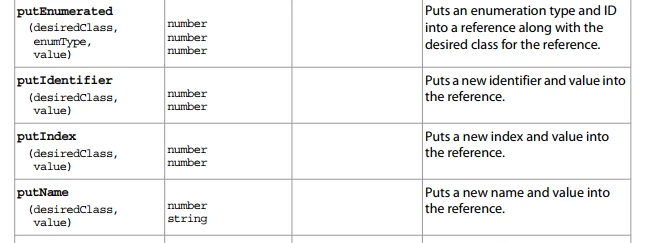
.putIdentifier - getting the path to the layer by ID, putIndex - by the numeric index, putName - by name. Since we don’t know anything about the document and cannot get IDs and names, we basically have only one option - putIndex.
That is, to get not an active layer, but just an n-layer (for example, the first)), instead
r.putEnumerated (stringIDToTypeID ("layer"), stringIDToTypeID ("ordinal"), stringIDToTypeID ("targetEnum"));
write
r.putIndex (stringIDToTypeID ("layer"), 1)
We return to the document properties and look for some useful property there that will allow us not to iterate over everything in an indefinite loop. We see INTEGERTYPE numberOfLayers - the number of layers (including hidden) in the document.
Here it is necessary to note the features of indexing layers - the index starts with 1 except for those cases when the document has a background layer. If it is, then indexing starts from 0.
We are writing the beginning of our function, in which we find out whether there is a background layer in the document (fortunately, the document property has a BOOLEANTYPE hasBackgroundLayer), if so, then we start enumerating the indices from zero, if not, then from one
var r = new ActionReference();
r.putEnumerated(stringIDToTypeID("document"), stringIDToTypeID("ordinal"), stringIDToTypeID("targetEnum"));
var from = executeActionGet(r).getBoolean(stringIDToTypeID('hasBackgroundLayer')) ? 0 : 1;
Please note that obtaining the value takes a noticeable time - this is due to the fact that we first get the entire handle of the object, and then select one property from it. This can be slightly optimized if, on the way to the object, you immediately indicate which one we need:
var r = new ActionReference();
r.putProperty(stringIDToTypeID("property"), stringIDToTypeID('hasBackgroundLayer'));
r.putEnumerated(stringIDToTypeID("document"), stringIDToTypeID("ordinal"), stringIDToTypeID("targetEnum"));
var from = executeActionGet(r).getBoolean(stringIDToTypeID('hasBackgroundLayer')) ? 0 : 1;
Now the code works almost instantly.
Further:
var r = new ActionReference();
r.putProperty(stringIDToTypeID("property"), stringIDToTypeID('numberOfLayers'))
r.putEnumerated(stringIDToTypeID("document"), stringIDToTypeID("ordinal"), stringIDToTypeID("targetEnum"))
var to = executeActionGet(r).getInteger(stringIDToTypeID('numberOfLayers'));
Now we write a loop (here I will allow myself some compact code)
var r = new ActionReference();
r.putProperty(stringIDToTypeID("property"), stringIDToTypeID('hasBackgroundLayer'));
r.putEnumerated(stringIDToTypeID("document"), stringIDToTypeID("ordinal"), stringIDToTypeID("targetEnum"));
var from = executeActionGet(r).getBoolean(stringIDToTypeID('hasBackgroundLayer')) ? 0 : 1;

var r = new ActionReference();
r.putProperty(stringIDToTypeID("property"), stringIDToTypeID('numberOfLayers'))
r.putEnumerated(stringIDToTypeID("document"), stringIDToTypeID("ordinal"), stringIDToTypeID("targetEnum"))
var to = executeActionGet(r).getInteger(stringIDToTypeID('numberOfLayers'));

s2t = stringIDToTypeID;
var artboards = [];
for (var i = from; i <= to; i++) {
    (r = new ActionReference()).putProperty(s2t("property"), p = s2t('artboardEnabled'));
    r.putIndex(s2t("layer"), i);
    var artboardEnabled = executeActionGet(r).getBoolean(p);
    if (artboardEnabled) {
        (r = new ActionReference()).putProperty(s2t("property"), p = s2t('artboard'));
        r.putIndex(s2t("layer"), i);
        var artboard = executeActionGet(r).getObjectValue(p),
            artboardRect = artboard.getObjectValue(s2t("artboardRect")),
            bounds = {
                top: artboardRect.getDouble(s2t('top')),
                left: artboardRect.getDouble(s2t('left')),
                bottom: artboardRect.getDouble(s2t('bottom')),

            };
        artboards.push({ layerIndex: i, bounds: bounds })
    }
}
alert(artboards.toSource());
Of course, a more complete understanding of Action Manager code comes gradually after reading forums, viewing scripts from other authors, and communicating with more advanced users (I am infinitely grateful to all the people who respond to requests for help and post interesting code examples).



 AdChoices